Shared-room casual racers
A handheld controller suits you if the desk needs to stay clear between sessions and you want to check whether vibration can be reduced during quieter hours.


A gamepad is the simpler choice when racing in a shared bedroom calls for quick put-away; a force-feedback wheel makes sense if steering and pedals justify the desk and floor space. Check the exact platform, game and connection before expecting particular feedback features, and consider whether vibration or mechanical noise could disturb the person sharing the room.
A handheld controller suits you if the desk needs to stay clear between sessions and you want to check whether vibration can be reduced during quieter hours.
A removable wheel and pedal setup may suit you if steering feedback matters, but a permanent rig would take up too much of the shared room.
If you play on a console and PC, the exact controller variant, connection and racing game matter as much as the type of controller you choose.
Choose when: You need racing controls that can be put away without clearing space for a wheel and pedals.
Trade-off: A gamepad does not provide wheel rotation or force-feedback steering; individual feedback features also depend on the game and connection.
Choose when: Wheel steering and separate pedals matter enough to set up a suitable desk area for each session.
Trade-off: You need mounting and pedal space, plus somewhere to store the equipment when the bedroom is used for other things.
| Concern | What to check | Who this matters to |
|---|---|---|
| Disturbance | Check vibration controls for your platform and game, and consider whether feedback could travel through furniture. | If someone else is resting nearby, I want control over vibration rather than assuming the equipment will be quiet. Around 28% of consumers put limiting disturbance first. |
| Put-away and desk space | For a wheel, check the desk edge and mounting area, pedal floor space and where the equipment will go afterwards. | When the desk is shared, I need to finish a session without leaving racing equipment in the way. Easy put-away comes first for around 22% of consumers. |
| Steering and braking feel | Decide whether supported gamepad feedback is enough or whether you want a compatible force-feedback wheel and pedals. | I would make room for a wheel if its steering and separate pedals are central to how I want to race. Around 22% of consumers prioritise wheel-based control. |
| Compatibility | Confirm the exact console or PC variant, your racing game and the connection required for the features you want. | If I switch between devices, the controller must work with my chosen game before its feedback features matter. Platform and game compatibility lead the choice for around 28% of consumers. |
Logitech G lists separate PlayStation/PC and Xbox/PC G923 versions, while Thrustmaster labels the cited T128 version for PC, PS4 and PS5. The family name alone is not enough to establish compatibility.
Check the full platform label of the exact wheel and confirm that your racing game supports it.
PlayStation says DualSense haptic feedback on PC requires USB and a supported game. A Bluetooth connection therefore does not preserve that feature.
If haptic feedback matters to you, check the game's support and plan for a USB connection.
The Thrustmaster T128 PlayStation/PC wheel uses a desk or table clamp and comes with pedals. A suitable mounting edge and clear floor area are both needed for that setup.
Measure the space you can use during play and decide where the wheel and pedals will go afterwards.
PlayStation describes the Thrustmaster T300RS GT Edition as particularly quiet, but that product-specific description does not establish how much sound or vibration another wheel will produce in your bedroom.
If disturbance is a concern, discuss the setup with the person sharing the room and check the controls and mounting arrangement for the model you intend to use.
DualSense is a handheld option for PS5 racing games when a wheel and pedals would be impractical.
The T128 is a wheel-and-pedal option for players who can temporarily use a desk or table.
The G923 is a wheel-and-pedal route for players planning a more substantial desk setup.
The Gran Turismo DD Pro is a direct-drive route for PS5 players considering a dedicated sim-racing arrangement.
This Xbox and PC wireless racing wheel is an option if you want wheel-shaped controls rather than a standard gamepad. Check support for your particular game and whether the wheel can be used and stored comfortably in the shared room.
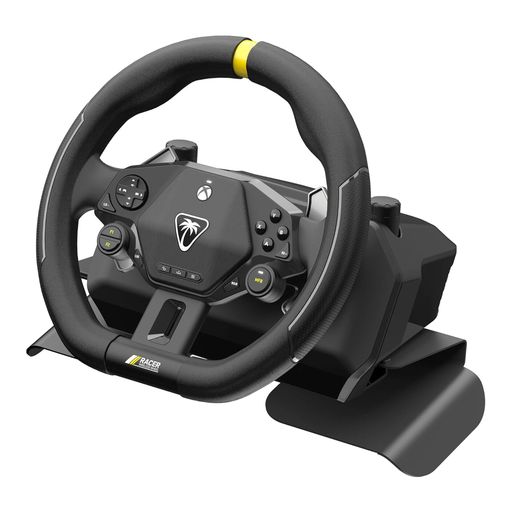 No image available
If your chosen Xbox or PC racing game supports this wheel, it offers an alternative to a handheld gamepad. Check its storage space and whether its operation would disturb the person sharing your room.
A gamepad is more practical if you need to put the controller away promptly; a wheel is worth considering when steering feedback and pedals justify mounting and storage space. Thrustmaster's T128, for example, has a removable desk or table attachment, but its pedals still need floor space.
Xbox Support says controller vibration can be adjusted or turned off on supported Xbox setups. Check the settings for your own controller, platform and game rather than assuming every setup offers the same control.
No: PlayStation says DualSense haptic feedback on PC requires USB and a supported game. Check the game's feature support before buying a controller specifically for that feedback.
Match the exact wheel variant to your console and racing game, not just the wheel's family name. Logitech G lists different G923 versions for PlayStation/PC and Xbox/PC, while Thrustmaster labels its cited T128 model for PC, PS4 and PS5.