A large screen does not, by itself, call for a specialist keyboard. Choose dedicated macro controls if you have recurring permitted commands to assign; choose wireless connection options if you move between devices; or choose a compact layout if desk space matters more than a numpad. Check the exact keys and UK or US layout before ordering.
Who these keyboards suit
Shortcut-heavy desk player
If you play at a fixed PC desk and regularly use remaps or shortcuts, dedicated controls may matter more than a small footprint. CORSAIR lists six dedicated macro keys on the K100 RGB; Logitech G lists nine assignable G keys on the G915 X LIGHTSPEED.
Large-screen multi-device player
If your large-screen setup connects to more than one device, connection choices may shape your decision. Logitech G lists 2.4 GHz wireless, Bluetooth and wired modes for the G915 X LIGHTSPEED.
Compact-layout and switch-feel buyer
If mouse room and switch choice take priority, consider which navigation keys you still need. Razer lists arrow keys, a function row and hot-swappable switch sockets for the BlackWidow V4 75%.
What to check before buying
Start with the commands and physical keys you use, then decide whether connection flexibility or a smaller footprint is worth a change of layout.
| Concern |
What to check |
Who this matters to |
| Command access |
Check whether shortcuts use dedicated macro keys or existing keys, and whether your game permits the intended assignments. |
If I use the same permitted commands repeatedly, I want keys I can reach without relying on a secondary layer. Around 38% of consumers put direct command access first. |
| Connection flexibility |
Confirm the exact wired and wireless modes, device-switching controls and physical layout. |
When I use my large-screen setup with more than one device, I want a connection method that suits each one. For around 25% of consumers, that flexibility is the primary concern. |
| Desk space and key feel |
Check the numpad, arrow keys and function row; if changing switches matters, confirm socket compatibility. |
I would give up some keys to make room for my mouse, or choose compatible switches to change the feel. Compact layout and key feel come first for around 37% of consumers. |
Buying pitfalls
-
Choosing a compact board without checking its keys
A tenkeyless board omits the numpad, while a 75% layout can retain arrow keys and a function row. The exact arrangement still matters if you use those keys for games or other tasks.
List your regular game, chat and desktop shortcuts, then check photographs and the exact layout variant before ordering.
-
Assuming macro keys improve every game
Dedicated keys provide places to assign commands, but their value depends on your bindings and the game's rules.
Check the game's policy on macros or automation. Choose extra controls only if you have permitted recurring actions to assign.
-
Choosing wireless for a permanently wired desk
Wireless modes offer more positioning and device options, but also bring charging and connection choices to manage.
If one PC stays at one desk, compare the layout and controls of wired and wireless models before deciding whether those extra modes matter to you.
-
Assuming a gaming keyboard has a UK layout
Joybuy's Redragon M68 listing describes a US-layout, 68-key keyboard. The site on which a product appears does not determine its key layout.
Check the exact variant's layout designation, legends and Enter-key shape, along with the applicable return terms.
Brands to consider
CORSAIR
The wired K100 RGB illustrates a control-focused keyboard for a fixed PC desk.
- CORSAIR lists six dedicated macro keys, a programmable control wheel and onboard profiles for this model.
- Its full-size, wired arrangement is less suited to a desk where a smaller board or cable-free positioning is the priority.
Logitech G
The G915 X range illustrates low-profile keyboards with several connection options.
- Logitech G lists 2.4 GHz LIGHTSPEED, Bluetooth and wired modes for its G915 X models, and nine assignable G keys on the full-size G915 X LIGHTSPEED.
- The G915 X TKL is tenkeyless; check whether you need a numpad before choosing that variant.
Razer
The BlackWidow V4 Pro and V4 75% illustrate different approaches to direct controls and compact customisation.
- Razer lists a macro-key row for the V4 Pro and 3- or 5-pin hot-swappable switch support for the V4 75%.
- The V4 75% retains arrows and a function row but is not a full-size layout; check whether you need a numpad or dedicated macro bank.
Joybuy keyboard options
These keyboards cover compact and full-size layouts with different connection and switch options. Compare each exact variant's keys and layout against the commands you use for turn-based tactics.
 No image available
Ticktype EVO75, Spray-coated Nebula, Creamy Rye switches
Consider this 75% board if you want a smaller keyboard and the option to change compatible switches. Its title lists a US layout, hot-swappable switches, tri-mode wireless and wired connection options, and Creamy Rye switches; check the precise navigation-key arrangement and whether its physical layout suits you.
View on Joybuy
 No image available
ASUS ROG Strix Scope II 96 Wireless, White, UK layout
The 96 layout is worth considering if you want a less spread-out arrangement while keeping a numpad. The title identifies a white wireless gaming keyboard with a UK layout; check the exact keycap variant and confirm any command-remapping features you need.
View on Joybuy
 No image available
Ticktype DP104, Gecha Gray, Thocky Linear switches
This is an option for a fixed desk if you want a 108-key full-size layout and switch-changing capability. The title lists a US layout, hot-swappable switches, Bluetooth, 2.4 GHz wireless and wired USB-C modes; check the physical key layout and any macro functions you require.
View on Joybuy
 No image available
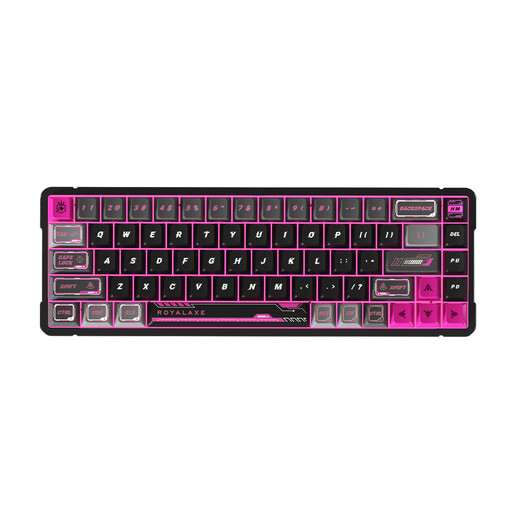
Royalaxe X68 Bright Red Magnetic Switch, 68-key
Consider this model only if a 68-key arrangement includes the controls you need. Its title identifies magnetic switches and an aluminium-alloy frame; check the exact key arrangement, layout variant and any programmable-command features before buying.
View on Joybuy
 No image available
AULA F75 PRO, 75% US QWERTY layout
This compact option may suit a desk where space and connection choices matter. Its title lists hot-swappable switches, Bluetooth, 2.4 GHz wireless and wired modes, and a US QWERTY layout; check the exact navigation keys and switch compatibility if you plan to customise it.
View on Joybuy
Common questions
Do I need a high polling rate for turn-based tactics?
A high polling-rate figure alone is not a reason to choose a keyboard for turn-based tactics. Start with the layout, commands, connection method and key feel you need; if you also play faster-paced games, assess their requirements separately.
Should I choose full-size, TKL or 75%?
Choose by the keys you cannot give up. A full-size layout can retain a numpad, TKL removes it, and a 75% model can keep arrows and a function row in a smaller arrangement; check the exact product rather than relying on the layout label alone.
Can I change the switches later?
You can change switches only on a model with compatible hot-swappable sockets. Razer lists support for 3- or 5-pin switches on the BlackWidow V4 75%; check socket and switch compatibility separately for any other keyboard.
What should I do with an old keyboard in the UK?
Check your local electrical recycling arrangements when replacing it. GOV.UK's guidance describes electrical and electronic equipment as equipment dependent on electric currents or electromagnetic fields to work properly; ask your council or retailer which collection route accepts your keyboard.


