
24/7 Customer Support

Free returns

Same-day & Next-day Delivery

Quality Guaranteed

Unlock Your Welcome Offers: FREE Delivery | Up to 80% OFF | Free 30-day JoyPlus trial
Download the APP
Buying a monitor for PC gaming or console gaming involves more than choosing the largest screen or highest refresh-rate figure. A display can look impressive on a product page yet be poorly matched to your graphics hardware, desk space or everyday workload.
The most common buying mistakes include:
Full HD (1920 × 1080) remains practical for smaller displays and systems focused on high frame rates. A 24-inch or 27-inch Full HD monitor is relatively easy for a mid-range graphics card to drive.
A QHD gaming monitor uses 2560 × 1440 pixels, providing more desktop space and sharper detail than Full HD. At 27 to 32 inches, QHD is a useful middle ground for gaming, office work and media.
A 4K gaming monitor delivers 3840 × 2160 pixels. It suits detailed single-player games, films and content creation, but check whether your graphics card and chosen connection can support the required resolution and refresh rate.
For multitasking, a curved gaming monitor or ultrawide gaming monitor can place more windows within one field of view. A 21:9 model such as 3440 × 1440 is particularly useful for racing games, timelines, spreadsheets and side-by-side applications. Measure your desk first: a 34-inch ultrawide monitor is substantially wider than a conventional 16:9 screen.
Refresh rate is measured in hertz (Hz) and indicates how many times the display can update each second. Common options include:
A high refresh rate monitor does not automatically eliminate blur or input delay. Look at the response-time method, connection limits and whether the advertised figure is available in the monitor’s usable mode.
An IPS monitor generally offers wide viewing angles and consistent colour across the screen, making it suitable for office work and content creation. VA panels often list higher native contrast, which can make dark scenes appear deeper, although viewing behaviour can vary between models. An OLED gaming monitor can offer very high contrast and a fast stated response time, but buyers should read the manufacturer’s guidance on static images and panel care.
An adaptive sync monitor adjusts its refresh behaviour to the graphics output, helping reduce tearing when supported by the device. FreeSync monitor compatibility is useful for many AMD-based systems, while some displays also list compatibility with NVIDIA graphics cards. For console use, verify the console’s supported resolution, refresh rate, HDMI specification and variable-refresh features rather than relying only on the monitor’s headline specification.
Also check DisplayPort and HDMI versions, USB hubs, audio output, built-in speakers, VESA mounting and stand adjustment. Flicker-free and low-blue-light modes are display features that some users may find more comfortable; they should not be treated as medical claims.
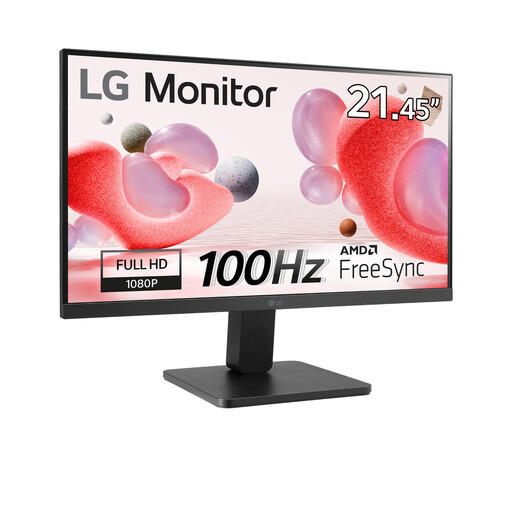
Why This Fits Their Persona: Its compact 22-inch format suits smaller UK desks, study areas and entry-level gaming setups.
The 100Hz refresh rate is clearly paired with Full HD resolution, avoiding a high-resolution specification that may be difficult for a modest system to run.
VA panel, 3000:1 contrast ratio, AMD FreeSync support and VESA compatibility.
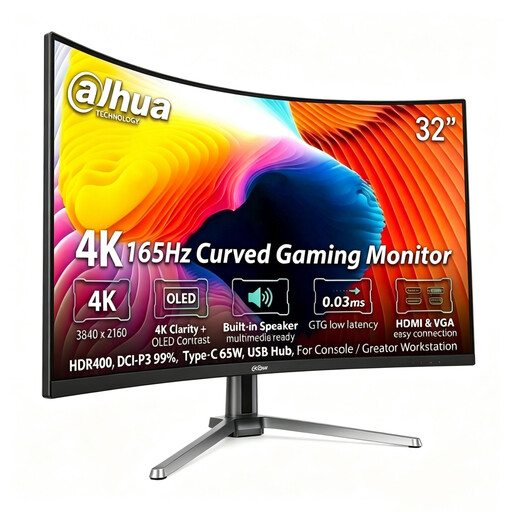
Why This Fits Their Persona: It combines high-resolution gaming with features suited to a console setup or creator workstation.
Its DP 1.4 and HDMI 2.1 inputs are specified for 4K at 165Hz, so the connection specification is not left unclear.
3840 × 2160 resolution, QD-OLED panel, 99% DCI-P3 and 65W USB-C output.
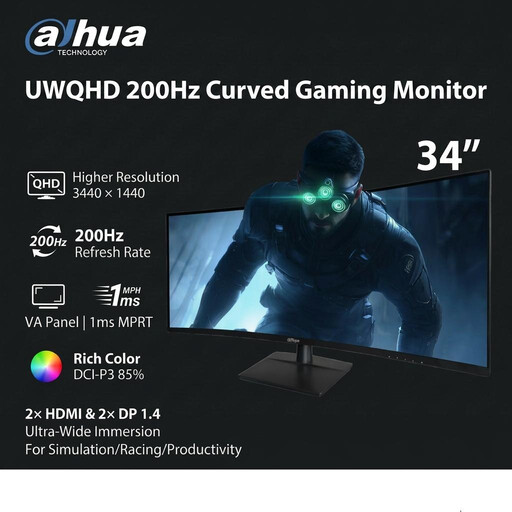
Why This Fits Their Persona: The 21:9 format is designed for racing, simulation, immersive games and wide productivity layouts.
The listing specifies different HDMI and DisplayPort limits, helping buyers choose the correct input for 3440 × 1440 at 200Hz.
34-inch UWQHD resolution, 1500R curvature, 200Hz refresh rate and height adjustment.
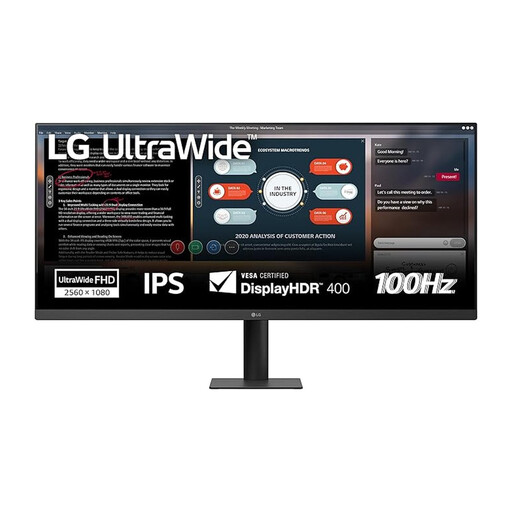
Why This Fits Their Persona: Its 21:9 layout provides space for documents, timelines and browser windows without adding a second display.
The product makes its UWFHD 2560 × 1080 resolution and 100Hz refresh rate explicit, so buyers can compare workspace against pixel density.
IPS panel, sRGB 99%, DisplayHDR 400 and height-adjustable stand with portrait mode.
We have compiled a complete, real-time list of products that fully satisfy these strict selection criteria and UK safety regulations.
It can be, but the usable refresh rate depends on the console, game and connection. Many console setups target lower refresh rates than gaming PCs, so prioritise the correct HDMI specification, resolution and variable-refresh support.
A higher refresh rate can affect power consumption, but the total depends on panel type, brightness, screen size and usage time. Use the manufacturer’s typical power figure as a comparison and enable energy-saving settings when the monitor is used for office work.
Lifespan depends on operating hours, heat, power conditions and handling. Keep ventilation clear, avoid impact to curved panels, use the supplied power accessories and follow the manufacturer’s cleaning and maintenance instructions. A VESA-mounted display should also be secured with compatible hardware.