
24/7 Customer Support

Free returns

Same-day & Next-day Delivery

Quality Guaranteed

Unlock Your Welcome Offers: FREE Delivery | Up to 80% OFF | Free 30-day JoyPlus trial
Download the APP
By the Joybuy Product Recommendation Officer
A motherboard determines which processor, memory, storage and expansion hardware your gaming PC can use. Choosing by appearance or a headline feature alone can lead to an expensive compatibility problem, particularly when upgrading an existing build.
The most common buying mistakes are straightforward:
Start with your processor, not the motherboard’s visual design.
An AMD AM5 motherboard supports compatible Ryzen 7000, 8000 and 9000 series processors, subject to the specific board’s CPU support list. Within this platform, a B650 motherboard can suit a cost-conscious gaming build, while a B850 motherboard may provide newer connectivity and platform features.
For Intel systems, an Intel LGA 1851 motherboard is designed for compatible Intel Core Ultra processors. B860 boards are generally positioned for mainstream gaming and productivity systems, while Z890 models offer a broader feature set for users who need extensive connectivity and expansion.
An Intel LGA 1700 motherboard, such as an Intel B760 model, remains relevant for compatible 12th, 13th and 14th generation Intel processors. Check whether the exact board uses DDR4 or DDR5 before ordering, as the memory type cannot normally be mixed.
A DDR5 motherboard can offer higher memory bandwidth than older DDR4 platforms, but capacity and slot count matter just as much as the advertised frequency.
For many new builds, 32GB is a practical starting point, while creators working with large projects may prefer 64GB or more.
A PCIe 5.0 motherboard may provide a PCIe 5.0 x16 slot for a graphics card and/or PCIe 5.0 M.2 storage. However, the actual generation available can depend on the processor and the slot used. A PCIe 4.0 SSD will still work in a compatible newer slot, but at its supported interface speed.
Review the number and location of M.2 sockets. A board described as an M.2 motherboard may offer two, three or five sockets, with some sharing bandwidth with SATA ports or other expansion slots.
For network access, Wi-Fi 6 and Wi-Fi 6 motherboard options remain practical for many UK homes. A Wi-Fi 7 motherboard or Wi-Fi 6E model is more suitable if your router and broadband setup support the relevant bands. Wired 2.5G or 5G Ethernet can be useful for large downloads, local file transfers and a stable gaming connection. Also check whether the board includes Bluetooth; a motherboard with Bluetooth can connect wireless controllers, headsets and other peripherals without a separate adapter.
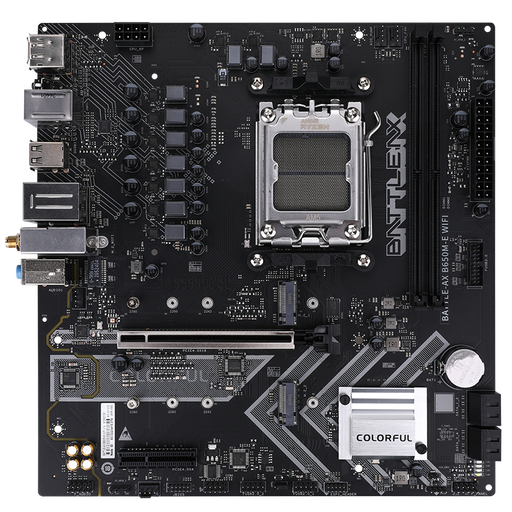
Why This Fits Their Persona: This compact AM5 option suits a first gaming PC or a small-footprint UK setup where a micro-ATX case is preferred.
It clearly uses the AM5 socket and DDR5 memory, helping avoid mixing an older CPU or DDR4 kit with a new platform.
Two M.2 PCIe 4.0 x4 slots, four SATA 6Gb/s ports, Wi-Fi 6 and Bluetooth 5.2.
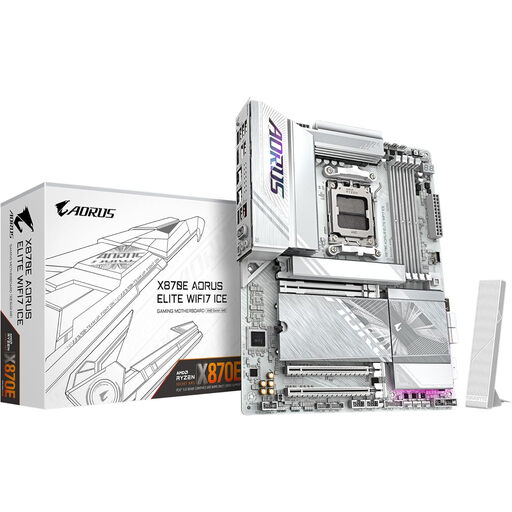
Why This Fits Their Persona: An ATX choice for enthusiasts, creators and users planning a feature-rich AMD build with substantial expansion requirements.
Its specification lists the AM5 socket, DDR5 support and PCIe 5.0 connectivity rather than relying only on decorative design claims.
Supports Ryzen 7000, 8000 and 9000 series processors, DDR5 capacities up to 256GB, Wi-Fi 7 and PCIe 5.0 storage.
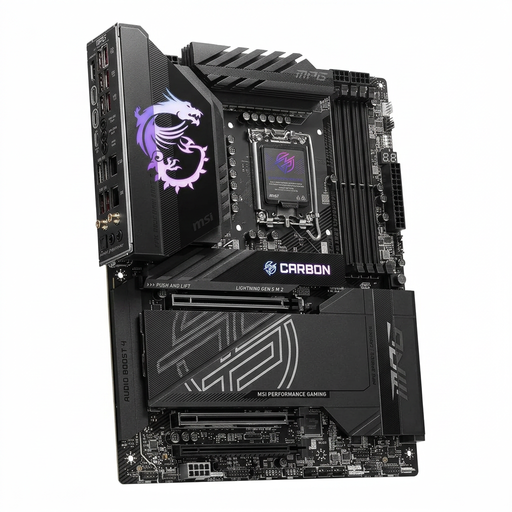
Why This Fits Their Persona: Designed around Intel LGA 1851 for users who need plentiful storage, fast networking and multiple high-speed peripherals.
It provides specific expansion figures, making it easier to check whether the board genuinely suits storage-heavy and peripheral-heavy builds.
Five M.2 slots, four SATA interfaces, up to 256GB DDR5, Wi-Fi 7, Bluetooth 5.4 and USB4 connectivity.
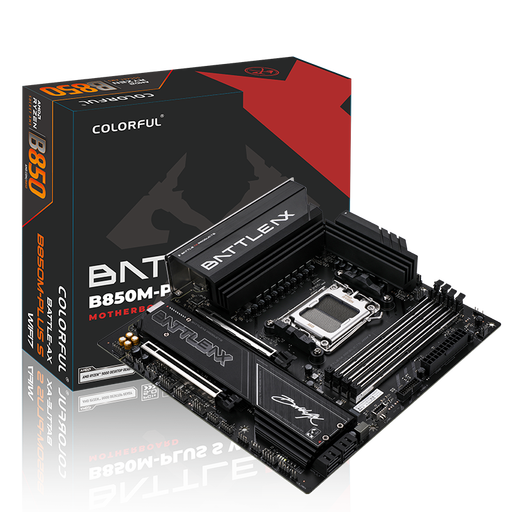
Why This Fits Their Persona: A micro-ATX gaming motherboard for a compact AM5 build that still needs fast wireless and wired networking.
Its Wi-Fi 7 and Bluetooth 5.4 features are listed alongside OS and regional limitations, so buyers can check practical compatibility first.
Four DDR5 slots supporting up to 192GB, a PCIe 5.0 x16 slot, two M.2 slots and 5G Ethernet.
We have compiled a complete, real-time list of products that fully satisfy these strict selection criteria and UK safety regulations.
Before purchasing, confirm that:
An upgrade can be worthwhile when your current board limits processor compatibility, DDR5 capacity, M.2 storage or network speed. If your existing board already supports your CPU, memory and graphics card, a motherboard change alone may not produce a noticeable gaming improvement.
A motherboard can remain usable for several upgrade cycles, but practical lifespan depends on firmware support, power delivery, cooling, storage standards and component compatibility. Keeping the PC dust-free and avoiding forced or mismatched connections helps reduce avoidable damage.
Not necessarily. Wired Ethernet is often the simpler choice for a fixed desktop. Wi-Fi 7 becomes more relevant when your router, broadband service and local frequency regulations support it, and when you need high-speed wireless access for gaming, streaming or file transfers.