Who this is for

Home photo-library keepers

People with irreplaceable family photos and documents on one home computer who need an easy, repeatable backup routine rather than occasional file transfers. The National Cyber Security Centre advises keeping copies of important data separately.

Laptop users moving large files

People who carry a computer or regularly copy sizeable photo libraries and need to consider portable-drive speed, port and cable compatibility, and physical handling. Samsung’s specifications for the T7 Shield highlight the importance of the host connection for quoted speeds.

Apple or Windows cloud users

People using iCloud or OneDrive who need to distinguish folder or device copying, storage allowances, recurring subscriptions and the role of a separate local backup. Microsoft and Apple describe different backup and cloud-storage workflows.

What to check before buying

External HDD

Choose it when: Your computer stays mainly at home and a mains-powered local backup drive is practical.

Consider: Keep the drive separate and disconnected after backups where practical; confirm capacity, power, formatting and computer compatibility.

Portable SSD

Choose it when: You carry a library, transfer large files often, or want a compact drive for a laptop.

Consider: Peak transfer speeds depend on the host port, cable and supported protocol, and the drive remains only one local copy.

Cloud plus local copy

Choose it when: You want access across devices as well as a separate local route for important files.

Consider: Check storage allowance, subscription terms, account recovery, selected folders and the restore process.

Priority What to check Your needs
Capacity and backup scope Decide whether you are protecting selected photos and documents or the whole computer. Leave room for future growth and retained versions. For Time Machine, Apple recommends a disk with at least twice the Mac’s storage capacity. I want enough room for the files that matter and for future additions, rather than choosing a drive from today’s free space alone.
Backup workflow Check which folders or device data are included, whether copying has completed, and whether the service is synchronisation, backup, or both. Match built-in tools to the operating system where appropriate. I want a routine I can repeat without guessing whether my photos and documents are actually included.
Separate recovery copy Keep a backup in a separate location where possible, avoid leaving local backup media permanently connected, and check that you can restore files. Consider access protection for portable media. I need a copy that is not dependent on the same computer, location or account as the original files.

Backup mistakes to avoid

  • Treating synchronised folders as enough for every recovery situation

    Cloud services can copy selected files across devices, but you still need to check the folders included, completed syncing, available capacity, account access and how files will be restored.

    Identify whether you need file synchronisation, device backup or both. Confirm folder or device coverage, your current allowance and the restore process before deleting a local copy.

    A photo library that grows beyond the included allowance can require a higher recurring storage tier.

  • Leaving the only external backup drive permanently connected

    The National Cyber Security Centre advises that a backup device should not stay permanently connected, as malware or ransomware can affect accessible data.

    After a completed backup, disconnect and store the local drive separately where practical. Keep another separate copy for irreplaceable files and periodically check recovery access.

  • Paying for portable-SSD speed your computer cannot use

    Samsung says the T7 Shield’s maximum quoted speeds require a USB 3.2 Gen 2 host, compatible cable and UASP. A USB-C-shaped connector alone does not establish those conditions.

    Check the computer’s actual USB specification and keep an appropriate cable if fast transfers are important.

    A higher-speed drive may offer limited practical benefit when the port, cable or protocol is the bottleneck.

  • Choosing capacity from current free space instead of backup scope

    A whole-computer backup can need substantially more space than a selected-folder backup. Apple says Time Machine users should allow at least twice the Mac’s storage capacity and notes that older backups can be deleted when a disk fills.

    Choose the backup scope first, then allow for growth and retained versions. If using Time Machine, apply Apple’s stated capacity guidance to the Mac being backed up.

    An undersized drive or cloud tier can mean upgrading earlier or losing older backup history.

Relevant brand references

Seagate

Relevant for a fixed-location, higher-capacity external-HDD route. Seagate’s UK Expansion Desktop data sheet lists EMEA capacities from 4TB to 28TB, USB 3.0, an 18W power adapter, and Windows 10-or-later or macOS X 10.12-or-later requirements.

  • Its stated higher capacities suit a desk-based local backup where a mains-powered drive is acceptable.
  • It remains a connected local drive, so it should not be the only copy or stay permanently attached to the computer.

Samsung

Relevant for portable SSD backups. Samsung identifies the T7 Shield MU-PE1T0S/EU as a 1TB USB 3.2 Gen 2 portable SSD with quoted sequential speeds up to 1,050MB/s read and 1,000MB/s write.

  • Its compact SSD format is relevant when a backup drive will be carried between devices.
  • Samsung’s peak-speed figures require a compatible USB 3.2 Gen 2 host, cable and UASP; controlled durability testing does not replace an independent backup.

Apple iCloud+

Relevant to Apple-centred households seeking paid cloud capacity for photos, files and iPhone or iPad backups, with access through Apple devices, iCloud for Windows and iCloud.com.

  • Apple’s UK page lists 50GB, 200GB and 2TB iCloud+ tiers and states that iCloud Photos retains original high-resolution photos in iCloud.
  • It is a recurring cloud service, so check capacity, subscription terms, account access and the difference between sync and backup before relying on it alone.

Microsoft OneDrive

Relevant to Windows households that want selected desktop folders copied to cloud storage and accessible across devices. Microsoft lists 100GB of cloud storage with Microsoft 365 Basic in the UK.

  • Microsoft says OneDrive folder backup can cover selected standard folders and make them available from other devices.
  • Check that the intended folders are selected and that the plan capacity suits the library; storage and terms are ongoing subscription considerations.

Joybuy product options

These Joybuy options focus on portable local storage for home photo and document backups, especially where files are moved between compatible devices. Choose capacity and connection support around your own backup scope rather than assuming one drive suits every library.

Samsung MU-PG4T0B 4 TB portable external SSD

Samsung MU-PG4T0B 4 TB USB 3.2 Gen 2x2 SSD

A portable local option for a larger photo or document library when a compatible high-speed host is available.

Stated 4TB capacity; USB 3.2 Gen 2x2; USB-C-to-C and USB-C-to-A cables supplied; password-enabled AES-256 hardware encryption.

Its stated up-to-2,000MB/s speed requires a USB 3.2 Gen 2x2-capable host. Check that 4TB covers the intended files, future growth and retained versions, and keep another copy for irreplaceable data.

Joybuy

Samsung MU-PE1T0S 1TB portable SSD

Samsung MU-PE1T0S 1TB USB 3.2 Gen 2 SSD

A compact choice for carrying a selected photo library or making large transfers between compatible computers.

Stated 1TB capacity; USB 3.2 Gen 2; quoted speeds up to 1,050MB/s read and 1,000MB/s write; stated IP65 dust and water resistance and up to 3m drop resistance.

Samsung states that maximum speeds require a USB 3.2 Gen 2 host, compatible cable and UASP. Confirm that 1TB covers your library and retained history.

Joybuy

Lexar ES4 1TB portable SSD with magnetic set

Lexar ES4 1TB Portable SSD with Magnetic Set

A portable 1TB local-storage option for copying files across compatible devices with USB-C or USB-A connections.

Stated USB 3.2 Gen 2 interface; quoted speeds up to 1,050MB/s read and 1,000MB/s write; USB-C and USB-A cables included; stated Lexar DataShield software for 256-bit AES encryption.

Check whether 1TB covers the backup scope and whether the encryption software works with the intended computer. Magnetic mounting is limited to the stated iPhone 15/16 arrangement.

Joybuy
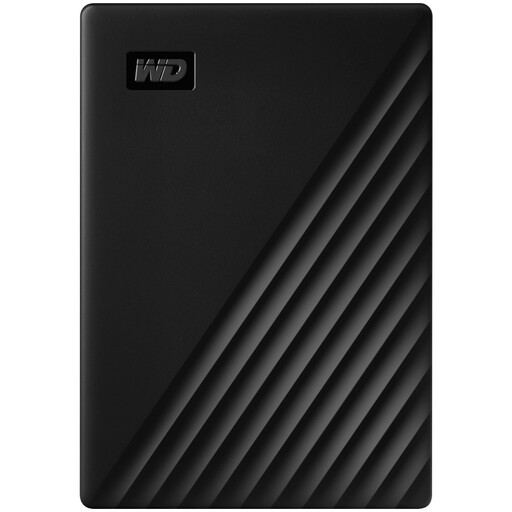
Western Digital My Passport 1TB Black external hard drive

Western Digital My Passport 1TB Black

A portable external-HDD option for scheduled local backups of selected photos and documents.

Stated 1TB capacity; USB 3.2 Gen 1; bus-powered use; AES-256 hardware encryption and password setup; WD backup software with scheduled-backup support.

The drive is pre-formatted for Windows; the listing states that macOS 11+ use requires downloadable drivers. Check capacity and Mac setup before buying.

Joybuy

SanDisk Portable SSD 2TB

SanDisk Portable SSD 2TB

A portable option for a larger selected collection of home photos, videos and documents.

Stated 2TB capacity; quoted read speed up to 800MB/s; stated 40g form, rubber hook and up to 2m drop protection.

Confirm the USB version, connector types and operating-system compatibility for your computer. The listing provides a read-speed figure but not a write-speed figure.

Joybuy

Frequently asked questions

How large should an external backup drive be for a Mac using Time Machine?

Apple recommends a storage device with at least twice the storage capacity of the Mac. This guidance applies to the Time Machine workflow; if you back up only selected folders, assess the chosen data and expected growth instead.

Can a portable SSD deliver its advertised maximum speed on every USB-C computer?

No. For the Samsung T7 Shield MU-PE1T0S/EU, Samsung says the maximum quoted read and write speeds require a USB 3.2 Gen 2 host, a compatible cable and UASP. A USB-C connector alone does not confirm those conditions.

What should I check before relying on OneDrive for computer files?

Check which folders are enabled in OneDrive’s Sync and backup settings, whether the intended files have finished syncing, the available storage allowance, and how to access or restore files. Microsoft distinguishes between folders that are backed up and those that are not.

What ongoing cloud-storage costs should a UK household compare?

Compare the current storage tier, monthly versus annual billing, included capacity, sharing needs and what happens if the plan changes or is cancelled. Apple’s UK page lists iCloud+ at £0.99 per month for 50GB, £2.99 per month for 200GB and £8.99 per month for 2TB; Microsoft lists Microsoft 365 Basic with 100GB at £1.99 per month or £19.99 per year. Recheck prices and terms before purchase.

What after-sales details should I check on an exact retailer listing?

Confirm the exact model number, seller, return terms, warranty provider and warranty duration before checkout. These details can differ between products and can change over time.