
24/7 Customer Support

Free returns

Same-day & Next-day Delivery

Quality Guaranteed

Unlock Your Welcome Offers: FREE Delivery | Up to 80% OFF | Free 30-day JoyPlus trial
Download the APP
The iPhone 15 Pro and Pro Max have revolutionised mobile content creation, particularly with their ability to shoot stunning 4K ProRes video. However, this professional-grade footage consumes storage at an astonishing rate, often filling your internal drive faster than you can say "action". If you've ever been stopped mid-shoot by a "Storage Almost Full" notification, you understand the need for a reliable external storage solution.
As the Joybuy Product Recommendation Officer, my role is to help you navigate the options. This guide is designed to provide practical advice on choosing the right iPhone 15 external storage, ensuring your workflow remains smooth, whether you're a filmmaker, a photographer or simply need to move large files between devices. We will look at key features and highlight a few standout options to consider.
Before diving into specific products, let's analyse a few key factors to consider. Making the right choice depends entirely on how you plan to use your drive.
When dealing with large files like 4K video, transfer speed is paramount. Look for drives that specify their interface standard. A high-speed USB C drive with a USB 3.2 Gen 2 interface typically offers speeds around 1000MB/s, which is excellent for transferring files quickly and recording high-quality video directly from your iPhone. For even more demanding workflows, some drives use USB 3.2 Gen 2x2, pushing speeds towards 2000MB/s, though your device must support this standard to take full advantage.
How and where you work will influence the best form factor for you.
A 1TB external SSD is often the sweet spot for content creators, providing ample space for hours of ProRes footage. However, always consider your other devices. Many modern drives are formatted to work seamlessly across different operating systems, making them suitable as external storage for Mac, PC and even as a PS5 external SSD to expand your game library. Always check the product specifications for confirmed compatibility.
Here are a few options that cater to different needs, from professional video production to everyday file transfers.

Why It Stands Out: The Lexar ES4 offers a complete magnetic solution straight out of the box. It includes a silicone magnetic case for your iPhone 15 and a separate magnetic ring for use with other cases. This thoughtful package makes it incredibly easy to adopt a magnetic SSD workflow without needing to purchase extra accessories. With solid USB 3.2 Gen 2 speeds, it's more than capable of handling direct-to-drive 4K video recording and fast file transfers.
Pros:
Who is it for? iPhone 15 users who want a straightforward, secure magnetic storage solution for filming and everyday backups, without the hassle of sourcing separate accessories. It's also a great option for users needing a versatile drive for their laptop, tablet or PS5.
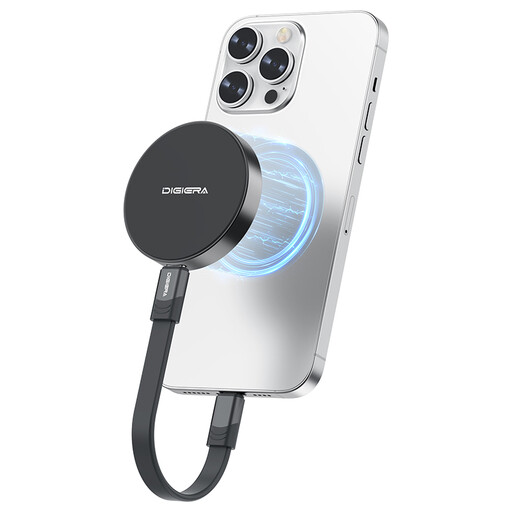
Why It Stands Out: For those who prioritise raw speed, the DigiEra LPS2000M-1 is a compelling choice. It utilises the USB 3.2 Gen 2x2 interface to deliver read speeds of up to 2000MB/s. This makes it one of the faster options available, ideal for professionals working with extremely large files or multi-stream editing workflows. Its built-in magnetic ring provides a secure attachment for mobile recording and its durable aluminium alloy body is built to withstand the rigours of field use.
Pros:
Who is it for? Professional videographers, editors and tech enthusiasts who need the highest possible transfer speeds from a portable SSD for iPhone 15 Pro. It's perfect for those whose work demands rapid data offloading and minimal wait times.
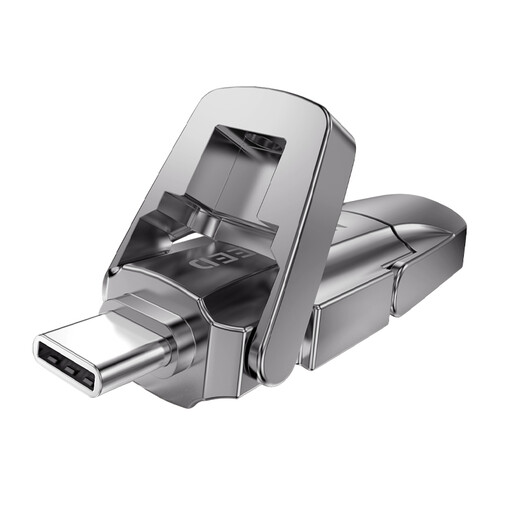
Why It Stands Out: The MOVESPEED flash drive redefines versatility. It packs SSD-grade performance into a tiny thumb drive form factor, complete with a clever flip cover that reveals both USB-C and USB-A connectors. This dual-interface design makes it incredibly useful for moving files between an iPhone 15, a modern MacBook, an older PC and more. Despite its small size, it delivers impressive speeds that are sufficient for direct 4K video recording.
Pros:
Who is it for? Users who value convenience and cross-device flexibility above all. It's the perfect tool for students, office workers and casual creators who frequently switch between devices and need a reliable, pocket-sized high-speed USB C drive.
If these specific models don't quite fit your requirements, there are many other excellent solutions available. To discover a wider selection of drives with different capacities and features, we invite you to explore our full range.
? Explore our complete collection of USB C storage drives
Yes, but with a key distinction. The iPhone 15 Pro and Pro Max models support recording ProRes video directly to a compatible external SSD connected via the USB-C port. This feature is specifically designed for the high data rates of ProRes and is not available for standard video formats.
For the best compatibility across Apple devices and Windows PCs, formatting your drive as exFAT is recommended. The iPhone 15 series also supports the APFS format, which is optimised for Apple devices but may not be readable on Windows machines without additional software.
Most modern external SSDs with a USB-C connector will work with the iPhone 15 for file storage and transfer. However, for demanding tasks like direct ProRes recording, the drive must have a sustained write speed of at least 220MB/s and must not draw excessive power. It is always advisable to check the drive's specifications to ensure it meets the requirements for your intended use.