For writing a personal essay beside someone else, start with a keyboard whose exact variant is described as quiet. Choose a compact layout if desk space is tight, or consider a shaped keyboard with a palm rest if longer writing sessions make fit your priority. Quietness and comfort descriptions are not guarantees of how a keyboard will sound or feel at your desk; also check its key layout, device compatibility and connection method.
Who these keyboards suit
Writers sharing a quiet desk
If someone sits close enough to hear routine typing, the sound of the exact keyboard matters more than a broad label such as mechanical. Logitech describes the Pebble Keys 2 K380s as having quiet, low-profile keys; its compact layout suits prose writing when a number pad is not needed.
Writers working through longer sessions
If you would give up some desk space for a shaped keyboard and palm support, consider the fit of an ergonomic layout. Logitech describes Wave Keys as having a wave-shaped frame and cushioned palm rest, though comfort will depend on your own desk setup and posture.
Writers who prefer mechanical keys
If you want a more defined key feel without giving a keyboard the whole desk, check both its dimensions and its switch variant. Logitech offers distinct switch options for the MX Mechanical Mini, while Keychron lists a 75% UK-ISO K3 Max; neither model name alone tells you how unobtrusive your typing will be.
What matters when choosing
For an essay at a shared desk, consider key noise alongside the space available for writing materials, then weigh session comfort and confirm the layout and connection your device needs.
| Concern |
What to check |
Who this matters to |
| Typing noise |
Look for a quiet-key description for the exact model or switch; do not assume that low-profile or mechanical means quiet. |
I need to draft beside someone without making every keystroke intrusive. Around 36% of consumers put typing noise first. |
| Desk footprint |
Compare the layout and dimensions with your available space, and check for any editing keys or number pad you regularly use. |
My keyboard has to leave room for notes and a mouse, but I still need the keys I use to revise. Roughly 29% of consumers prioritise desk space. |
| Long-session comfort |
Check the keyboard shape, palm support and desk depth rather than relying on a comfort claim alone. |
When drafting and revising takes a while, I care more about whether the keyboard fits my usual typing position. Around 21% of consumers place comfort first. |
| Layout and connection |
Confirm the selected UK key layout, operating-system support and whether your device can use the stated connection. |
I need familiar punctuation keys and a connection that works with the device I write on. About 14% of consumers make compatibility their primary concern. |
Buying mistakes to avoid
-
Assuming low-profile or mechanical keys will be quiet
Switch variants can differ in sound. Logitech sells the MX Mechanical Mini with Tactile Quiet, Clicky and Linear options, so the family name does not identify the variant you would use beside someone else.
Check the full switch name before buying, and look for a quiet-key description that applies to that exact choice.
-
Choosing a compact board without checking its keys
A smaller layout can free space for essay notes but may omit a number pad or condense controls you use while editing.
Compare the actual key layout with the shortcuts and navigation keys you use, particularly before choosing a mini or 75% board.
-
Assuming a UK listing has a UK key layout
Products in the same family can have different regional layouts. Keychron lists a UK-ISO K3 Max option, and Apple identifies a British English Magic Keyboard variant.
Check the selected layout immediately before purchase rather than relying on the product-family name.
-
Taking comfort claims as a promise of personal fit
A shaped keyboard and palm rest still need to fit your hands, posture and available desk depth.
Measure the space you have, assess the keyboard shape and check the applicable return terms before committing to an ergonomic layout.
Relevant keyboard brands
Logitech
Logitech offers several approaches to this choice, from compact low-profile keys to a shaped keyboard with palm support and a compact mechanical model.
- Logitech describes Pebble Keys 2 K380s as compact with quiet low-profile keys, and Wave Keys as having a wave-shaped frame and cushioned palm rest.
- Quietness and comfort are model-specific manufacturer descriptions. MX Mechanical Mini also has switch variants with different sounds, so check the exact configuration.
Keychron
The K3 Max is a compact low-profile mechanical option for writers considering a UK-ISO layout.
- Keychron lists the K3 Max as a 75% keyboard with wired, Bluetooth and 2.4 GHz connection options.
- Check the selected switch and layout before buying; its product description does not establish how its typing sound compares with other keyboards at a shared desk.
Apple
Apple offers a British English Magic Keyboard for writers using the compatible Apple devices specified for that model.
- Apple lists Bluetooth and USB-C charging for the British English Magic Keyboard.
- Check compatibility with your particular device; Apple does not position this model as a quiet shared-desk option.
Joybuy keyboards for shared-desk writing
These keyboards cover shaped and full-size layouts, multi-device use, and variants described with quieter keys or switches. Compare their footprint and key layout against your shared desk before choosing; some named variants use a US layout.
 No image available
HP 960 Ergonomic Split Layout Wireless Keyboard with Padded Wrist Rest
Consider this wireless split-layout keyboard if palm support matters during longer essay sessions. Check that its shape fits your desk and typing position, and confirm the selected key layout if UK key placement matters to you.
Joybuy
 No image available
Targus EcoSmart Full Size Wireless Keyboard (UK)
Consider a full-size wireless layout if you regularly use keys that a compact board might omit. Allow room for its footprint and check the selected key arrangement rather than relying on the UK label alone.
Joybuy
 No image available
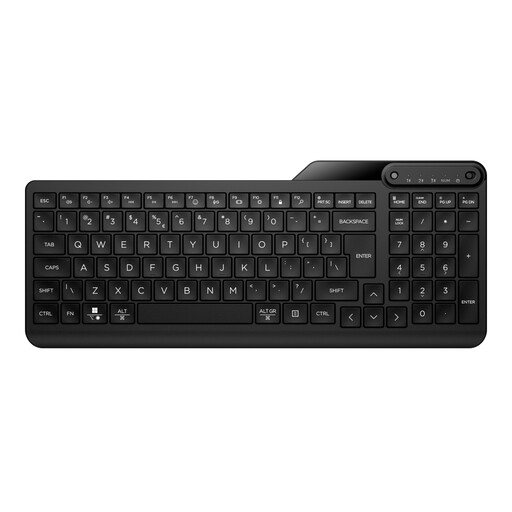
HP 460 Multi-Device Bluetooth Keyboard
Consider this model if writing across Bluetooth devices matters to you. Confirm compatibility with each device and the selected key layout, as well as whether its footprint leaves enough shared desk space.
Joybuy
 No image available
ET Silent Wireless Keyboard and Mouse Combo, US Layout
Consider the keyboard-and-mouse bundle if you want both devices for the desk. Its full-size keyboard uses a stated US layout and 2.4 GHz wireless connection; check the key placement and make room for the mouse as well.
Joybuy
 No image available
Ticktype DP104 Tri-Mode, Gecha Gray, Silent Tactile Switches, US Layout
Consider this mechanical variant if you want the named Silent Tactile switches and have room for a full-size board. The title specifies 108 keys and a US layout; confirm that key placement suits your writing and do not treat the switch name as a measured noise result.
Joybuy
Questions about choosing and using a keyboard
How do I connect a Bluetooth keyboard before I start writing?
Switch on the keyboard and put it in pairing mode, then select it in your computer or tablet’s Bluetooth settings and enter a code if prompted. Logitech’s pairing guidance describes this general sequence; use your model’s instructions for its particular buttons.
Do I need a UK key layout for essay writing?
Choose a UK-ISO or British English variant if familiar UK punctuation and key placement matter to you. A product family can include other layouts: Keychron separately lists a UK-ISO K3 Max option, so check the variant selected before purchase.
How should I clean a keyboard used at a shared desk?
Switch it off or unplug it, gently remove loose debris and wipe the keys with a soft, lightly damp cloth. Logitech advises against pouring water directly onto a keyboard because it can damage electrical components.
What should I do with an old keyboard?
Check your local council or retailer for an electrical recycling or take-back option. GOV.UK’s guidance on UK waste electrical and electronic equipment addresses recovery, reuse and recycling, but household collection arrangements should be checked locally.


