Large-screen arena players
You want a 31.5- or 32-inch desktop display without giving up a high refresh rate. ASUS ROG lists a dual-mode option at this size; check whether its 4K and Full HD modes suit the games you play.


Choose a 31.5- or 32-inch monitor if screen size is central to how you want to play, then check which resolution and refresh rate your games and device can actually use. A dual-mode display can offer 4K at 240Hz and Full HD at 480Hz, but reaching the faster mode means giving up 4K detail; smaller, higher-refresh esports screens make a different size-versus-speed trade-off.
You want a 31.5- or 32-inch desktop display without giving up a high refresh rate. ASUS ROG lists a dual-mode option at this size; check whether its 4K and Full HD modes suit the games you play.
You put refresh-rate headroom ahead of physical screen size. Samsung Odyssey and BenQ ZOWIE list 27-inch and 24.1-inch high-refresh models respectively, but neither delivers the requested large-screen format.
You want to use the same monitor for arena matches, other games and more than one device. Check each device’s supported output mode, the monitor’s inputs and variable refresh rate compatibility before deciding on a screen size.
Choose it when: You want a large screen for detailed games as well as a faster mode for arena matches; ASUS ROG lists 4K at 240Hz and Full HD at 480Hz for the 31.5-inch PG32UCDP.
Trade-off: The 480Hz mode uses Full HD, and your PC, game and connection must be able to supply the mode you intend to use.
Choose it when: Refresh-rate headroom matters more to you than a large playing area. Samsung lists the 27-inch QHD Odyssey OLED G6 G60SF at 500Hz; BenQ ZOWIE lists the 24.1-inch XL2586X at 540Hz.
Trade-off: Both screens are smaller than a 31.5- or 32-inch display, and a higher monitor refresh rate does not make a game produce more frames.
| Concern | What to check | Who this matters to |
|---|---|---|
| Screen size and detail | Compare the diagonal size, native resolution and space needed on your desk; do not judge image detail from size alone. | If I want arena games to fill a larger desktop screen, I need the resolution and desk fit to work for me too. Around 27% of consumers put large-screen scale first. |
| Competitive refresh | Check the refresh rate at your intended resolution and whether your usual games can run at a corresponding frame rate. | When fast-moving matches are my priority, I can accept a change in resolution or screen size for more refresh-rate headroom. Around 33% of consumers put competitive speed first. |
| Device and connection fit | Confirm the desired mode through the intended port and cable, and check variable refresh rate compatibility across the connected devices. | If I switch between a PC and a console, I want to know which display modes each can actually use. Around 27% of consumers make connection and device fit their primary concern. |
| Everyday ownership | Consider room reflections, stand adjustment and the exact model’s panel-care guidance if choosing OLED. | For long sessions with a persistent game HUD, I need a screen I can position comfortably and care for as directed. Around 13% of consumers put these ownership needs first. |
A monitor’s highest setting may require a different resolution or connection. A monitor cannot make full use of a high refresh rate if the PC supplies substantially fewer frames.
Check frame rates in your usual arena games and confirm the exact monitor’s mode-specific input limits.
The cited Samsung Odyssey OLED G6 G60SF is 27 inches, while the BenQ ZOWIE XL2586X is 24.1 inches. Their high refresh rates do not change their physical size.
Decide whether screen scale or refresh-rate headroom takes priority before comparing those models with a 31.5- or 32-inch display.
Persistent game HUDs make panel-care instructions relevant. The Joybuy listing for the ASUS ROG PG32UCDP warns against showing static images at high brightness for extended periods.
Read the exact model’s care guidance and consider how reflections will look where the monitor will sit.
GOV.UK says retailers covered by electrical-waste take-back requirements must offer to take back waste of the same type as an item purchased from them, including items bought online. That does not establish a home-collection arrangement.
Ask the retailer how to hand over your old monitor before arranging the replacement.
The ROG Swift OLED PG32UCDP is a large-screen dual-mode option for comparing 4K detail with a faster Full HD mode.
The Odyssey OLED G6 G60SF provides a smaller-screen, high-refresh comparison point.
The 32GS95UE-B is a large-screen dual-mode OLED comparison point.
The XL2586X is a compact esports comparison point rather than a large-screen option.
These monitors offer different ways to get a large display for arena games: 32-inch conventional screens and wider 34-inch and 49-inch formats. Check game support and desk space particularly carefully before choosing an ultrawide model.
 No image available
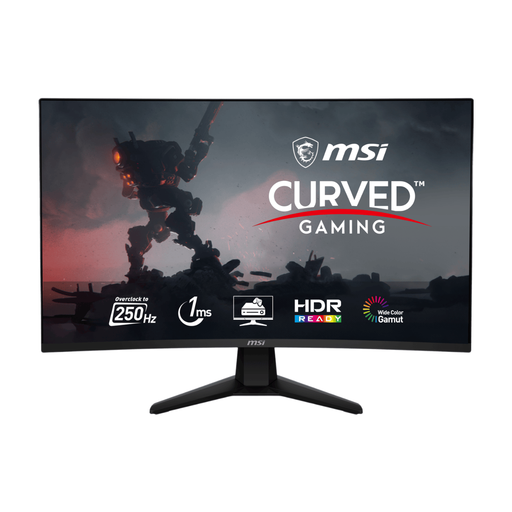
Consider this if you want a 32-inch curved screen and put refresh rate ahead of resolution. The title specifies FHD, Adaptive Sync and up to 250Hz in an overclocked mode; check whether FHD detail and that mode suit your setup.
 No image available
This 32-inch UHD OLED model is worth considering if large-screen detail matters alongside arena play. Confirm the refresh mode, input and variable refresh rate support you need, and read the exact model’s OLED care guidance.
 No image available
Consider the wider format if your arena games and device support the display mode you want. The title specifies 3440 × 1440 resolution, 200Hz, a VA panel and DisplayPort 1.4; check connection limits and desk fit for your setup.
 No image available
This is a 32-inch option if you want QHD rather than Full HD for arena play. The title specifies 2560 × 1440, 165Hz, Adaptive Sync and a 100 × 100mm VESA mounting pattern; confirm the refresh limit through your intended connection.
 No image available
Choose this format only if your arena games, device and desk suit an especially wide screen. The title specifies a 49-inch 32:9 curved QD-OLED display, 240Hz and AMD FreeSync Premium; confirm how your intended games use that aspect ratio.
No. A monitor cannot display frames that your device does not produce; a PC delivering 100 frames per second will not make full use of a 240Hz monitor. Check performance in your usual games at the resolution you plan to use.
Yes, if you intend to use it: the monitor and connected graphics device need compatible support. AMD describes FreeSync as synchronising display refresh with compatible graphics output, so check the exact monitor, connection and device rather than relying on a connector name alone.
Follow the care guidance for the exact model. ASUS ROG lists OLED Care features for the PG32UCDP, and its Joybuy listing warns against displaying static images at high brightness for extended periods; check that model’s manual and warranty terms for your intended use.
Ask the retailer about its electrical-waste take-back arrangement before ordering. GOV.UK says retailers covered by the applicable requirements must offer to take back waste of the same type as an item purchased from them, including an online purchase; confirm how the handover is arranged.