
24/7 Customer Support

Free returns

Same-day & Next-day Delivery

Quality Guaranteed

Unlock Your Welcome Offers: FREE Delivery | Up to 80% OFF | Free 30-day JoyPlus trial
Download the APP
Shooting video on the iPhone 15 or 16 Pro is a game-changer. The quality, especially in Apple ProRes format, can be stunning. But as many creators quickly discover, these high-resolution files come with a significant drawback: they consume your iPhone's internal storage at an alarming rate. A few minutes of 4K ProRes footage can fill up gigabytes of space, leading to frustrating "Storage Almost Full" notifications and a workflow bottleneck when it's time to transfer those massive files to your computer.
A MagSafe SSD offers a streamlined solution. This type of magnetic external hard drive attaches directly to the back of your iPhone, allowing you to record footage straight to the drive. This not only frees up your phone's precious storage but also dramatically speeds up your post-production process. This guide is designed to help you navigate the options and find a reliable portable SSD for your iPhone 15 Pro that fits your creative needs.
Before diving into specific models, it's helpful to understand the key features that matter most for video production. Keeping these points in mind will help you make an informed choice.
When recording or transferring large video files, speed is not just a convenience—it's a necessity. Look for two key specifications: read speed and write speed.
Pay attention to the interface standard. USB 3.2 Gen 2 offers speeds up to 10Gbps (around 1050MB/s), which is excellent for most 4K recording. For even faster transfers to a compatible computer, USB 3.2 Gen 2x2 doubles that to 20Gbps (around 2000MB/s).
ProRes files are large, so storage capacity is a primary concern. While smaller drives are available, a 1TB portable SSD is a practical starting point for serious videographers, offering a good balance of space and portability. Consider how much you typically shoot in a day to gauge your needs. The physical design is also important. A compact, lightweight drive that attaches securely to your phone without adding excessive bulk is ideal for mobile shooting rigs.
If you're shooting on location, your gear needs to be tough. Look for SSDs with durable materials like metal alloys or protective silicone casings. Some models offer IP (Ingress Protection) ratings, such as IP65, which indicates resistance to dust and water—a valuable feature for outdoor work. Finally, ensure the drive uses a USB-C connector for seamless compatibility with your iPhone 15/16 Pro and modern Macs or PCs.
Here are a few standout options that address the needs of mobile content creators.

Why It Stands Out: The Lexar ES4 is a complete and versatile package. It not only provides solid performance but also includes the accessories needed to get started right away. The inclusion of both a magnetic silicone case and a separate magnetic ring means it can adapt to your existing setup, whether you have a MagSafe-compatible case or not.
Pros:
Who is it for? This is an excellent choice for creators who are new to the magnetic SSD ecosystem and want a straightforward, all-inclusive solution that works straight out of the box.
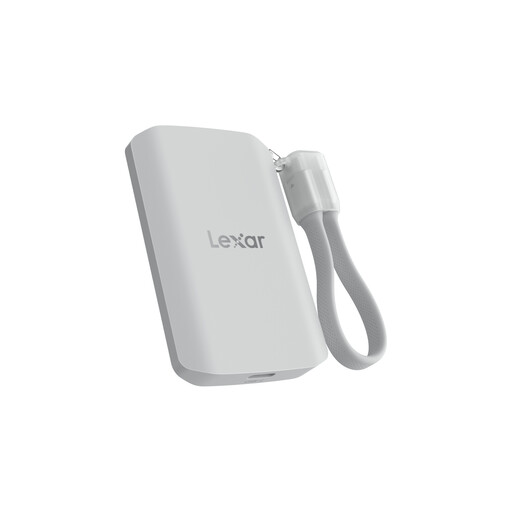
Why It Stands Out: Built for performance and durability, the Lexar ES5 is aimed at professionals who push their gear to the limits. Its USB 3.2 Gen 2x2 interface delivers impressive speeds up to 2000MB/s, drastically cutting down transfer times to compatible computers. The rugged build, with an IP65 rating and 3-metre drop resistance, provides peace of mind when shooting in challenging environments.
Pros:
Who is it for? Professional videographers and on-the-go creators who prioritise maximum transfer speed and require a durable drive that can withstand the rigours of location shoots.
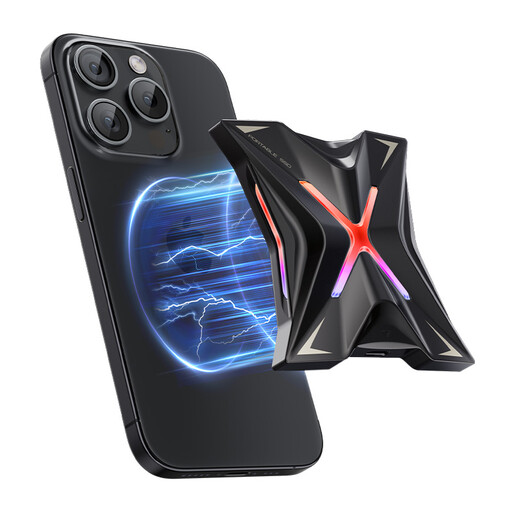
Why It Stands Out: The MOVESPEED SSD combines top-tier performance with excellent thermal management. Its zinc alloy shell is not just for looks; it acts as a heatsink, dissipating warmth during long recording sessions to maintain stable performance. With speeds reaching up to 2060MB/s, it's one of the faster options available for creators who need to move large files quickly.
Pros:
Who is it for? Tech-savvy creators and professionals who demand both high speed and stable, long-term performance, especially during extended 4K video recording sessions where heat can become a factor.
These three models represent some of the strong contenders in the market, but the world of iPhone external storage is always expanding. If you're looking for different capacities, form factors or specific features not highlighted here, there are many other drives to consider.
Explore our full range of high-speed drives to find the perfect match for your workflow. Discover more in our External Storage USB category.
Yes. With an iPhone 15 Pro or newer and a compatible USB-C SSD, you can select the external drive as your recording destination in the Camera app settings. This is the primary benefit of using an external SSD, as it allows you to bypass the phone's internal storage and record for much longer periods. Just ensure your SSD has a sustained write speed sufficient for the resolution and frame rate you are using.
For the most secure connection, a MagSafe-compatible case is recommended. The magnets in the case align perfectly with the SSD for a strong hold. However, some SSDs, like the Lexar ES4 mentioned above, include an adhesive magnetic ring that you can attach to a standard, non-magnetic case to enable the feature.
The main difference is speed. USB 3.2 Gen 2 provides a maximum data transfer rate of 10Gbps (which translates to real-world speeds around 1050MB/s). USB 3.2 Gen 2x2 doubles this by using two 10Gbps lanes, offering a maximum rate of 20Gbps (real-world speeds around 2000MB/s). While the iPhone 15 Pro's USB-C port is limited to 10Gbps (Gen 2 speeds), a Gen 2x2 drive is still a great investment for future-proofing and for significantly faster file transfers to a computer that has a compatible USB 3.2 Gen 2x2 port.