For a fixed overhead colour-mixing lesson, check whether the complete camera setup can be mounted securely, frame the work area and hold a consistent white balance under your filming lights before choosing a camera type. An interchangeable-lens camera gives you lens choices for the desk setup: Canon’s EOS R50 kit includes a vari-angle screen and microphone input, while Sony’s ZV-E10 II offers up to 4K 60p for a more involved video workflow. Panasonic’s HC-VX3 offers an integrated zoom and White Set control, but Panasonic UK showed it as unavailable when checked.
Who is this for?
Colour-critical craft tutor
If viewers need to distinguish changes in paint, dye or pigment, controllable white balance and repeatable lighting matter alongside image detail. Panasonic lists a White Set mode on the HC-VX3; Sony explains that white balance corrects colour casts caused by lighting.
Solo overhead demonstrator
If you frame and operate the camera while working at the desk, you need a way to inspect the shot before your hands enter it. Canon lists a vari-angle touchscreen and autofocus on the EOS R50, though you still need to check the view from your particular mount.
Portfolio creator planning a video workflow
If you expect to edit the lesson or record narration, compare recording modes and audio connections with what you will actually use. Canon lists 4K 30p and a 3.5 mm microphone jack on the EOS R50; Sony lists up to 4K 60p and 10-bit 4:2:2 recording on the ZV-E10 II.
What matters when choosing?
For this overhead lesson, the lens system changes how you put the setup together; colour, framing and recording checks still matter whichever route you take.
Interchangeable-lens mirrorless camera
Consider it when: You also want portfolio stills or expect to change lenses as your filming setup develops; Canon’s EOS R50 kit and Sony’s ZV-E10 II represent different recording needs within this route.
Trade-off: The chosen lens determines desk coverage and close-focus capability, so a camera body alone does not settle the overhead setup.
Integrated-lens camcorder
Consider it when: You prefer a built-in zoom and camcorder controls to choosing lenses; Panasonic lists both a 24x optical zoom and White Set control on the HC-VX3.
Trade-off: Its listed 4K mode is 25p, and Panasonic UK showed the HC-VX3 as unavailable when checked. The built-in zoom still needs to cover your desk from the intended mounting height.
| Concern | What to check | Who this matters to |
|---|
| Consistent colour and visible detail |
Check for controllable white balance and set it under the lights you will use. Confirm that the framed shot shows the mixing area clearly. |
If I teach colour mixing, viewers need to see changes in pigment without the lighting shifting the apparent colours. Around 40% of consumers put repeatable colour and visible detail first. |
| Solo overhead filming |
Compare the mount’s rated payload with the complete setup, then check desk coverage, close focus and how you will view the framing. |
Working alone at the desk, I need a secure camera position and a way to inspect the shot before recording. For around 40% of consumers, dependable solo overhead setup is the primary concern. |
| Editing and narration |
Choose the recording mode you need and confirm the exact audio connection or included microphone for your setup. |
If I plan a more edited portfolio film, I need recording and narration options that fit that workflow. Editing and audio flexibility come first for around 20% of consumers. |
Setup mistakes to avoid
-
Choosing on resolution alone
A sharp 4K shot can still make paint look warmer or cooler than intended if the light changes or automatic white balance shifts. Sony explains that white balance corrects lighting-related colour casts.
Use consistent desk lighting and set an available white-balance control under those lights before filming the lesson.
-
Checking body weight but not the mounted setup
The overhead support carries the lens, battery, mounting plate and any accessories as well as the camera. Image-stabilisation features do not establish whether that support is safe or rigid.
Check the support’s rated payload against the complete configuration, then test attachment and stability before recording.
The configured rig may call for a stronger arm, clamp, plate or counterweight.
-
Treating a mirrorless body as a complete filming setup
Without a suitable lens, the body cannot establish whether you can frame the desk and focus on close work. Storage and narration equipment also depend on your chosen recording setup.
Check the lens, recording card, overhead support and any microphone you intend to use as one working configuration.
-
Planning around an unavailable camcorder
Panasonic UK showed the HC-VX3 as unavailable when checked. Its features make it useful to compare with a mirrorless setup, but they do not establish that you can obtain one for your lesson.
Check a current retailer listing before making your filming plan depend on that model.
Relevant brands for reference
Canon
The EOS R50 kit is a mirrorless stills-and-video option for a fixed desk lesson, with an APS-C sensor, vari-angle touchscreen, 4K 30p recording and a microphone input listed by Canon UK.
- The adjustable screen helps with setup checks when its position remains visible on your overhead rig.
- Check the kit lens’s desk coverage and close focus at your mounting height. Canon lists lens and digital stabilisation for the EOS R50, not in-body sensor-shift stabilisation.
Sony
The ZV-E10 II is an interchangeable-lens video option. Sony UK lists an APS-C sensor, E-mount lenses, 4K recording up to 60p and support for 10-bit 4:2:2 formats.
- Its listed recording options are relevant if your portfolio edit calls for those frame rates or formats.
- Select a lens that can cover and focus on the work area; a body-only configuration does not answer either question.
Panasonic
The HC-VX3 is an integrated-lens camcorder reference for creators who prefer a built-in zoom and a White Set control to choosing interchangeable lenses.
- Panasonic UK lists a 24x optical zoom, White Set white balance and 4K 25p recording for the HC-VX3.
- Check that its widest view covers your desk from the mounting height. Panasonic UK showed the model as unavailable when checked.
Joybuy product choices
These choices include two interchangeable-lens kits and three compact cameras with integrated lenses for a desk-filming setup. For each one, check colour controls, the view of your work area and compatibility with a securely rated overhead mount.
 No image available
Sony Alpha ZV-E10 II K with 16–50 mm f/3.5–5.6 power-zoom lens
Consider this kit if you want to edit a 4K desk lesson using its listed 4K 60p and 10-bit 4:2:2 recording options. Check the included lens’s desk coverage and close focus at your planned height, and compare the complete setup with your mount’s rated payload.
View on Joybuy
 No image available
Sony ZV-E10K with 16–50 mm power-zoom lens
The included lens gives you a starting configuration for a solo desk lesson. Check its field of view and close focus from your overhead position, confirm the white-balance controls you need and match the complete setup to your mount’s rated payload.
View on Joybuy
 No image available
DJI Osmo Pocket 3 Creator Combo
This compact 4K camera bundle includes a microphone for a lesson with narration. Check whether you can see its screen, frame the whole mixing area and attach the configured camera safely in your intended overhead position; confirm its white-balance controls for your lighting.
View on Joybuy
 No image available
DJI Osmo Pocket 3
Its listed 4K video and rotatable touchscreen make it a compact option to assess for a desk lesson. Check screen visibility and work-area coverage from above, then confirm white-balance controls and the mount’s suitability for your complete setup.
View on Joybuy
 No image available
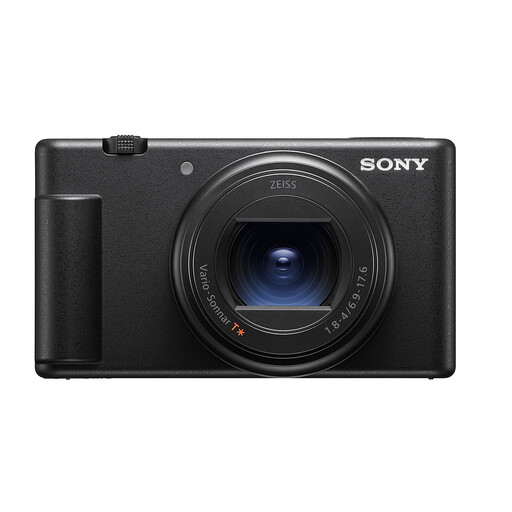
Sony ZV-1 II
Its integrated zoom lens avoids choosing a separate lens for a 4K lesson. Before using it overhead, check desk coverage, screen visibility, white-balance controls and whether your chosen support can hold the complete setup securely.
View on Joybuy
Frequently asked questions
Will 4K make the colours in my lesson look accurate?
No: 4K records image detail but does not correct a colour cast from your lighting. Set white balance under the lights you will use; Sony explains its role in correcting lighting-related colour casts, and Panasonic lists a White Set option on the HC-VX3.
Do I need image stabilisation for a fixed overhead lesson?
Image stabilisation is not a substitute for a secure, rigid overhead mount. Check the support’s rated payload and attachment with the camera, lens, battery and mounting plate installed; neither Panasonic’s listed HC-VX3 stabilisation nor Canon’s lens and digital stabilisation specification for the EOS R50 establishes that a particular rig is safe.
What else might I need besides the camera?
Plan for a suitably rated overhead support, a lens if you choose a body-only mirrorless camera, and a recording card suitable for your selected mode. You may also need desk lighting and a microphone for narration; check what the exact camera configuration includes before assembling the setup.
What if another person appears in my portfolio video?
Consider how the identifiable person’s image will be used before recording or sharing it, and seek appropriate permission. The Information Commissioner’s Office says the UK GDPR household exemption applies to purely personal or household activity; do not assume it covers a public or organisational portfolio.


