
24/7 Customer Support

Free returns

Same-day & Next-day Delivery

Quality Guaranteed

Unlock Your Welcome Offers: FREE Delivery | Up to 80% OFF | Free 30-day JoyPlus trial
Download the APP
For serious gamers, the limitations of touchscreen controls are all too familiar. Imprecise movements, fingers obscuring the action and a lack of tactile feedback can be the difference between victory and defeat. If you are looking to elevate your performance in competitive titles or simply want a more comfortable and immersive experience for on-the-go and cloud gaming, a dedicated mobile gaming controller is a worthwhile investment.
Navigating the market can be challenging, with countless options varying in form, function and connectivity. This guide is designed to provide practical advice, helping you understand the key features to look for and highlighting a few standout options to suit different playstyles.
Before diving into specific products, consider these key factors to ensure you select a controller that aligns with your gaming habits.
The way a controller connects to your device directly impacts its responsiveness. You generally have two choices:
Controllers come in various shapes and sizes, each offering a different feel.
It is crucial to check that the controller works with your specific device. While many controllers support both, some are designed exclusively as an iPhone game controller or a gamepad for Android. Pay close attention to the connection type (Lightning vs. USB-C) and the required operating system version. If you play across multiple platforms, look for a controller with broad compatibility for PC, Mac and mobile.
Here are our recommendations, selected to meet the needs of different types of players.

Why It Stands Out: The DualSense is more than just a PlayStation accessory; it's a premium, multi-platform controller. Its standout features are the immersive haptic feedback and adaptive triggers, which provide a level of physical feedback that few other controllers can match in supported games. The build quality is exceptional, and its traditional ergonomic design ensures comfort for hours. The striking Techno Red colourway adds a bold aesthetic to any gaming setup.
Pros:
Who is it for?: The multi-platform gamer who values a premium, comfortable experience and plays across a console, PC and mobile. It is ideal for those who want one high-quality controller for all their devices and appreciate immersive features.
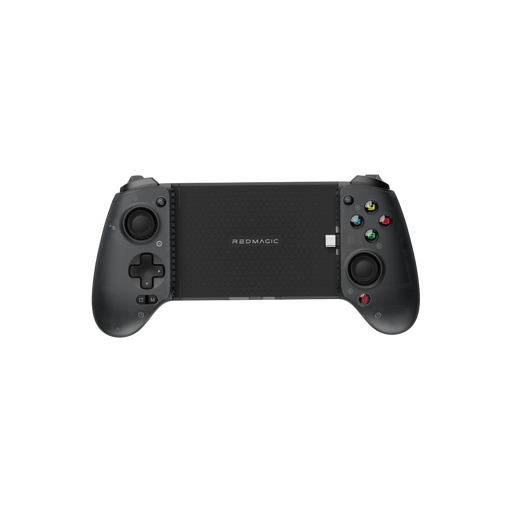
Why It Stands Out: The REDMAGIC Shadow Blade 2.0 is built for one primary purpose: competitive mobile gaming. Its defining feature is the direct Type-C wired connection, which delivers the ultra-low latency needed for high-stakes gameplay. The telescopic design is lightweight and ergonomic, transforming your phone into a dedicated gaming machine without adding significant bulk. Refined thumbsticks and tactile buttons provide the precision required to outperform the competition.
Pros:
Who is it for?: The serious, mobile-first competitive player. If you primarily play fast-paced FPS, MOBA or racing titles on your phone and demand the absolute fastest input response, this is a leading choice.
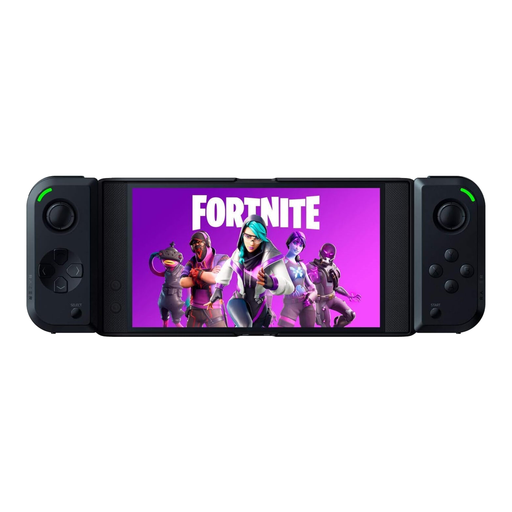
Why It Stands Out: The Razer Junglecat offers a unique blend of portability and modularity. Its dual-sided design clips onto your phone, creating a compact, handheld console experience. The controllers can also be used detached, offering flexibility in how you play. It connects via low-latency Bluetooth and offers extensive customisation through the Razer mobile app, allowing you to remap buttons and adjust sensitivity to your liking.
Pros:
Who is it for?: The gamer who prioritises portability above all else. It is an excellent companion for cloud gaming services like Xbox Cloud Gaming and for players who want a pocket-sized controller that doesn't compromise on control.
These three controllers represent some of the strong choices available, but the right fit is always a personal one. If your needs are different or you simply want to explore a wider range of styles and price points, we have curated a broader selection.
Browse our full smartphone gaming collection to find the perfect controller for your setup.
1. Can I use a PC game controller on my mobile phone? Yes, many modern PC controllers, particularly those with Bluetooth functionality, are compatible with both Android and iOS devices. It is always best to check the manufacturer's specifications to confirm compatibility with your phone's model and operating system.
2. Is a USB-C or Bluetooth gamepad better for mobile gaming? This depends on your gaming priorities. A USB-C controller for gaming offers a direct connection with the lowest possible input lag, making it ideal for competitive games. A Bluetooth gamepad provides wireless convenience and is more than responsive enough for most single-player and casual games.
3. Do all mobile games support a phone controller? Not all games do, but support is becoming increasingly common. Most popular action, adventure and racing titles, along with all major cloud gaming platforms, offer robust controller support. You can usually find this information in the game's description on the App Store or Google Play Store.