For detailed plans at a desk used by several people, start by comparing flat 4K monitors with enough physical adjustment for each user; a 31.5–32-inch screen is worth considering if the desk can accommodate it. Add USB-C charging and a hub for frequent laptop changes, but check each laptop’s video and power requirements. Colour-focused features matter more when reviewers assess renderings or finishes as well as line drawings.
Who is this for?
Shared-desk plan reviewers
People who inspect plans, drawings and PDFs at a desk used by more than one person need to consider screen position, reflections and the space available for documents. The Health and Safety Executive advises assessing the whole workstation, not just its display.
Laptop-based technical reviewers
People who bring a work laptop to the desk may want display, charging and peripheral connections through fewer cables. The connection still needs to suit each laptop that will use it.
Colour-sensitive design reviewers
People reviewing rendered visuals, finish references or presentation graphics alongside line drawings have more reason to check a monitor’s stated colour coverage and calibration features.
What matters when choosing?
For a shared plan-review desk, check whether everyone can position the screen comfortably, then weigh drawing space and laptop connections against the work actually done there. The Health and Safety Executive advises considering the workstation, its conditions and individual users together.
| Concern | What to check | Who this matters to |
|---|
| Shared-desk positioning |
Check height, tilt and swivel adjustment. For a clamp-mounted screen, check the desk edge and clearance. |
If several people use the desk, I need to move the screen to suit my position without crowding the drawings. Around 38% of consumers would put shared-desk adjustment first. |
| Plan detail |
Compare flat 27-inch and 31.5–32-inch 4K screens against desk space and viewing distance; check native resolution. |
When inspecting annotations and straight-line drawings, I need enough usable screen area without overlooking where the monitor will sit. For around 31% of consumers, seeing plan detail is the primary concern. |
| Laptop connections |
Match each laptop’s video connection and charging requirement to the monitor; check the hub ports and whether KVM switching is needed. |
If people regularly swap laptops, I want to reconnect the display and peripherals without rebuilding the desk setup. Laptop and multi-device connections would come first for around 23% of consumers. |
| Colour review |
Compare stated colour-space coverage and calibration features with the files and approval workflow in use. |
When finishes or renderings are being approved, I need to know which colour specifications matter beyond reading monochrome plans. Around 8% of consumers would prioritise colour-focused review. |
Buying pitfalls
-
Choosing by diagonal size alone
A larger screen does not settle the questions of resolution, desk fit or how straight lines appear. BenQ’s CAD-monitor guidance recommends considering size and resolution together and cautions that curved screens can skew lines.
Compare native resolution and physical footprint as well as size; favour a flat screen if judging line geometry is central to the work.
-
Assuming any USB-C port will dock every laptop
Monitor power-delivery ratings vary across the models described by BenQ, Dell, ASUS and LG. A suitable connector alone does not establish that a laptop can send the intended video signal or receive the charging power it needs.
Check video-output support and charging requirements for every laptop likely to use the desk, then compare them with the monitor’s connections and stated power delivery.
-
Leaving the screen in one position for every user
People sharing a desk may need different screen positions. The Health and Safety Executive advises considering individual requirements, furniture and working conditions as part of the workstation assessment.
Check the stand or a compatible arm for the movement users need, and assess screen position, reflections and document space at the actual desk.
-
Prioritising colour features for linework alone
BenQ and ASUS describe colour-focused features on professional monitors, but calibration claims are more pertinent when the work includes renderings, finishes or presentation material.
Decide whether colour-sensitive approval is part of the workflow before giving those features priority over screen positioning or connections.
Relevant brands to consider
BenQ
The DesignVue PD3225U is a reference point for a shared desk that also needs CAD/CAM mode, laptop connections and colour-focused specifications.
- BenQ lists a 31.5-inch 3840 × 2160 display, KVM switching, 85 W Thunderbolt power delivery and a height-adjustable stand for the PD3225U.
- Its colour specifications and CAD/CAM mode may be less relevant if reviewers only read monochrome PDFs.
Dell
The UltraSharp U3225QE is worth examining when a shared desk needs a 4K display alongside substantial laptop power delivery and hub connections.
- Dell lists an integrated USB hub, power delivery up to 140 W and height, pivot, swivel and tilt adjustment for this model.
- Check whether each laptop needs those docking capabilities before choosing them over a simpler connection setup.
ASUS ProArt
The PA329CRV is a colour-oriented option to examine when plan review includes visual or finish approval.
- ASUS specifies 98% DCI-P3 coverage, factory calibration to Delta E <2, USB-C power delivery up to 96 W and an adjustable stand for the PA329CRV.
- Treat those colour figures as manufacturer specifications, not a substitute for checking the approval workflow’s colour requirements.
LG
The Ergo 32UN880K-B is relevant where repositioning the screen and preserving desktop space are priorities.
- LG specifies a 31.5-inch 4K display, a C-clamp stand with extend and retract movement, and USB-C power delivery up to 60 W.
- Check that the desk accepts the clamp and that 60 W meets the connected laptop’s charging requirement.
Joybuy monitors for plan review
These monitors offer different starting points for plan review: larger 4K screens, a smaller 4K option and models with connections or features that may matter at a shared desk. Check each screen’s positioning and laptop compatibility against the people and equipment that will use it.
 No image available
BenQ MA320UP 32-inch 4K USB-C monitor
Consider this for a shared desk where a large 4K screen and USB-C connection are priorities.
The product title identifies an IPS panel, Nano Glossy finish and height-adjustable stand. If straight-line display or laptop docking is important, check the panel shape and each laptop’s video and charging compatibility.
Joybuy
 No image available
ASUS ProArt Display PA32UCG-K 32-inch 4K monitor
Consider its colour-oriented features if reviewers assess visuals as well as building plans.
The product title identifies an IPS Mini LED display, hardware calibration and Thunderbolt 3. Check laptop video and charging requirements separately; the named colour features do not establish how a particular approval workflow will perform.
Joybuy
 No image available
iiyama ProLite XUB2792UHSU-B6 27-inch 4K monitor
Consider the 27-inch size where the available desk space makes a larger screen difficult to place.
The product title specifies 4K UHD resolution. Compare the smaller screen area with the size of drawings users inspect, and check the stand and any laptop-charging requirements before choosing it for a shared desk.
Joybuy
 No image available
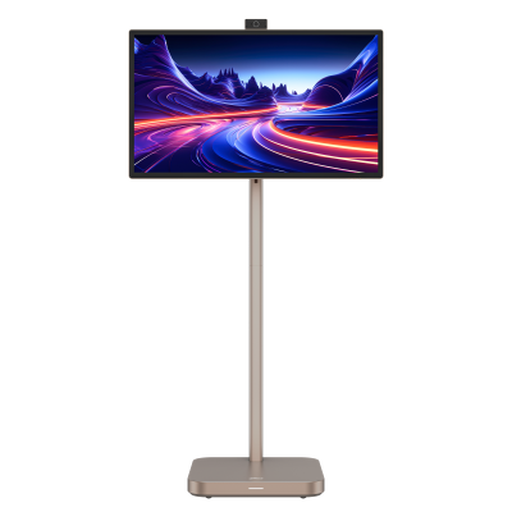
Dahua 31.5-inch 4K Explorer smart monitor
The large 4K screen may interest reviewers who also want the Android 11 smart-monitor features named in the product title.
The display is described as curved; BenQ’s CAD guidance cautions that curvature can skew lines, so check it carefully for line-critical drawings. Confirm the panel specification before purchase, as the product information gives conflicting panel types.
Joybuy
 No image available
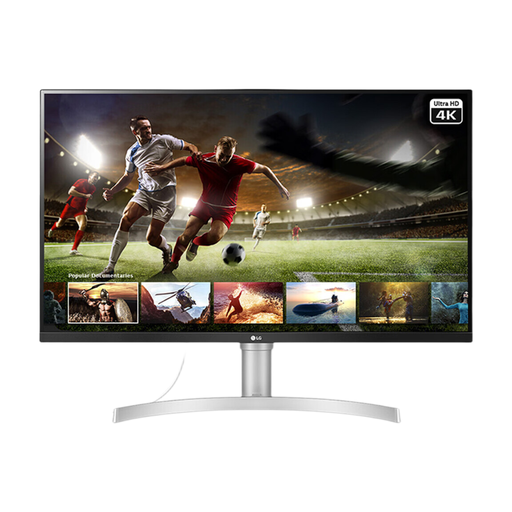
LG UHD Monitor 32UN650K 32-inch 4K IPS
Consider this larger screen for plan review if its connections and physical positioning suit the shared desk.
The product title lists HDMI and DisplayPort connections. Check the supplied stand or a compatible mount if different users need height, swivel or pivot adjustment, and check how laptops will connect.
Joybuy
Frequently asked questions
Is an adjustable monitor enough to make a shared workstation suitable?
No. The Health and Safety Executive advises looking at the whole workstation, including furniture, working conditions and individual requirements. Check the monitor’s position alongside seating, document space and reflections at the desk.
Where should people position the screen at a shared desk?
The Health and Safety Executive advises positioning the top of the screen at about eye height and arranging the desk and screen to avoid glare or bright reflections. Users should be able to reposition the display and leave room for the documents they need.
Will a USB-C monitor charge every work laptop?
No. Check the monitor’s stated power delivery against each laptop’s charging requirement, and confirm that the laptop supports video output through the connection being used. BenQ, Dell, LG and ASUS specify different power-delivery ratings for the models discussed here, so a USB-C connector by itself is not enough to decide.


