Who this choice matters to
The right layout depends on whether changing desk height, comparing several sources or reading long pages drives your work.
Standing-desk record comparers
If you move between sitting and standing, you need to reset the screen position rather than leave it at one fixed height. The Health and Safety Executive advises positioning the top of the screen at eye level, about an arm’s length away.
Side-by-side researchers
If a scan, transcription, catalogue entry and notes need to remain visible together, consider the space available for each window. Screen width and your usual window arrangement matter more to this decision than gaming-focused features.
Long-document readers
If you mainly read transcriptions, catalogues or tall scans, a taller screen shape may serve you better than extra width. Check how much of a page you can see while keeping text at a comfortable size.
What to check when buying
Start with the screen position your standing desk allows, then consider whether your usual work needs wider panes, taller pages or connections for two computers.
| Concern |
What to check |
Who this matters to |
| Screen positioning |
Check the stand’s height range or arm compatibility against your desk’s standing height. The Health and Safety Executive advises placing the top of the screen at eye level and about an arm’s length away. |
When I alternate between sitting and standing, I need to reposition the screen rather than work around a fixed height. Around 33% of consumers put screen positioning first. |
| Side-by-side space |
Compare screen resolution and aspect ratio with the number of windows you normally keep open; check that a wider display fits the desk. |
If my scan, transcription and notes must stay visible together, I want enough room for each pane. For around 25% of consumers, simultaneous comparison is the primary concern. |
| Room for tall pages |
Compare vertical pixel counts and aspect ratios, particularly a 3:2 layout against a conventional 16:9 screen. |
Long transcriptions and vertically arranged records make repeated scrolling disruptive to my reading. Tall-page space comes first for around 25% of consumers. |
| Computer switching |
Check the exact monitor’s KVM and hub functions alongside each computer’s video, data and charging requirements. |
When I move between a research computer and another laptop, I want to know how the keyboard, mouse and display will switch. Around 17% of consumers prioritise the multi-device setup. |
Relevant brands for reference
These product lines illustrate different screen layouts and connections; the features vary by model, so check the exact display rather than relying on a brand name.
Dell
Dell’s UK range includes a 27-inch 4K Thunderbolt hub monitor, a separate height-adjustable 27-inch 4K model and a 40-inch ultrawide hub monitor.
- Dell UK specifies height-adjustable stands for the U2725QE, S2725QS and U4025QW. The U4025QW offers a 5120 × 2160 layout for a wide arrangement of windows.
- Connections differ between these models. Check the exact port list rather than assuming the S2725QS has the U2725QE’s hub functions.
BenQ
BenQ’s RD280UA is a reference for work dominated by long, vertically structured documents: BenQ UK specifies a 28.2-inch, 3:2 display at 3840 × 2560.
- The RD280UA specification lists a flexible arm, pivot and 130 mm of height adjustment.
- Its programming-oriented viewing modes are BenQ features, not evidence that they improve historical-record research. A 3:2 layout also offers less horizontal span than an ultrawide.
Samsung
Samsung’s 32-inch ViewFinity S80UD is a reference for a 4K desktop shared by two source computers.
- Samsung Business UK specifies USB-C, LAN and a built-in KVM that lets two sources use one keyboard and mouse.
- This is a 16:9 screen rather than a tall 3:2 layout. Check desk depth and the connections supported by both computers.
LG
LG’s DualUp 28MQ780-B illustrates a tall, stacked-workspace alternative to a wide monitor.
- LG UK specifies a 16:18, 2560 × 2880 display with a clamp stand, KVM and USB-C power delivery.
- LG UK labels the 28MQ780-B discontinued. Use it as a format reference, not as an assumed current buying option.
Joybuy monitors for these workflows
These monitors offer conventional 4K or wide-screen layouts for comparing records. Match each screen’s shape to your usual windows, then check that its stand and connections work with your standing desk and computer.
 No image available
BenQ MA270UP 27-inch 4K USB-C monitor
Consider this for a conventional arrangement of a scan, transcription and notes when you need to reposition the display as the desk height changes.
The product name specifies a height-adjustable stand and Nano Glossy IPS panel. Check the stand’s reach at your standing height and confirm the USB-C functions required by your laptop.
View on Joybuy
 No image available
BenQ MA320UP 32-inch 4K USB-C monitor
Consider the larger conventional screen if you want more physical room for your comparison windows and have sufficient desk depth.
The product name specifies a Nano Glossy IPS panel and height-adjustable stand. Check the standing screen position and your laptop’s USB-C video and charging requirements before relying on one connection.
View on Joybuy
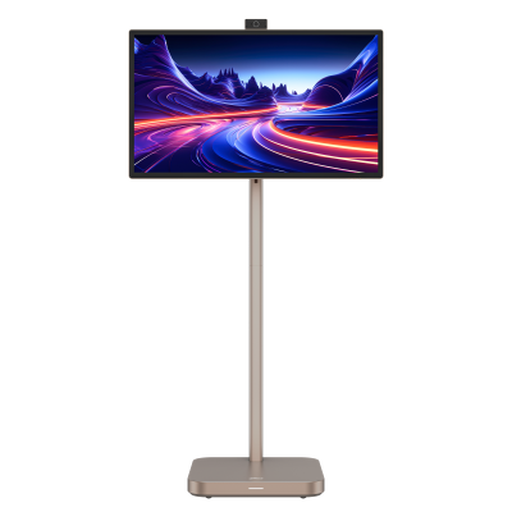 No image available
Dahua Explorer 31.5-inch 4K smart monitor
This larger 4K option is relevant if you prefer a conventional layout for comparing records and notes.
The product name specifies Android 11, 8GB+128GB and a built-in battery. Check the supplied stand’s positioning on your desk and confirm what the required connection can do with your computer.
View on Joybuy
 No image available
Dahua 34-inch curved UWQHD gaming monitor
Consider this shape when keeping records in horizontal panes matters more than fitting a long page vertically.
The product name specifies 3440 × 1440 resolution, a 200Hz refresh rate, two HDMI ports and two DisplayPort 1.4 ports. Check the available desk space and whether the screen can reach your standing position.
View on Joybuy
 No image available
CRUA 49-inch curved DQHD gaming monitor, black
Consider this very wide layout only if several comparison panes need to stay open and the desk can accommodate the screen.
The product name specifies 5120 × 1440 resolution, a 32:9 aspect ratio, a height-adjustable stand and VESA 75 × 75 mm mounting. Check the stand’s usable range, desk depth and support capacity; the wide layout does not provide the vertical room of a tall-page display.
View on Joybuy
Questions about setup and use
How should I position the monitor when I raise my standing desk?
Reset its position after changing desk height. The Health and Safety Executive advises placing the top of the screen at eye level and about an arm’s length away, so check that the stand or a compatible arm gives you enough adjustment at both desk heights.
Do UK display screen equipment rules specify a monitor size?
The Health and Safety Executive’s display screen equipment guidance does not prescribe a particular monitor size or resolution. Its guidance identifies workers who use a screen daily for continuous periods of an hour or more as covered by the DSE rules; choose dimensions that fit your documents and workstation rather than treating a larger screen as a compliance shortcut.
Can one USB-C cable connect my laptop, charge it and run my peripherals?
It can do so only when the exact laptop and monitor support the required video, data and charging functions. Check the laptop’s output and charging specifications, the monitor manual and any KVM requirements before planning a one-cable setup.
What should I check about warranty and after-sales support?
Check the terms for the exact model and seller, including what is covered and when the warranty period begins. For instance, BenQ UK states a two-year limited warranty from purchase for its RD280U; do not assume the same terms apply to another model.
How should I clean a monitor used for frequent record work?
Follow the instructions for your panel’s coating and model. Dell Support warns against spraying water or cleaning solution directly onto a monitor screen; check the manual for a suitable cloth and cleaning method before wiping it.


