Choose the monitor around what the shared desk needs to do: an integrated KVM and multi-source display modes matter when two computers must share a keyboard and mouse, while an ultrawide screen suits footage and work kept visible side by side. If desk space and repositioning are the constraint, consider an adjustable clamp-mounted display. A monitor displays footage; if you also need to record a fixture, confirm the source, capture equipment, software, connections and recording rights separately.
Who these setups suit
Two-computer desk sharers
If two people alternate between computers at one workstation, an integrated KVM can let them share a keyboard and mouse without reconnecting both. Samsung describes this arrangement for its S60UD; check the connections required by your two computers.
Fixture reviewers who need side-by-side space
Keeping footage or a replay beside notes, schedules or a second computer feed makes simultaneous viewing important. LG states that its 34WR55QK-B can display content from two computers using Picture-by-Picture.
Shared-desk users short of surface space
If the screen needs to move between users or leave more room on the desk, consider an adjustable clamp-mounted display. LG’s 32UN880K-B illustrates this approach, provided the desk can accept its mount.
What to prioritise
Decide whether the main constraint is shared control, simultaneous viewing or physical desk fit. Then check the exact model and source-device connections; none of these display features establishes a recording method.
| Concern |
What to check |
Who this matters to |
| Two-source viewing and control |
Check for both the required multi-source display mode and an integrated KVM if two computers must share a keyboard and mouse. |
Switching between two computers is disruptive when I need the same controls for both. Around 45% of consumers put shared control first. |
| Side-by-side screen space |
Check the screen dimensions against the desk and confirm Picture-by-Picture if two separate inputs must appear together. |
I want footage alongside notes or another feed without hiding either window. For around 33% of consumers, simultaneous workspace is the primary need. |
| Desk fit and positioning |
Measure the available desk area and, for a clamp mount, check desk-edge compatibility and adjustment range. |
A crowded shared desk makes it important for me to move the screen between users. Desk fit and positioning come first for around 22% of consumers. |
Buying pitfalls
-
Assuming the monitor records the fixture
Display resolution, input switching and USB-C connections describe how a monitor shows a source, not how footage is captured.
Decide whether you need live viewing, replay review, computer screen recording or capture from a camera or broadcast source. For capture, check the separate equipment, software, connections, storage requirements and rights to record.
-
Confusing Picture-by-Picture with a KVM
Picture-by-Picture can show two sources at once, but that alone does not let one keyboard and mouse control both computers.
Require an explicitly stated KVM feature if shared peripheral control matters. If you only need to see both sources, check the available display modes instead.
-
Choosing a wide or clamp-mounted screen without measuring
An ultrawide needs sufficient desk width, while a clamp mount needs a suitable desk edge or mounting position. Both affect where shared-desk users can place the screen.
Measure the desk and check the mounting instructions and viewing position before choosing a model.
-
Assuming every USB-C connection can power a laptop
The stated power-delivery limits differ by model: Samsung specifies up to 90W for the S60UD, while LG specifies up to 65W for the 34WR55QK-B.
Compare the exact monitor’s USB-C capabilities with the laptop’s display connection and charging requirements; use the laptop charger if the monitor’s power delivery is insufficient.
Brands to consider for these setups
Samsung
Samsung’s ViewFinity S60UD is a 27-inch QHD example for a desk that needs two-source viewing and shared controls.
- Samsung specifies an integrated KVM, Picture-in-Picture, Picture-by-Picture and USB-C power delivery up to 90W for this model.
- Check both computers’ inputs, cables and charging requirements; these specifications do not apply to every Samsung monitor.
Dell
Dell’s UltraSharp U2724DE is a 27-inch QHD option when a compact display, hub connections and multi-source viewing are priorities.
- Dell specifies a 120Hz refresh rate, Picture-in-Picture, Picture-by-Picture, 90W power delivery and a height-adjustable stand for the U2724DE.
- Its display features do not replace the separate equipment and software needed if the fixture must be recorded.
LG
LG has two relevant, distinct examples: the 34WR55QK-B for ultrawide two-source viewing and the 32UN880K-B for clamp-mounted positioning.
- LG specifies Picture-by-Picture and USB-C power delivery up to 65W for the 34WR55QK-B, and an adjustable C-clamp stand for the 32UN880K-B.
- Confirm whether separate peripheral switching is needed with the ultrawide, and whether the desk accepts the clamp-mounted model.
Joybuy monitor choices
These monitors offer different display sizes and formats for viewing sports footage at a shared desk. Before choosing one for two computers, check its exact multi-source and peripheral-switching features; recording requires a separate, suitable workflow.
 No image available
Modern MD342CQPW 34-inch UWQHD curved monitor, white
Consider this 34-inch format if footage and desk work need space on one screen. The stated configuration is 3440 × 1440, 120Hz and 1500R curvature. Confirm Picture-by-Picture and KVM behaviour if you need two computers visible or controlled together.
View on Joybuy
 No image available
MAG 274QP QD-OLED X24 27-inch WQHD monitor, black
This 27-inch option suits a desk where a smaller screen format is preferred. Its stated resolution is 2560 × 1440, with a 240Hz refresh rate. Confirm the required multi-source modes and arrange separate peripheral switching if both computers must share a keyboard and mouse.
View on Joybuy
 No image available
Dahua 34-inch UWQHD 200Hz curved monitor
The 34-inch ultrawide format is relevant when footage and work windows need room on the same display. Its stated resolution is 3440 × 1440, with a 200Hz refresh rate. Check Picture-by-Picture and KVM support if simultaneous inputs or shared controls are essential.
View on Joybuy
 No image available
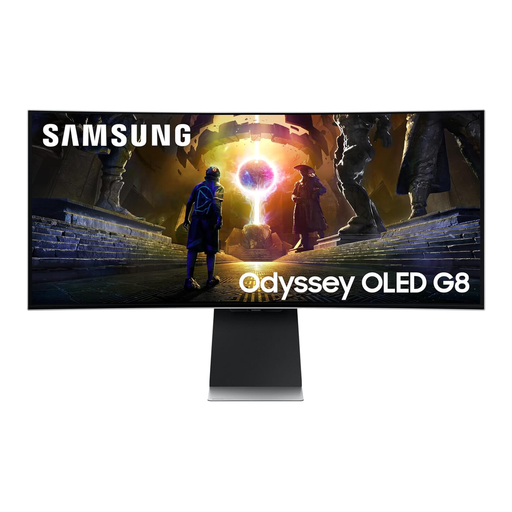
Samsung Odyssey G8 LS34DG850SUXXU 34-inch curved OLED monitor
Consider its 34-inch WQHD format when a wide display is the priority for footage and desk work. The stated refresh rate is 175Hz. Check the exact model’s multi-source and KVM features before relying on it to serve two computers at once.
View on Joybuy
 No image available
Lenovo R34w-30 34-inch UWQHD monitor
This 34-inch ultrawide is an option when the main need is display space for footage and work. Check its dimensions against the shared desk, and confirm Picture-by-Picture or KVM support separately if those functions are needed.
View on Joybuy
Common questions
What is the difference between Picture-by-Picture and a KVM switch?
Picture-by-Picture shows two sources on the screen; a KVM lets one keyboard and mouse control two computers. Samsung specifies both functions for its S60UD, but check the exact model and connections before planning a shared-control setup.
Does a shared workplace desk need a display screen assessment?
For workers who use display screen equipment daily for continuous periods of an hour or more, the Health and Safety Executive says the UK display screen equipment rules apply, including to hot-desking. Employers must assess workstations and reduce identified risks; the monitor is only one part of that setup.
Should I check for UKCA or CE information on a monitor?
Check the safety information and applicable marking for the specific monitor and market. GOV.UK says CE marking continues to be recognised for many product categories in Great Britain alongside or instead of UKCA, but requirements are not identical in Northern Ireland.
How should I dispose of an old monitor?
Use an appropriate electrical-equipment collection or take-back route rather than putting a monitor in ordinary waste. GOV.UK identifies the Waste Electrical and Electronic Equipment Regulations 2013, as amended, as the UK framework; check your local authority’s options and any retailer take-back terms.


