Who is this for?

Long-form proposal writers

If you spend extended sessions drafting and proofreading, screen position deserves attention alongside text clarity. The Health and Safety Executive advises placing the top of the screen at eye level and the screen about an arm's length away.

Research-heavy proposal builders

If you move between a draft, source documents, spreadsheets and browser windows, consider how much material you need visible at once. LG's 34WR55QK-B illustrates the wider, 3440 × 1440 workspace available from an ultrawide model.

Laptop-first hybrid workers

If you want to connect a laptop at your desk with fewer cables, check both USB-C video compatibility and charging power. The ratings differ between the BenQ GW2790QT and LG models cited here, so the laptop's requirements matter.

What matters when choosing?

27-inch QHD

Choose when: Drafting and revising text is your main task and you want an adjustable screen on a conventional desk.

Trade-off: The 2560 × 1440 Dell S2725DS, BenQ GW2790QT and HP E27u G5 examples have fewer pixels than the cited 27-inch 4K model.

27-inch 4K

Choose when: Fine text, detailed PDFs or visual material take priority; LG specifies 3840 × 2160 for its 27U730A-B.

Trade-off: Check that text is comfortable at your preferred display scaling rather than choosing by resolution alone.

34-inch ultrawide

Choose when: Keeping a draft and reference material visible side by side matters most; LG's 34WR55QK-B is a 3440 × 1440, 21:9 example.

Trade-off: The wider screen needs more desk width than a 27-inch display.

Concern What to check Who this matters to
Screen position Check the stand's height range and whether VESA mounting is available if the stand cannot place the screen suitably. For long drafting sessions, I need the screen to fit my seated position rather than work around a low stand. Around 36% of consumers put screen positioning first.
Text and document detail Compare screen size and native resolution, then check text at your preferred display scaling. When proofreading dense pages and tables, I want to read the detail comfortably. For around 29% of consumers, document clarity is the primary concern.
Room for several windows Measure usable desk width and depth, and confirm your computer can output the screen's native resolution. I need to keep a proposal draft beside its references instead of switching windows repeatedly. That workspace is the main priority for around 21% of consumers.
Laptop connection Confirm USB-C video support and compare the monitor's power-delivery rating with your laptop's charging requirement. When moving a laptop between desks, I want one connection to handle the display and charging, if both devices support it. Around 14% of consumers prioritise that connection.

Mistakes to avoid

  • Choosing a fixed stand without checking screen height

    A stand that sits too low for your desk and chair can make the screen harder to position. The Health and Safety Executive advises placing the top of the screen at eye level and about an arm's length away.

    Compare the stand's adjustment range with your seated eye level. If it will not work, check VESA compatibility before planning to use a monitor arm.

  • Assuming USB-C will charge any laptop

    USB-C functions and power-delivery ratings vary by model. BenQ specifies 65 W for the GW2790QT, while LG specifies up to 90 W for the 27U730A-B; neither rating establishes compatibility with your laptop.

    Check the laptop manufacturer's video-output and charging requirements against the exact monitor's USB-C functions.

  • Ordering an ultrawide before measuring the desk

    A 34-inch display takes more horizontal room than a 27-inch screen, while the keyboard and any paper documents still need space.

    Measure the usable width and depth, and plan where the screen will sit relative to your keyboard before deciding on the wider format.

Relevant brands to consider

Dell

Dell's UK specifications for the S2725DS show one approach to a 27-inch QHD writing monitor: 2560 × 1440 resolution and an adjustable stand.

  • The S2725DS specification lists height, tilt, swivel and pivot adjustment.
  • Check the stand and connections of the exact model you intend to buy; these features should not be assumed across Dell monitors.

BenQ

BenQ's GW2790QT specification combines a 27-inch QHD display with USB-C connectivity and stand adjustment.

  • BenQ lists 2560 × 1440 resolution, 110 mm height adjustment and 65 W USB-C power delivery for this model.
  • Compare that model-specific charging rating with your laptop's requirements.

LG

LG's 27U730A-B and 34WR55QK-B illustrate different choices: a 27-inch 4K display for document detail and a 34-inch ultrawide for horizontal workspace.

  • LG specifies 3840 × 2160 and up to 90 W USB-C power delivery for the 27U730A-B; the 34WR55QK-B is 3440 × 1440 with up to 65 W.
  • The wider model needs more desk room, and each model's USB-C rating must be checked against the intended laptop.

HP

HP's E27u G5 specification provides a 27-inch QHD example with an anti-glare screen and adjustable stand.

  • HP lists 2560 × 1440 resolution plus height, tilt, swivel and pivot adjustment for the E27u G5.
  • HP lists a three-year limited manufacturer warranty for this model; check the terms and exact variant before purchase.

Joybuy monitors for proposal work

These monitors cover QHD drafting, 4K document review and a wider screen for working across several windows. Choose by the workspace and connections your own proposal work requires, then check the exact model against your desk and computer.

BenQ MA270UP 27-inch 4K monitor

BenQ MA270UP 27-inch 4K USB-C monitor

Consider this model for reviewing detailed proposal documents on a 27-inch screen. Its name specifies 4K UHD, a Nano Glossy IPS panel, USB-C and a height-adjustable stand; check reflections at your desk and confirm the USB-C functions your laptop needs.

View on Joybuy
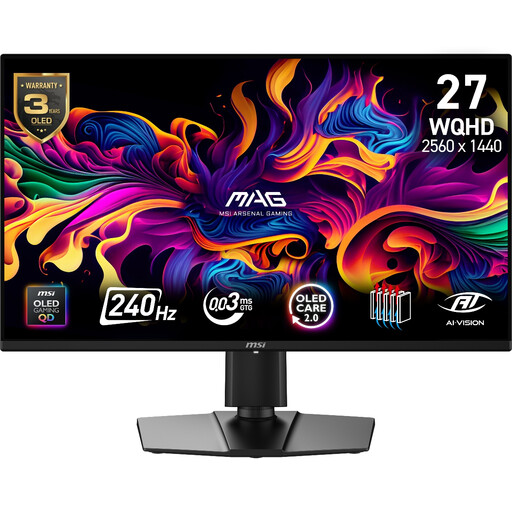
MAG 274QP QD-OLED X24 QHD monitor

MAG 274QP QD-OLED X24 27-inch QHD monitor

Consider this QHD option if proposal drafting is your main task and you are assessing a monitor that also has gaming-oriented features. Its name specifies 2560 × 1440 resolution and a 240 Hz QD-OLED panel; check the stand and laptop connections against your workstation needs.

View on Joybuy

MSI MD272UPSW 27-inch 4K Smart Monitor

MSI MD272UPSW 27-inch 4K Smart Monitor

This 27-inch 4K IPS model is an option for detailed document review. Its name specifies Google TV and USB-C 65 W; confirm that your laptop supports the required USB-C video connection and can use the stated charging power.

View on Joybuy
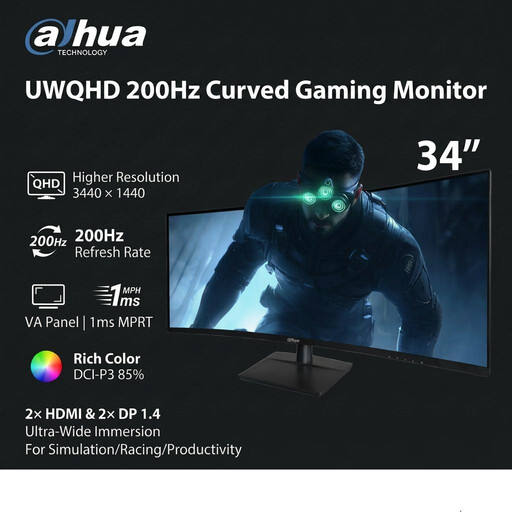
Dahua 34-inch UWQHD curved monitor

Dahua 34-inch UWQHD curved gaming monitor

Consider the wider format if you want a draft and reference windows visible together. The name specifies a 3440 × 1440 VA panel, 200 Hz refresh rate, two HDMI inputs and two DisplayPort 1.4 inputs; measure your desk and check the connections your computer requires.

View on Joybuy

LG 27UP650K 27-inch 4K IPS monitor

LG 27UP650K 27-inch 4K IPS monitor

Consider this 27-inch 4K display for reviewing detailed proposal material. Its name specifies a 3840 × 2160 IPS panel, built-in speakers, HDMI and DisplayPort; check the stand's adjustment range and any laptop connection requirements before buying.

View on Joybuy

Frequently asked questions

Is a 27-inch QHD monitor enough for proposal writing?

A 27-inch QHD monitor is a reasonable starting point for drafting and revising text if its screen and stand suit your desk. Dell, BenQ and HP specify 2560 × 1440 for the cited 27-inch models, but check the adjustment offered by the exact monitor you choose.

Should I choose 4K or an ultrawide screen?

Choose by whether document detail or side-by-side workspace is more important to you. LG specifies 3840 × 2160 for its 27U730A-B 4K model and 3440 × 1440 in a wider 21:9 format for its 34WR55QK-B; measure desk space before choosing the latter.

Can one USB-C cable connect and charge my laptop?

It can if the laptop supports compatible USB-C video output and accepts the monitor's available charging power. The cited BenQ and LG models have differing power-delivery ratings, so compare the exact monitor with the laptop manufacturer's specifications.

How should I position a monitor for extended writing?

The Health and Safety Executive advises positioning the top of the screen at eye level and the screen about an arm's length away. Keep the screen and keyboard central rather than twisting towards the display, and check whether the stand lets you achieve that arrangement.

What should I check about the warranty?

Check the manufacturer's terms for the exact model and the retailer's separate after-sales terms. HP lists a three-year limited manufacturer warranty for the E27u G5, but that term should not be assumed for other HP models or listings.