Multi-window lesson planners
If lesson plans, slides, web resources and school-platform pages need to remain visible together, consider a QHD or ultrawide workspace. Check that the larger screen fits your desk and viewing position.


For document-led lesson preparation on a small desk, start with a 24-inch monitor; a 16:10 model offers more vertical space than a standard Full HD display. Consider 27-inch QHD when you regularly compare detailed materials across windows, or an ultrawide when keeping applications side by side matters most. Whichever format you choose, check desk fit, screen adjustment and laptop connections separately.
If lesson plans, slides, web resources and school-platform pages need to remain visible together, consider a QHD or ultrawide workspace. Check that the larger screen fits your desk and viewing position.
If worksheets, email and one main document take priority over several large windows, a 24-inch monitor may fit the workspace more readily. Joybuy describes the Dell P2425’s 16:10 format as providing extra vertical space for documents compared with standard Full HD.
If you move a laptop between school and home, USB-C video and charging could simplify reconnection. Check the exact laptop’s video output and power requirements against the monitor’s ports before planning around one cable.
Choose the screen shape around the documents and windows you need to see together, then check whether it can be positioned comfortably on your desk. Treat laptop connection as a separate compatibility decision.
| Concern | What to check | Who this matters to |
|---|---|---|
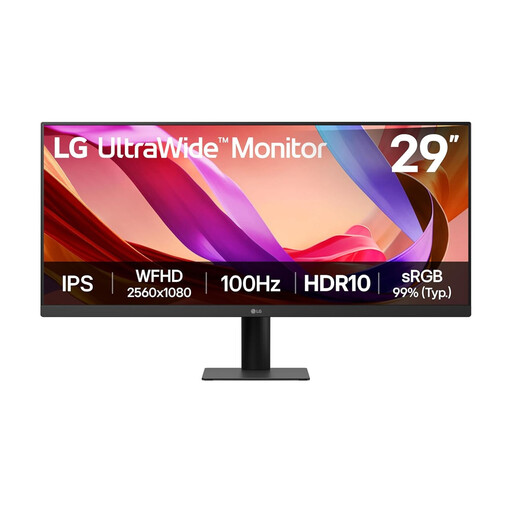
| Space for several windows | Compare resolution, aspect ratio and screen width. BenQ specifies 2560 × 1440 for the GW2790QT; LG specifies 2560 × 1080 and a wider 21:9 format for the 29U511A-B. | When a lesson plan needs to stay beside research or slides, I want enough room to read both without constant switching. Around 31% of consumers would put simultaneous-window space first. |
| Workstation fit | Check stand adjustment, desk depth and glare. For an arm, confirm the monitor’s mounting pattern and the arm’s compatibility. | For long preparation sessions, I need the screen positioned to suit my desk rather than choosing by size alone. Comfortable workstation fit would come first for around 31% of consumers. |
| Document space on a small desk | Measure usable desk width and depth. Compare a 24-inch 16:10 screen with larger formats; Joybuy lists the Dell P2425 at 1920 × 1200. | With a shallow desk and mostly worksheets or one main document, I would favour usable vertical space over a wider panel. Around 23% of consumers would prioritise that compact document setup. |
| Laptop connection | Confirm compatible USB-C video output, monitor power delivery, laptop charging needs and cable capability. | If I reconnect a school laptop frequently, I want video and charging to work through the intended connection. Laptop-connection convenience would be the main concern for around 15% of consumers. |
A wide display may be difficult to position at a comfortable viewing distance on a shallow desk. Ergotron’s positioning guidance advises at least 51 cm between your eyes and the monitor.
Measure desk width and depth, then check whether the screen can sit at a suitable height without excessive glare. Check monitor and arm compatibility before choosing a separate mount.
If the supplied stand cannot give you a suitable position, an arm or a different desk layout may be needed.
USB-C video and charging depend on the functions supported by both the monitor and the laptop; a connector shape alone does not establish compatibility.
Check the monitor’s video and power-delivery specifications against the laptop manufacturer’s port and charging requirements, including the cable you intend to use.
A separate charger, dock or video adapter may still be needed if the intended connection cannot perform every required function.
Feature labels cannot establish whether a monitor will suit your particular workstation. The Health and Safety Executive advises considering equipment, furniture and working conditions together.
Check height, viewing position and glare as part of the whole setup. Where a workplace assessment applies, include the monitor within it rather than treating a feature label as a substitute.
Dell P2425 and Dell P2425HE have different full model identifiers, so a feature described for one should not be assumed for the other.
Compare the complete model code, resolution, ports, stand and included accessories on the product you intend to buy.
Dell’s P2425HE is a compact, document-oriented USB-C hub monitor to consider for a compatible laptop setup.
The GW2790QT offers a 27-inch QHD option for comparing detailed lesson materials across windows.
The 29U511A-B is an ultrawide option for keeping lesson-resource applications side by side.
These options cover compact screens for document-led preparation and ultrawide screens for side-by-side windows. Compare the exact model and connections with your desk and computer before choosing.
 No image available
Consider this for document-led lesson preparation where a compact workspace matters. Its listed display type is IPS WUXGA; if you intend to connect and charge a laptop through one cable, check the laptop’s video and charging compatibility.
 No image available
The ultrawide format is an option when you want lesson plans and other resources visible side by side. The listed variant has a 3440 × 1440 VA panel and HDMI and DisplayPort inputs; measure desk width and confirm the video connection your computer will use.
 No image available
This is a compact option for worksheets and a main document. Joybuy lists the P2425 as a 1920 × 1200, 16:10 monitor; check the exact port functions before planning a USB-C laptop connection, and do not confuse it with the P2425HE.
 No image available
Consider its wide layout when a lesson plan needs to remain beside a browser or school platform. Joybuy describes the 29U511A as a 21:9, 2560 × 1080 monitor; check desk width and whether its listed HDMI or DisplayPort connection suits your computer.
 No image available
This compact 16:9 option suits a setup centred on one main document. Its listed format is Full HD rather than the taller 1920 × 1200 format; check the stand position and your computer’s video connection against your desk setup.
No: a 24-inch monitor can suit document-led work on a smaller desk. Consider 27-inch QHD when detailed materials and several windows need to remain visible, or an ultrawide if horizontal side-by-side space is the priority and the desk can accommodate it.
It can if the monitor and laptop support compatible USB-C video and charging, with enough power for the laptop. BenQ specifies DisplayPort Alt Mode and 65 W power delivery for the GW2790QT; Dell specifies up to 90 W for the P2425HE. Check your exact laptop, monitor model and cable before relying on one connection.
No: the Health and Safety Executive describes employer duties concerning workers who use display screen equipment daily for continuous periods of an hour or more, not a requirement to buy a particular monitor. Its workstation guidance considers equipment, furniture and working conditions together.
Check which electrical-equipment collection or retailer take-back route accepts monitors in your area before disposing of it. The Office for Product Safety and Standards and the Department for Environment, Food & Rural Affairs identify the Waste Electrical and Electronic Equipment Regulations 2013, as amended, as the relevant UK framework.