What matters when choosing?
Settle workplace permission first, then choose between keeping one current working set and carrying a physical copy.
Approved cloud sync
Choose it when: Your organisation provides or approves access to the same working files across permitted devices.
Bear in mind: Account access and configuration matter, and Microsoft says OneDrive changes and deletions sync as well as additions.
USB flash drive
Choose it when: You need a compact, authorised hand-off of a modest file set between compatible ports.
Bear in mind: A small removable device can be misplaced, and separate copies can cause version confusion.
Portable SSD
Choose it when: Permitted transfers repeatedly involve large folders and transfer time matters.
Bear in mind: Rated speed depends on the exact drive, computer port and cable; Samsung also specifies UASP for its T7 Shield maximum speeds.
Portable hard drive
Choose it when: Carrying a larger file set is the priority and your workplace allows the drive.
Bear in mind: It still creates a physical copy to manage and does not replace an approved shared working folder.
| Concern |
What to check |
Who this matters to |
| Workplace permission and security |
Ask which transfer routes and devices are permitted, and whether removable storage must be managed or encrypted. |
If I handle work data, I need a route my organisation allows before the drive's features matter. Around 40% of consumers put permission and protection first. |
| One current set of files |
Check whether an approved work account can sync the required folders on each permitted device, including files needed offline. |
When I edit files in both places, I want to work from the current version rather than reconcile separate copies. Keeping files aligned is the primary need for around 30% of consumers. |
| Repeated large transfers |
Check the file set's size and the exact drive, port and cable specifications; treat rated speeds as conditional. |
Large folders make each manual transfer worth planning, especially when I move them often. Faster movement of those files comes first for around 20% of consumers. |
| Simple physical hand-offs |
Check capacity and whether both computers accept the drive's USB-A or USB-C connector. |
For a few documents, I want a straightforward permitted hand-off without carrying a larger drive. A compact transfer is the leading need for around 10% of consumers. |
Joybuy portable-storage choices
These drives cover portable SSDs, USB flash drives and an external hard drive for physical transfers between home and office. Choose among them only if removable storage is permitted for your files; an approved sync service addresses the different need for one current working set.
 No image available
Samsung MU-PE1T0S 1 TB portable SSD, black
Consider this for repeated large-file transfers between computers that permit removable storage.
The named variant has a USB Type-C 3.2 Gen 2 connection. For the corresponding UK T7 Shield 1 TB model, Samsung states speeds of up to 1,050 MB/s read and 1,000 MB/s write, conditional on a suitable host and cable with UASP.
Check both computers' ports and your employer's storage and encryption requirements before using it for work files.
View on Joybuy
 No image available
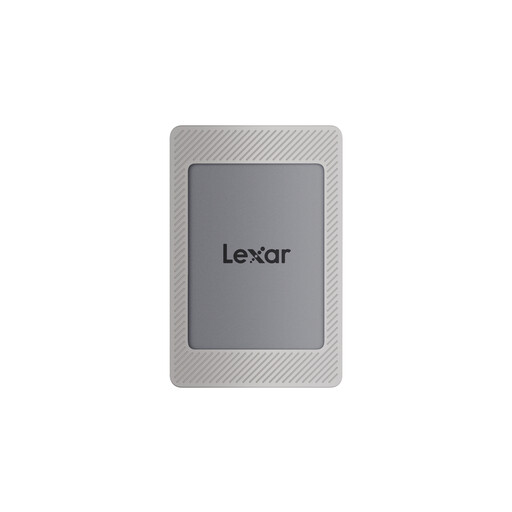
Lexar ES4 1 TB portable SSD, magnetic set
Consider this SSD if your permitted workflow involves carrying sizeable files and the intended computers can use its connection.
The product name specifies USB 3.2 Gen 2 and rated speeds of up to 1,050 MB/s read and 1,000 MB/s write. Check the ports and cables you will use rather than assuming those ratings apply to every connection.
If your workplace requires specific security software or configuration, confirm what it permits before transferring work files.
View on Joybuy
 No image available
DigiEra LUS320 128 GB USB-A and USB-C flash drive
This is a compact option for authorised file hand-offs when one computer uses USB-A and the other uses USB-C.
The product name specifies a dual-interface USB 3.2 drive, a swivel design and a rated read speed of up to 500 MB/s. Confirm that both work devices accept the drive and that your organisation permits its use for the files involved.
View on Joybuy
 No image available
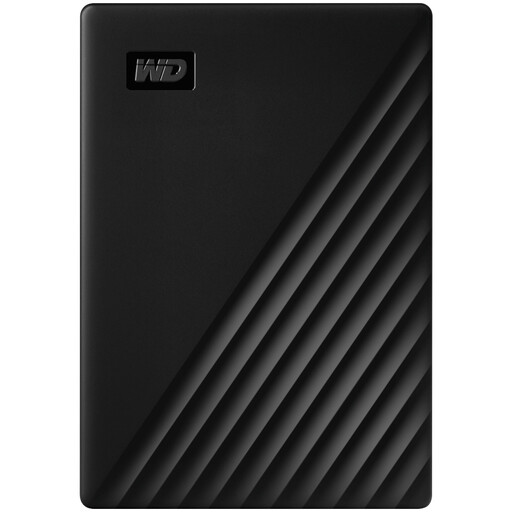
Western Digital My Passport 2 TB portable hard drive, black
Consider this when the authorised file set calls for a 2 TB physical drive rather than a compact document hand-off.
Check compatibility with both computers and your employer's rules for removable storage. If a work computer needs additional software to use the drive, confirm that installation is allowed before relying on it.
View on Joybuy
 No image available
Kingston Technology IronKey Keypad 200 16 GB flash drive
Consider this for a small, authorised file set if a keypad-access drive fits your organisation's requirements.
The product name describes AES-256 encryption and marks FIPS 140-3 Level 3 as pending, not confirmed certification. Check the required connector, capacity and security approval with IT before carrying work data.
View on Joybuy
Common questions
Can I use my own USB drive for work files?
Check your employer's policy before connecting or buying one for work. Acas notes that hybrid-working policies can set limits, and the Information Commissioner's Office advises organisations to minimise personal data on insecure storage such as USB sticks.
Should a portable drive for work files be encrypted?
Use the protection your organisation requires for the files and device. The Information Commissioner's Office identifies encryption as a way to protect stored personal information against unauthorised access if a drive is lost or stolen; confirm whether your employer requires a particular managed or encrypted option.
Can I access synced work files without an internet connection?
Yes, where your approved service and the required files are configured for offline access. Microsoft says synced OneDrive and SharePoint files can be available on a computer offline; check your employer's setup and make the files available locally before you need them.
Does syncing my files give me a separate backup?
No, sync alone does not establish a separate recovery copy. Microsoft says OneDrive additions, changes and deletions appear in the synced folder and on its website, so follow your organisation's retention and recovery procedures for unwanted changes.
Which connections should I check before choosing a drive?
Check the ports on both computers and the connectors or cable ends needed for the exact drive. A dual USB-A and USB-C flash drive addresses those two port types, while an SSD's highest rated speed may require a particular USB mode, host and cable.


