What to check before choosing storage
Start with the information that must be restored and the disruption you can tolerate, then check how the chosen copy will be separated, protected and tested.
| Priority |
What to check |
Your needs |
| Recoverability |
Set a backup schedule for essential documents, contacts, emails and invoices. Test a full restore with the actual device, software and credentials needed for recovery. |
I need to know that the files required to keep the organisation running can be restored, not merely copied. The National Cyber Security Centre advises regular backup copies and restore testing. |
| Separation |
Disconnect local media when it is not backing up or restoring. Store it securely away from the main device, and use separate credentials and MFA for destructive cloud actions where relevant. |
I want a recovery copy that is not routinely reachable from an infected computer or a compromised general administrator account. |
| Data protection |
Check encryption, PIN or password custody, physical access and authorised-user controls. Confirm capacity against the actual backup set before choosing compact removable media. |
When a portable copy includes personal or confidential data, I need controls that remain practical if the device is lost, moved off-site or handled by another authorised person. |
| Cloud controls |
Check earlier-version recovery, retention, deletion safeguards, MFA, authorised-client limits and alerting. For personal data, review processor terms and any relevant international transfers. |
I need remote or automated recovery without assuming that an ordinary cloud account is protected from deletion, overwrite or compromised access. |
Joybuy backup storage options
Joybuy product options for creating a separately stored offline backup copy, including portable SSDs and encrypted removable storage.
 No image available
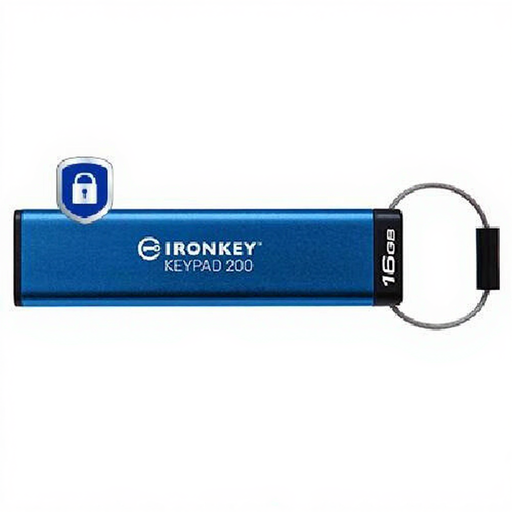
Kingston IronKey Keypad 200 16GB
A compact offline copy for sensitive records where a PIN-controlled, physically disconnectable USB device suits the required backup size.
The listing states 16GB capacity, XTS-AES-256 hardware encryption, an integrated keypad, Admin and User PINs, and read-only modes. Confirm that 16GB covers the backup set and verify the exact unit’s validation status and PIN-recovery process before relying on it as the only copy.
Joybuy
 No image available
Samsung MU-PE1T0S 1TB Portable SSD
A 1TB local-copy option for teams that can follow a manual backup, disconnect and secure-storage routine.
The listing states USB 3.2 Gen 2, 1TB capacity, claimed read and write speeds up to 1,050 MB/s and 1,000 MB/s, IP65 resistance and claimed drop resistance up to 3 metres. Check supported backup software, operating systems, password-protection settings and a real restore before deployment.
Joybuy
 No image available
SanDisk Portable SSD 2TB
A larger local recovery copy for organisations whose essential files exceed the capacity of smaller portable media.
The listing states 2TB capacity, read speeds up to 800 MB/s, USB-device compatibility and claimed drop protection up to 2 metres. No encryption or access-control feature is stated, so assess encryption separately for personal data and test the intended restore workflow.
Joybuy
 No image available
DigiEra LPS2000M-3 1TB Portable SSD
A portable local-copy option for USB-C systems where the organisation can confirm compatibility across every computer used for backup and recovery.
The listing states 1TB capacity, USB 3.2 Gen 2×2, claimed read and write speeds up to 2,000 MB/s and 1,800 MB/s, plus stated impact and vibration resistance. No encryption or PIN/password control is stated, and the drive must be disconnected and securely stored after use.
Joybuy
 No image available
Lexar ES4 1TB Portable SSD with Magnetic Set
A 1TB portable copy for a manual workflow across PCs, Macs and USB-A or USB-C connections.
The listing states USB 3.2 Gen 2, claimed read and write speeds up to 1,050 MB/s and 1,000 MB/s, PC and Mac compatibility, USB-A and USB-C cables, and Lexar DataShield AES-256 encryption software. Verify the exact encryption method, supported operating systems, password recovery and restore procedure before relying on it for essential records.
Joybuy
Frequently asked questions
Is an external drive by itself an offline backup?
Only when it is disconnected from the computer and stored securely when not being used for backup or restoration. The National Cyber Security Centre warns that viruses can affect devices connected to an infected computer, so a drive left attached should not be treated as a separate offline copy.
How often should a small organisation back up and test restoration?
Set the schedule around the amount of work the organisation can afford to recreate, then test restoration regularly. National Cyber Security Centre small-business guidance identifies daily or weekly copies of essential information as an action point and says to test that the backup works and can restore information.
Do UK data-protection rules require backup encryption?
The UK GDPR requires appropriate technical and organisational security measures, and the Information Commissioner’s Office identifies encryption as an example of an appropriate measure depending on the nature and risks of the processing. For backups containing personal information, decide on encryption through a documented risk assessment and maintain controls for credentials and authorised access.
What should be checked before using a cloud backup provider for personal data?
If the provider acts as a processor, the controller needs a written contract or other legal act containing the required UK GDPR processing terms. Where the organisation initiates a restricted transfer of personal information outside the UK, it must identify the transfer and use an applicable transfer mechanism, such as UK adequacy regulations, appropriate safeguards or an exception.
Can cloud backup replace an offline copy?
Not automatically. National Cyber Security Centre guidance says cloud and on-premises backups are not ransomware-resistant by default, so assess earlier-version recovery, deletion safeguards, account access and backup-client controls; an offline copy remains a separate route if a compromise reaches cloud identities or clients.


