Multi-device family organisers
Photos, videos and documents are spread across phones and computers. These households need a manageable way to access files and share selected items without moving every file by hand.


Choose cloud storage when automatic uploads and access across household devices matter most, but do not assume a synced library is your only recoverable backup. An external drive can hold a separate local copy; a NAS suits shared home storage if someone can manage it. Whichever route you choose, check what is copied and restore a test file before relying on it.
Photos, videos and documents are spread across phones and computers. These households need a manageable way to access files and share selected items without moving every file by hand.
The priority is restoring family media after a device fails, files are deleted or access is lost. A library that is easy to view matters less than a separate copy that can actually be recovered.
These households want a portable or home-controlled copy and need to consider device compatibility, password protection and how they would regain access if credentials were lost.
Start with the loss you need to recover from, then choose how household members will access the files. The National Cyber Security Centre defines a backup as a copy kept in a separate safe location; synchronisation and sharing answer different needs.
Consider it when: Photos begin on phones and household members need uploads, signed-in access or selective sharing across devices.
Allow for: Account access, storage limits and service terms; keep a separate recovery plan rather than treating a synced view as sufficient.
Consider it when: You want a locally controlled copy or regularly move a large media library from a computer.
Allow for: A copying routine and safe storage; a drive kept at home can be lost in the same incident as the originals.
Consider it when: Several people need a shared home file location and someone can administer the system.
Allow for: Network setup, ongoing administration and a separate destination for recovering files if the NAS is lost.
| Concern | What to check | Who this matters to |
|---|---|---|
| Independent recovery | Check which phone and computer folders are copied, where the separate copy lives and whether you can restore a sample file. | If family photos could be lost with a device or during an incident at home, I need a copy I can restore, not merely another synced view. Around 31% of consumers put independent recovery first. |
| Access and sharing | Check device support and whether you can share selected albums or folders without granting access to the whole library. | When different family members use different devices, I want them to reach the right files without opening up everything. Multi-device access and selective sharing come first for around 31% of consumers. |
| Capacity and transfers | Compare the complete library and expected growth with available storage; for a drive, check its connection against your devices. | As our video collection grows, I need enough room for a complete copy and a practical way to move large files. This is the primary concern for around 23% of consumers. |
| Privacy and continued access | Check account recovery and two-step verification, or the exact drive model’s password features and unlock compatibility. | If I carry sensitive documents or depend on an account for family files, I need to protect access without locking the household out. Around 15% of consumers prioritise privacy and continued access. |
A library kept current across devices helps with access, but seeing the same files in several places does not establish that an independent copy can be restored.
Identify where the originals and the separate copy are held, then restore a test photo, video or document from the proposed backup.
A drive is useful for recovery only when it contains a current copy. Scheduled copying also needs the right folders selected and completed tasks checked.
Choose a routine the household will maintain, confirm that its phone and computer files are covered, and periodically test a restore.
Google says Photos, Drive and Gmail share account storage, and a full account prevents new photo and video backups. Access can also be affected by the provider’s account and service terms.
Review total account use, renewal and recovery details, and how to export files before changing services.
Moving a large library to another service can take time and requires somewhere to hold the exported files.
Password protection addresses unauthorised access, not drive loss or failure. Western Digital warns that a forgotten password on supported WD Security drives cannot be recovered.
Check the exact model’s protection and device compatibility, keep credentials recoverable, and retain another copy of important files.
iCloud Photos is relevant to households using Apple devices to keep a photo library up to date across them.
Google Photos is relevant when household members want backed-up media available on signed-in devices.
Synology’s NAS and Drive tools are relevant to households prepared to manage shared home storage.
Samsung’s portable SSD range is relevant to households considering a carried local copy of a media library.
Western Digital is relevant when considering a compatible external drive with password protection.
Seagate One Touch external drives are relevant to households considering a local copying routine.
These external drives and SSDs are options for a local copy of family files; the NAS offers a shared home-storage route. Set up and test a separate recovery copy where protection from losing a single drive, account or home location matters.
 Image unavailable
Consider this for a portable local copy of photos or videos. The listed variant has 1TB capacity and a USB Type-C 3.2 Gen 2 connection; check that your devices support your intended copying and restore routine.
A drive kept in the home is not an off-site copy.
 Image unavailable
Consider this when a portable local copy needs to work with one of the devices named for this variant, including iPhone 15/16, PC and Mac. Its name specifies 1TB, USB 3.2 Gen 2 and claimed speeds of up to 1,050 MB/s read and 1,000 MB/s write; actual transfer speed depends on the setup.
Check your device connection and file-copy and restore process before relying on it for phone media.
 Image unavailable
Consider this for a computer-based local copy of a photo and video library. This variant is a 2TB portable external hard drive; check software compatibility, select the folders you need and test a restore if you plan to use scheduled backups.
Keep another recoverable copy if the drive and original devices could be affected by the same incident.
 Image unavailable
Consider this when a growing Mac-based media library calls for a larger local copy. This variant is labelled for Mac and has 5TB capacity; confirm compatibility with every computer that must read or restore the files.
Check the available backup workflow and applicable warranty terms for the exact listing before purchase.
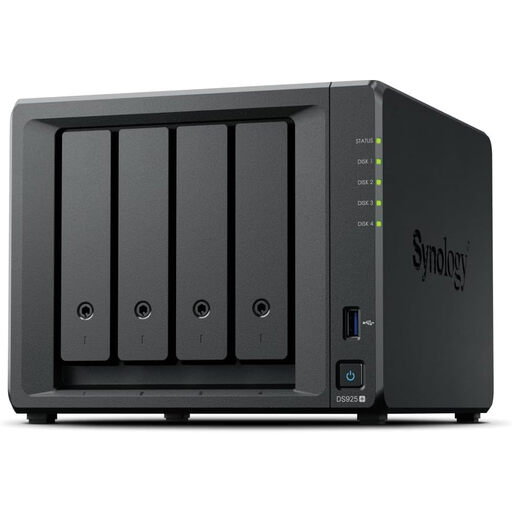 Image unavailable
Consider this 4-bay NAS when several household members need shared home storage and someone can manage its setup. Confirm which compatible drives are required and whether they are part of the bundle.
Plan a separate recovery destination: shared storage in the home is not, by itself, an off-site backup.
No. Synchronisation keeps a library current across devices, while the National Cyber Security Centre defines a backup as a copy of important data stored in a separate safe location. If recovery is your goal, confirm that you can restore a separate copy when the original is inaccessible.
One drive can hold a backup, but it cannot cover every loss scenario if it is your only copy or remains beside the original devices. The Information Commissioner's Office notes that cloud storage can keep important files outside the home as part of a backup solution; consider an off-site copy if a home incident is a concern.
Decide whether you need backup, sharing, cross-device access or all three, then check capacity and the provider’s account, renewal, cancellation and export terms. GOV.UK consumer guidance also advises thinking about keeping data in more than one place and how you would access it if a service were suspended or cancelled.
Consider encryption or password protection if the consequences of losing the drive include unauthorised access to sensitive files, but confirm that the exact drive and your devices support the chosen method. Western Digital warns that forgotten passwords on supported WD Security drives cannot be recovered, so retain a secure way for the household to regain access.
Enable two-step verification where the provider offers it and keep account-recovery methods current. The National Cyber Security Centre explains that the second sign-in step adds protection beyond a password alone; it does not replace a separate backup of the files.