Choose a conventional keyboard if familiar, readily accessible keys matter most, or a compact programmable keyboard if desk space and configurable shortcuts take priority. Two screens do not by themselves call for multi-device switching: that matters when you control separate computers or other host devices. Check the physical layout, software compatibility and desk position before committing to either setup.
Who is this setup for?
Shortcut-heavy podcast editors
If splitting, moving and labelling clips means repeating the same commands, programmable keys or a separate assignable controller may be worth considering. Check that your editing application accepts the actions you intend to assign.
Editors switching between devices
If each screen belongs to a different computer, or you alternate between an editing computer and another device, a keyboard that switches hosts may be useful. It is a different need from connecting two monitors to one computer.
Editors working for long sessions
Keyboard choice is only part of arranging a two-screen workstation. The Health and Safety Executive advises positioning the keyboard and screens to avoid awkward reaching or twisting.
What matters when choosing?
Establish which computer drives each screen, then weigh shortcut access against the key layout and the space available for a mouse and other equipment.
| Concern |
What to check |
Who this matters to |
| Editing shortcuts |
Check whether key assignments work with your operating system and editing application, and whether the keys you use remain readily accessible. |
When I repeatedly split and move clips, I want assigned commands I can recall without interrupting the edit; around 33% of consumers put shortcut access first. |
| Device switching |
Find out whether the screens use separate host devices; if so, check the keyboard’s switching method and supported connections. |
If I alternate between two computers, I want one keyboard to follow the device I am using; roughly 25% of consumers prioritise switching between hosts. |
| Desk space and layout |
Check the physical UK or US layout, arrow and navigation keys, and the space left for the mouse and other controls. |
With other podcast equipment on my desk, I need the keyboard to fit without losing keys I rely on; around 25% of consumers make layout and space their main concern. |
| Workstation position |
Check whether the keyboard can sit centrally just below elbow height without forcing you to twist towards either screen, as advised by the Health and Safety Executive. |
During longer edits, I need a keyboard position that works with my screens, chair and mouse; about 17% of consumers put workstation fit first. |
Buying mistakes to avoid
-
Assuming two monitors require device switching
One computer can drive both screens. A keyboard’s host-switching feature addresses control of separate devices, not movement between monitors attached to the same computer.
Map the connections behind both screens before making multi-device switching a requirement.
-
Choosing a compact board without checking the keys
A reduced layout may change how you reach arrow or navigation functions. US QWERTY labelling can also differ from the UK layout you expect.
Inspect the exact variant’s layout and work through your most-used timeline shortcuts before buying.
-
Expecting a keyboard to fix the whole workstation
Keyboard position interacts with screen placement, mouse reach, desk and chair. The Health and Safety Executive advises keeping the keyboard central and avoiding twisting towards the screen.
Reassess the arrangement when adding a second display or a control surface, rather than assessing the keyboard in isolation.
-
Assuming specialised controls work with any computer
Apple’s Touch ID keyboard has specific Mac requirements, while configurable actions depend on the relevant software and the commands your editing application accepts.
Check the exact computer, operating system and intended editing commands before choosing those features.
Relevant brands to consider
Logitech
The MX Keys S is a low-profile wireless option for editors who prefer a conventional keyboard and may switch between devices.
- Logitech specifies backlighting, programmable actions and switching across up to three devices for the MX Keys S.
- Check the operating-system support for its configuration software and whether the actions you want work in your editing application.
Keychron
The K3 Max offers a compact programmable route for editors willing to configure their shortcuts.
- Keychron UK lists a 75% UK-ISO variant with wired, Bluetooth and 2.4 GHz connections, plus QMK/VIA remapping.
- Check whether its reduced set of dedicated keys suits the way you navigate a timeline.
Apple
Apple’s compact Magic Keyboard with Touch ID is a Mac-specific option with British-English key labelling.
- Apple specifies wireless operation, USB-C charging and Touch ID for the relevant model.
- Touch ID requires a Mac with Apple silicon running macOS 15.1 or later; check that the compact key arrangement also suits your shortcuts.
Elgato
Stream Deck + is a companion controller for assigned commands, not a replacement for a typing keyboard.
- Elgato specifies eight customisable LCD keys, four push rotary encoders and a touch strip.
- It needs USB and desk space; confirm that your editing software supports the actions or integrations you intend to use.
Keyboards on Joybuy
These keyboards offer compact or near-full-size layouts for a two-screen editing desk. Compare their stated UK or US layouts and connection options against your computer and shortcut needs.
 No image available
HyperX Alloy Rise 75 Wireless Keyboard, UK
Consider this wireless keyboard if desk space and access to timeline-navigation keys both matter. Check the exact physical UK layout, key-assignment software and compatibility with your editing application before relying on configurable shortcuts.
View on Joybuy
 No image available
Razer Huntsman V3 Pro Mini 60% Analog Optical Keyboard
The 60% layout is worth considering when keyboard footprint is the priority, provided modifier-key access to arrow functions fits your timeline workflow. Confirm the physical layout and whether your computer and editing application support the commands you intend to record.
View on Joybuy
 No image available
ASUS ROG Strix Scope II 96 Wireless Keyboard, Black, UK layout
The stated UK layout may suit an editor who wants a familiar key arrangement without choosing a full-size board. Check the 96-format footprint against your desk and confirm software support before planning to assign podcast-editing commands.
View on Joybuy
 No image available
AULA F75 75% tri-mode mechanical keyboard, US QWERTY
Consider the 75% format if desk width matters, but check how its navigation keys fit your usual editing commands. Its stated connection modes are wired, Bluetooth and 2.4G; confirm whether the US QWERTY layout, macro setup and any required host switching suit your workstation.
View on Joybuy
 No image available
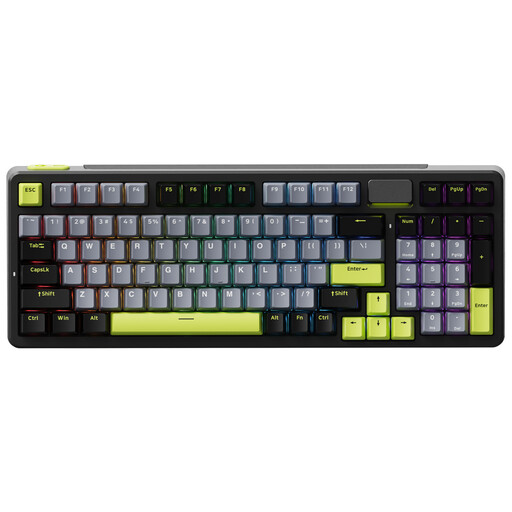
Rapoo V700DIY 96% tri-mode mechanical keyboard, US QWERTY, Gasket Mount-BG
The 96% layout may appeal if you want more dedicated keys while keeping desk width in mind. Check whether the stated US QWERTY layout suits your shortcuts, and confirm the exact item’s pointing controls, programmable-command support and host-switching behaviour before making them part of your workflow.
View on Joybuy
Common questions
Do two monitors require a multi-device keyboard?
No: multi-device switching matters when the keyboard must control separate host devices, not simply because one computer has two monitors. Check which computer drives each screen before choosing that feature.
Where should the keyboard sit during a long editing session?
The Health and Safety Executive advises placing it centrally, just below elbow height, with the mouse in line with the elbow and the screens arranged to avoid twisting. If you edit on a laptop for prolonged periods, a separate keyboard and mouse can also allow its screen to be raised.
Will Touch ID on Apple’s Magic Keyboard work with every Mac?
No. Apple states that the Touch ID model requires a Mac with Apple silicon running macOS 15.1 or later. Check your exact Mac and operating-system version before choosing that model for Touch ID.
Can a separate control surface replace my editing keyboard?
Not for normal text entry: Elgato’s Stream Deck + provides assignable keys and rotary controls as a companion device. Consider it only if the actions you repeat are supported by your editing software and you have room for another USB device.


