Choose a PS5 with a built-in disc drive if your household uses PS4 or PS5 discs, eligible disc-based upgrades, Blu-ray or DVD media. Sony Interactive Entertainment states that the Slim Digital Edition and PS5 Pro can use a compatible optional drive in specified model groups, but the PS5 Pro is a digital-first choice for its 2TB storage and title-dependent enhanced features rather than for disc access.
Who each route suits
Players with PS4 or PS5 game discs
You need a disc-capable PS5 to install and play physical PS4 or PS5 games, or to use a PS4 disc as the licence disc for an eligible PS5 upgrade. Sony Interactive Entertainment says the overwhelming majority of PS4 games are playable on PS5, subject to title-level exceptions.
Download-first households
The Digital Edition suits an account-based download library when optical game and film playback are not needed. A compatible drive can be added later only to specified slim Digital Edition model groups, and pairing it requires internet access.
4K performance enthusiasts with large digital libraries
PS5 Pro may suit players who value 2TB storage and features in PS5 Pro-enhanced games more than immediate disc use. Disc playback remains an optional extra, while enhancements vary by game.
What to check before choosing
Built-in disc drive
Choose it when: physical PS4 or PS5 games, disc upgrades or Blu-ray and DVD playback matter from day one.
Keep in mind: games still install to console storage and the licence disc remains necessary for play.
Slim Digital Edition
Choose it when: your usable games library is download-led and you do not need physical media now.
Keep in mind: later disc access depends on a compatible CFI-2000 or CFI-2100 slim model and a separately purchased drive.
PS5 Pro
Choose it when: 2TB storage and enhanced features in supported games are the priority.
Keep in mind: it has no included disc drive, and its visual and frame-rate benefits vary by title.
| Priority |
What to check |
Your needs |
| Existing game discs |
Check whether the console includes a drive or supports the CFI-ZDD1 drive. Confirm important PS4 titles individually, as compatibility and features can vary by game. |
I want to keep using physical PS4 or PS5 games, including eligible PS4 disc upgrade paths. |
| Film and media discs |
Choose a disc-capable setup for 4K Ultra HD Blu-ray, Blu-ray and DVD playback. A disc-free console needs a compatible drive before it can read these formats. |
My console also needs to play the household's Blu-ray or DVD collection. |
| Future flexibility |
Check the exact Digital Edition model group before relying on an add-on drive. Confirm drive compatibility, setup requirements and the full purchase total at checkout. |
I may start with downloads but want a practical route to physical games later. |
| Digital access and subscriptions |
Compare the games you plan to buy with membership benefits. Check renewal terms and the current catalogue, as subscription games and features can change. |
I want downloads and online features without treating a changing catalogue as permanent ownership. |
Buying pitfalls to avoid
-
Assuming every Digital Edition accepts the optional disc drive
Sony limits the CFI-ZDD1 drive to PS5 Pro and specified CFI-2000 or CFI-2100 slim Digital Edition model groups. An incompatible console cannot use this accessory route.
Check the console model group before ordering the drive, then confirm the live price, warranty and availability at checkout.
-
Choosing digital-only despite owning important PS4 discs
A disc-free PS5 cannot read PS4 game discs, and an eligible PS4 disc upgrade still needs the disc when playing the upgraded PS5 version.
List the household's physical PS4 and PS5 games before buying. Choose a built-in-disc console or confirm a compatible drive if those titles matter.
-
Buying PS5 Pro mainly for a physical-library setup
PS5 Pro is all-digital. Its distinguishing features are 2TB storage and enhancements in supported PS5 Pro-enhanced games, not an included disc drive.
Choose PS5 Pro after checking that its supported-game features and storage fit your display and play habits; otherwise compare a disc-equipped PS5 first.
-
Treating PlayStation Plus catalogue access as permanent ownership
PlayStation Plus benefits and included games can change, while subscriptions continue until cancelled.
Use a subscription for catalogue discovery or online-play benefits, but consider separate purchases for games you want to keep available. Confirm renewal and cancellation terms before paying.
Relevant brand reference
PlayStation / Sony Interactive Entertainment
The directly relevant console ecosystem for this decision includes PS5 Digital Edition, disc-equipped PS5, PS5 Pro, PlayStation Store and PlayStation Plus.
- Official PlayStation materials distinguish the built-in-drive PS5 from the disc-free Digital Edition and PS5 Pro, which can use the specified optional drive when compatible.
- PS5 Pro enhancements apply only to select enhanced games and vary by title; Sony's statements are product specifications rather than independent performance testing.
Joybuy product options
Joybuy options for households deciding between a built-in disc drive, a slim digital console with a later drive option, or a PS5 Pro for a download-led library.
 No image available
Sony PlayStation 5 Slim Disc Edition
A lower-friction option for a mixed physical and digital library, with a built-in Ultra HD Blu-ray drive for physical PS5 and PS4 game discs.
Physical games still install to console storage and require the disc for use. Confirm the exact UK model variant, storage capacity, warranty and availability before buying.
Joybuy
 No image available
Sony PlayStation 5 Slim Digital Edition
Suited to a download-led library, with the listed CFI-2100 slim model able to use a separately sold optional Disc Drive.
No disc drive is included, so physical PS4 or PS5 games and Blu-ray or DVD media need a compatible drive. Drive pairing requires internet access.
Joybuy
 No image available
PlayStation 5 Disc Edition Console + Marvel’s Wolverine Bundle
A disc-capable console-and-game bundle for households that want physical Blu-ray disc access alongside the included game.
The listing states that the bundled game is PEGI 18 and requires age verification on delivery. Check the hardware revision, storage capacity, game format and UK suitability before buying.
Joybuy
 No image available
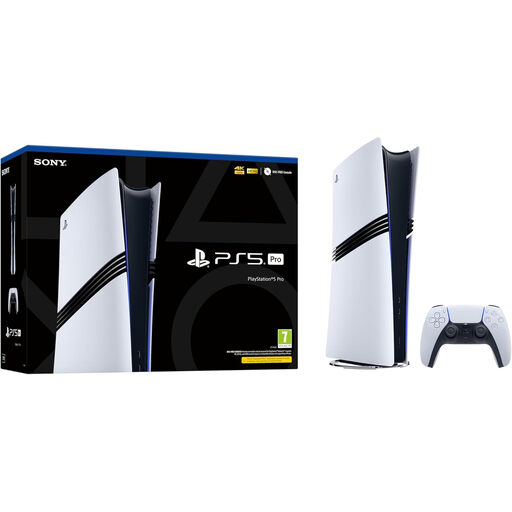
Sony PlayStation 5 Pro Digital Edition
A digital-first PS5 Pro option with stated 2TB SSD storage for larger download libraries and PS5 Pro-specific features in supported titles.
No disc drive is included, so physical games and optical media require a separate compatible drive. Enhanced graphics and frame-rate benefits vary by game.
Joybuy
Frequently asked questions
Can I play physical PS4 games on a PS5?
Yes, if the PS5 has a disc drive. Sony Interactive Entertainment says the overwhelming majority of more than 4,000 PS4 games are playable on PS5, though some titles may have unavailable features, errors or unexpected behaviour. A disc-free PS5 needs a compatible optional drive before it can use PS4 game discs.
Can a PS5 Digital Edition become disc-capable later?
Yes, but only specified PS5 Digital Edition CFI-2000 and CFI-2100 slim model groups can use the CFI-ZDD1 Disc Drive. The same drive works with PS5 Pro, and internet access is required to pair the drive and console during setup.
Can I watch Blu-ray films and DVDs on a PS5?
A PS5 with a disc drive can play 4K Ultra HD Blu-ray, Blu-ray and DVD media. A disc-free Digital Edition or PS5 Pro needs the compatible drive before it can use these formats.
Will a PlayStation Plus catalogue replace a purchased digital library?
No. Sony states that PlayStation Plus games and online features can change, and the subscription continues until cancelled. Treat catalogue access as a benefit for the active subscription period rather than a replacement for games you want to keep available.


