Cottage-TV retro players
If you want to share games on the cottage television, check the exact handheld’s video output and the dock, cable or controller it may need before choosing by screen size.


For solo play with the option of using a cottage TV, consider the Anbernic RG35XX H; the Retroid Pocket 5 has a larger screen but needs a separate compatible dock for TV output. If licensed cartridges matter more than TV play, the Evercade EXP-R is a handheld-only choice: Evercade says it cannot connect to a TV or monitor. Before travelling, check the TV input, the accessories you will need and your right to use any game files.
If you want to share games on the cottage television, check the exact handheld’s video output and the dock, cable or controller it may need before choosing by screen size.
If you would rather take physical, officially licensed games than organise files while away, check cartridge compatibility and which games come with the particular bundle.
If you are willing to set up apps, storage and games you are entitled to use, a larger Android handheld may appeal more than a cartridge-based device. Check your intended software and accessories before leaving.
Choose when: You mainly want portable play but may use the cottage TV; Anbernic lists HD TV output for the RG35XX H.
Trade-off: Its 3.5-inch display is smaller than the Retroid Pocket 5’s stated 5.5-inch display, and you must organise games you are entitled to use.
Choose when: You want the Retroid Pocket 5’s larger display and configurable Android setup, with TV use as an option.
Trade-off: Retroid lists its compatible HDMI dock as a separate product, adding an accessory to pack and connect.
Choose when: You prefer the Evercade EXP-R’s officially licensed physical-cartridge format to managing game files.
Trade-off: Evercade says the EXP-R has no TV-out port, so it cannot serve a shared-TV plan.
| Concern | What to check | Who this matters to |
|---|---|---|
| Cottage TV play | Check the exact model’s video output, the TV’s accessible HDMI input and any required dock or cable. | If I want to share a game on the cottage TV, I need to know the handheld will connect with the accessories I bring. Roughly 45% of consumers would put shared-screen play first. |
| Games ready for the trip | Check which games or cartridges the particular bundle includes and whether you have permission to use any files you add. | When I arrive, I want a game I am entitled to use without sorting out files. For around 33% of consumers, a ready-to-use licensed library would be the primary concern. |
| Handheld flexibility | Compare the operating system, screen, stated storage and microSD support; check the apps and controllers you intend to use. | I would accept some setup for a larger screen and more options to organise my games. Around 22% of consumers would make handheld flexibility their main priority. |
Anbernic lists HD TV output for the RG35XX H, Retroid lists a separate compatible dock for the Pocket 5, and Evercade says the EXP-R cannot connect to a TV or monitor.
Check the exact model, the cottage TV’s HDMI input and the connection accessories before you go.
A TV-capable setup may also mean packing a separate dock, HDMI cable or controller.
Support for a game format does not establish permission to copy or download games. UK Intellectual Property Office guidance says most uses of copyright material still require permission.
Check the games supplied with your particular bundle, and add only files you are entitled to use.
Evercade’s EXP-R guide specifies a compatible 5V, 1–3A USB mains adapter that is not included; Retroid’s compatible TV dock is a separate product.
Check your model’s charging requirements, then test charging, games, controllers and any TV connection with the kit you plan to take.
Depending on the setup, that kit may include a mains adapter, display cable, dock, controller or storage card.
The RG35XX H is a compact Linux handheld to consider if you want portable play with a possible TV connection.
The Pocket 5 offers an Android route for travellers who want a larger screen and are comfortable configuring their handheld.
The EXP-R is a physical-cartridge option for travellers who prefer officially licensed games to managing files.
These AISLPC R36MAX variants are options for playing on the handheld during a cottage stay. If TV play or a particular game library is essential, check the exact variant and its supplied accessories before choosing.
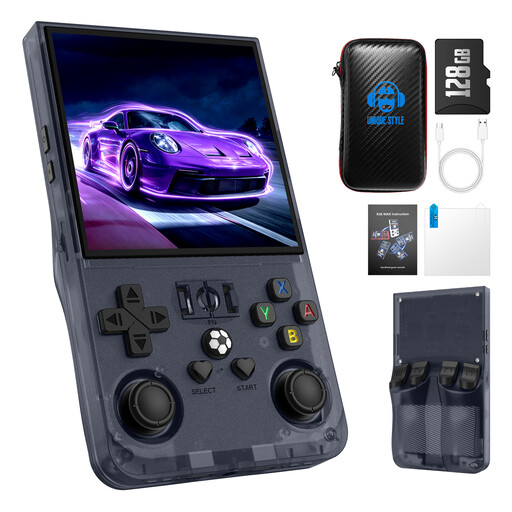 No image available
A Linux handheld to consider for portable retro play at the cottage.
The title specifies a 4.0-inch IPS display with 720×720 resolution, 64GB storage and a 4,000mAh battery. If you need TV play, check this exact variant’s output and required accessories; also confirm the included games and what you need for charging.
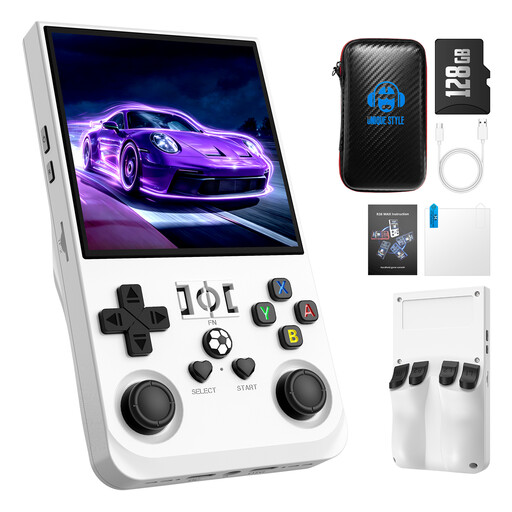 No image available
A Linux handheld to consider if you want portable play and prefer the White variant.
The title specifies a 4.0-inch IPS display with 720×720 resolution and a 4,000mAh battery. Confirm this variant’s storage capacity before buying, as its listing gives conflicting capacities. Check TV output, included games and charging accessories if they matter for your trip.
No. Evercade says the EXP-R has no TV-out port and cannot connect to a TV or monitor, so choose it for handheld cartridge play rather than a shared-TV evening.
The Pocket 5 can use Retroid’s separately sold Official Dock, which Retroid lists as compatible and specifies with HDMI output. Check that the cottage TV has an accessible HDMI input, and pack the compatible dock and a suitable cable.
No blanket permission follows from a handheld’s format support. UK Intellectual Property Office consumer guidance says most uses of copyright material require permission, so check your rights to the particular games before copying or downloading them.
Evercade’s EXP-R quick-start guide specifies a compatible USB mains adapter rated at 5V and 1–3A, and says the adapter is not included. Follow the manual for any other handheld rather than applying the EXP-R specification to it.