Choose a compact wired gamepad if desk space and a straightforward connection matter most, a six-button pad if your main games use that face-button layout, or an arcade stick if lever-and-button controls justify its larger footprint. None is a safe choice on shape alone: check the exact model against your host device, connection method and emulator mapping before buying.
Who each controller suits
PC or Raspberry Pi emulation players
If you play through Windows or RetroPie, start with host compatibility and button mapping rather than the controller’s appearance. RetroPie notes that some wireless controllers need special drivers and some emulators need manual configuration.
Six-button arcade and Mega Drive fans
A six-button face layout is worth considering when those controls dominate your games. 8BitDo specifies its M30 six-button pad for Windows, Android, Switch and several Raspberry Pi systems; check the connection mode for your particular host.
Desk-based arcade-stick players
A lever and separate arcade buttons may be the format you want for seated play, provided you can leave room to use and store the stick. 8BitDo lists its Arcade Stick for Xbox at 303 × 203 × 115 mm and 2,000 g, so measure your available surface before committing to that model.
What matters when choosing
For retro games in a student room, choose the control format around your most-played games, then check that the exact controller works with your host and fits where you play.
Conventional gamepad
Choose it when: You want a handheld controller for games that use a conventional D-pad, shoulder buttons or analogue controls.
Trade-off: A conventional layout is not the same as a dedicated six-button arcade face layout. For example, 8BitDo specifies its wired Ultimate 2C for Windows and Android; do not assume that specification extends to other hosts.
Six-button retro pad
Choose it when: Face-button access matters more to your main arcade or Mega Drive-style games than a modern dual-stick layout.
Trade-off: The 8BitDo M30 offers wireless use, but pairing and charging become part of the setup; RetroPie cautions that some Bluetooth controllers need special drivers.
Arcade stick
Choose it when: A physical lever and separate buttons are central to how you want to play, and you have a suitable surface.
Trade-off: The 8BitDo Arcade Stick for Xbox needs substantially more playing and storage space than a handheld pad; its stated Xbox and Windows support does not establish compatibility with other hosts.
| Concern |
What to check |
Who this matters to |
| Host compatibility and mapping |
Match the exact model and connection mode to your console, operating system or RetroPie setup; check whether your emulator needs button mapping. |
If I use a PC or Raspberry Pi for several retro systems, I need the controls to register and map to my games. Roughly 46% of consumers put compatibility and mapping first. |
| Six-button layout |
Compare the face-button arrangement with your main games, then check whether other games require shoulder buttons or analogue sticks. |
For games built around six face buttons, I would rather have those actions close to hand than prioritise a modern dual-stick layout. About 27% of consumers make the six-button layout their primary concern. |
| Wireless flexibility |
Check the supported wireless method, your host’s connection options and whether the controller can also be used over USB. |
If the screen is away from my desk, I want to play without routing a cable across the room, while accepting pairing and charging. Wireless flexibility comes first for around 18% of consumers. |
| Arcade-stick format |
Measure playing and storage space; check the stick’s dimensions and its stated host and input mode. |
When lever-and-button controls are the point of playing, I can set aside a stable surface and somewhere to store the stick. Approximately 9% of consumers prioritise that physical format. |
Mistakes to avoid
-
Assuming USB or Bluetooth means universal compatibility
A controller can connect physically yet still need the right input mode, driver or emulator configuration. RetroPie specifically cautions that some wireless and Bluetooth controllers need special drivers.
Check the maker’s supported hosts for the exact model, then check how your emulator maps its buttons.
-
Choosing a stick before measuring the room
8BitDo lists its Arcade Stick for Xbox at 303 × 203 × 115 mm and 2,000 g. A stick of that size calls for more usable surface and storage space than a handheld pad.
Measure the area where you will play and where the stick will go afterwards.
-
Treating battery runtime as uninterrupted play
8BitDo’s stated M30 battery runtime is a manufacturer rating; wireless use also involves pairing and charging.
If you prefer to stay plugged in, check whether your chosen wireless controller supports use over USB or choose a wired model.
-
Overlooking console-specific limitations
PowerA states that its Enhanced Wired Controller for Nintendo Switch is for docked use only and lacks HD rumble, IR, motion controls and amiibo NFC.
Read the limitations for the precise controller variant rather than relying on the console name in its title.
Brands to consider for these controller formats
8BitDo
Relevant if you are comparing a conventional wired pad, a six-button retro pad and an arcade stick.
- 8BitDo specifies the M30 for Switch, Windows, Android and several Raspberry Pi systems, including RetroPie.
- Support differs by model: its Ultimate 2C Wired is specified for Windows and Android, while its Arcade Stick for Xbox is specified for Xbox and Windows.
Logitech G
Relevant if you prefer a conventional wired PC gamepad to a retro-shaped pad.
- Logitech G describes the F310 as a wired gamepad with a four-switch D-pad and a 6-foot USB cable.
- A PC controller’s connection alone does not settle how buttons will map in your particular emulator.
PowerA
Relevant when your retro games run on a docked Nintendo Switch and you want a console-specific wired pad.
- PowerA’s Enhanced Wired Controller is made for a physical connection to a docked Switch.
- PowerA says this model is docked-only and does not support HD rumble, IR, motion controls or amiibo NFC.
HORI
Relevant when an Xbox- or Windows-compatible lever-and-button controller is the format you want.
- HORI’s Fighting Stick Alpha manual specifies Xbox Series X|S, Xbox One and Windows 10 support.
- On PC, HORI specifies XInput rather than DirectInput for this model; check the input expected by your games or emulator.
Joybuy product choices
These choices include an Xbox-oriented arcade stick, wired Xbox gamepads and a PlayStation DualSense controller. Compare them against your actual host and preferred control layout; a retro-inspired design does not by itself provide a six-button arcade layout.
 No image available
HORI Fighting Stick Alpha for Xbox Series X|S
Consider this if you want lever-and-button controls and have a surface and storage space for a full-size stick.
HORI’s manual specifies Xbox Series X|S, Xbox One and Windows 10; PC operation uses XInput. Check that your emulator recognises and maps its controls.
View on Joybuy
 No image available
Hyperkin DuchesS Wired Controller, White, for Xbox Series X|S, Xbox One and Windows 10/11
Consider this conventional wired pad for retro games on a compatible Xbox or Windows host when you do not specifically need a six-button arcade layout.
Check how its buttons map in the emulator you intend to use.
View on Joybuy
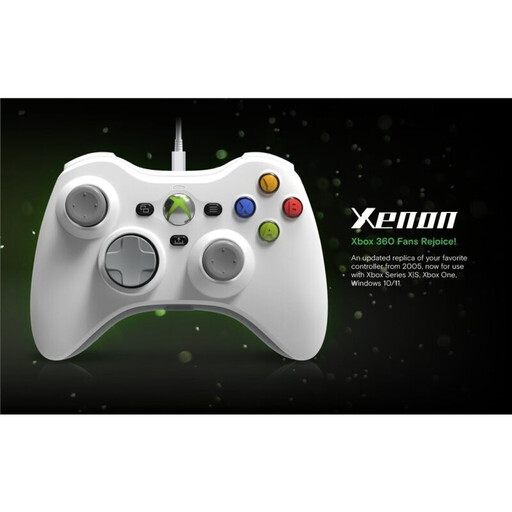 No image available
Hyperkin Xenon Wired Controller, White, for Xbox Series X|S, Xbox One and Windows 10/11
This is another conventional wired option for a compatible Xbox or Windows setup, rather than a dedicated six-button pad.
Choose between controller shapes according to your games, and confirm emulator recognition before buying.
View on Joybuy
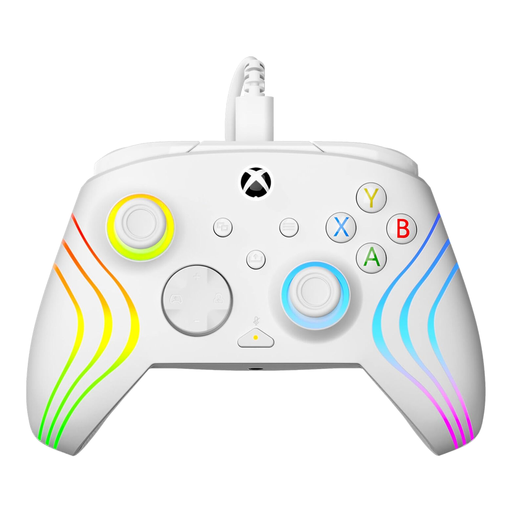 No image available
Turtle Beach PDP Afterglow Wave Wired Controller, White, for Xbox and Xbox Series
Consider this wired gamepad if you play on a compatible Xbox and prefer handheld controls to a desk-based stick.
Check your exact console or PC setup and emulator mapping; its title does not establish a six-button arcade arrangement.
View on Joybuy
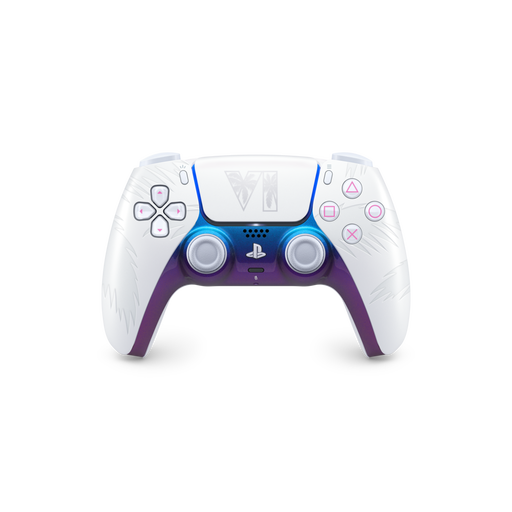 No image available
PlayStation DualSense Wireless Controller, Grand Theft Auto VI White Limited Edition, for PS5, PC, Mac and mobile
Consider this wireless controller if your retro games run on a compatible host and you want a conventional gamepad rather than arcade-stick controls.
Confirm your emulator’s button mapping and, if you plan to connect by USB-C, check whether you need to supply a cable.
View on Joybuy
Common questions
Will any controller work automatically with RetroPie?
No. RetroPie supports many controllers, but says some wireless or Bluetooth models need special drivers and some emulators need manual configuration. Check the exact controller and its input mode against your setup.
Is a six-button pad useful beyond one retro system?
Yes, if the layout suits the games you play and the model supports your host. 8BitDo specifies the M30 for several systems, including Windows, Switch and Raspberry Pi setups, but a six-button pad may be a less practical sole controller for games that depend on two analogue sticks.
Can a wired Switch controller be used in handheld mode?
Not the PowerA Enhanced Wired Controller discussed here: PowerA specifies docked use only. Check the exact controller’s use restrictions if you regularly play away from the dock.
What should I do with a broken controller in the UK?
Check the electrical-equipment collection or take-back options available locally or through a retailer rather than assuming it belongs in general waste. UK government guidance on waste electrical and electronic equipment addresses its recovery, reuse and recycling.


