Choose a smart speaker if hands-free audio, timers, alarms and reminders are central to your routine; choose a smart display if you will regularly use visual information or video calls. A Bluetooth speaker or digital radio is a simpler choice when you mainly want audio and do not need a voice assistant. Before choosing a voice-enabled device, check its services, account requirements and privacy controls.
Who each option suits
Hands-free routine builders
If you live alone and want to start audio or set timers and reminders while cooking or moving around your home, a voice-first device is worth considering. Ofcom’s UK smart-speaker research identifies audio, information, alarms and reminders as common uses.
Screen-needing home organisers
If seeing a calendar, list, compatible camera feed or video call would change how you use the device, compare a smart display with an audio-only speaker. Amazon describes these visual functions for its screen-equipped Alexa devices.
Privacy- and ecosystem-conscious buyers
If voice-history settings, microphone or camera controls, compatible accounts and service terms will determine whether you use the device, examine those controls before settling on an ecosystem. Amazon, Google and Apple describe different settings and service conditions for their devices.
What matters when choosing
Decide whether you need voice requests, visual tasks or audio playback alone; then check the services and controls of the device you would use at home.
Smart speaker
Choose when: Spoken audio requests, timers and reminders are more useful to you than a screen.
Trade-off: Voice features depend on the chosen assistant, account and available services, and a spoken request may not produce the content you intended.
Smart display
Choose when: You will regularly view lists, calendars or compatible camera feeds, or make video calls.
Trade-off: A screen takes visible space, and camera-equipped models call for an additional privacy decision.
Bluetooth speaker or digital radio
Choose when: Straightforward music playback or radio listening matters more than assistant-led routines.
Trade-off: Playback is controlled through the device or a paired source rather than independent voice requests for reminders and information.
| Concern |
What to check |
Who this matters to |
| Hands-free audio and information |
Check whether your preferred music and radio services work with the chosen assistant in the UK. Keep a direct playback control if selecting an exact station matters. |
When my hands are occupied, I want to start audio or ask for brief information without finding my phone. About 36% of consumers put hands-free audio and information first. |
| Alarms, timers and reminders |
Confirm the routine functions you need on the device and account you plan to use; consider where it will sit and whether you can hear its alarms there. |
If I organise household tasks with spoken prompts, I need timers and reminders I can set as I go. For about 29% of consumers, routine management is the primary need. |
| Privacy and service control |
Review voice-history settings, physical microphone controls and any camera controls. Check UK feature eligibility and whether the functions you want require a subscription. |
I would only keep a voice assistant in my home if its data controls and service terms suited me. Privacy and service control come first for about 21% of consumers. |
| Visual help and communication |
Identify the visual tasks you would use regularly; for calls or camera views, confirm support on the exact display and service. |
Seeing a list at a glance or making a video call would be more useful to me than an audio reply alone. About 14% of consumers prioritise visual organisation and communication. |
Common buying mistakes
-
Choosing a display for voice-only tasks
A screen can help with lists, calendars and calls, but it does not make every audio request, alarm or reminder more useful.
List the visual tasks you expect to use regularly. If there are few, compare an audio-only smart speaker or a conventional audio device.
A camera-equipped display also brings a camera-control decision into your home routine.
-
Buying hardware for a feature you cannot yet use
Assistant features can depend on the device, account, language, region and subscription. Google says some Gemini for Home features require Google Home Premium; Amazon sets separate terms for Alexa+ after Early Access.
Check the current UK eligibility and plan for the exact feature you want before choosing a device around it.
-
Expecting voice commands to work while the microphone is off
Amazon says an Echo device will not respond to Alexa commands while its microphones are switched off.
Use the physical control when you want to pause voice interaction, and plan another way to operate the device until you switch it back on.
-
Relying solely on spoken radio requests
A voice request may select something other than the station you intended, which matters if you listen to particular programmes.
Check how your preferred stations are named in the chosen service and retain app or device controls for precise selection.
Brands to consider for voice-led routines
Amazon Echo / Alexa
Echo speakers and displays are an option for Alexa-led audio, household routines and, on screen models, visual controls.
- Amazon describes microphone-off buttons and voice-history controls for Echo devices; check camera controls on the particular display model.
- Alexa+ access and terms depend on eligibility and rollout. Amazon says its terms after Early Access differ for Prime and non-Prime members.
Google Home / Gemini for Home
A route to consider if you already use Google services and want to check their integration with home routines and compatible accessories.
- Google lists basic voice functions including media playback, alarms, timers, lists and reminders.
- Google says service availability varies by region and some Gemini for Home features require Google Home Premium. Check the exact accessory and feature before relying on either.
Apple HomePod / Siri
HomePod is an Apple-device-centred option for Siri audio and control of compatible HomeKit accessories.
- Apple describes voice control for HomeKit accessories and lists a four-microphone Siri design for HomePod mini.
- Check setup-device requirements and privacy settings. Apple says Siri interaction transcripts may be stored and a subset reviewed.
A Bluetooth speaker option on Joybuy
This Bluetooth speaker represents the straightforward-audio route for someone who does not need assistant-led alarms, reminders or information requests.
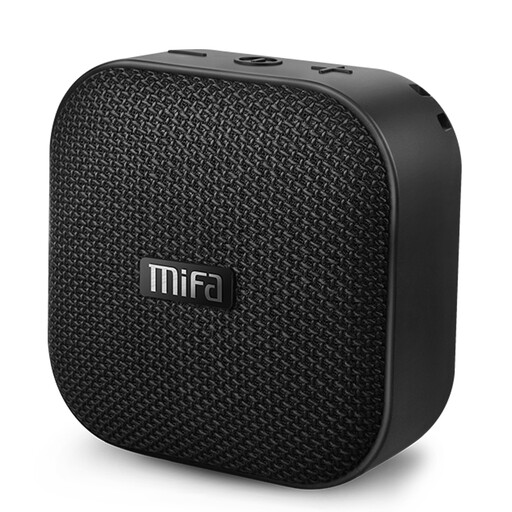 Image unavailable
MIFA A1 Bluetooth speaker, black
Consider this portable Bluetooth speaker if you mainly want music playback rather than a voice-led home routine. If you need alarms, reminders, radio or voice-assistant functions, confirm them before buying; also check battery runtime and the specific water-resistance rating if you plan to carry it or use it near water.
View on Joybuy
Questions about everyday use
Do I need a smart display if I live alone?
Not if your main tasks are listening, setting timers and getting spoken reminders. Choose a display when you expect to use its visual functions regularly, such as viewing lists or making compatible video calls.
Can I turn off a smart speaker’s microphone?
On Echo devices, Amazon says the microphone-off button disconnects the microphones. Alexa will not respond to voice commands until you turn them back on; check the controls on any other model you are considering.
Will a voice request always find the radio station I want?
No. Spoken station requests can produce an unintended result, so keep app or device controls available if selecting a particular station matters to you.
Are advanced assistant features included with the device?
Not necessarily. Google says some Gemini for Home features, including Gemini Live, require Google Home Premium; Amazon sets different Alexa+ terms for Prime and non-Prime members after Early Access. Check current eligibility and plan terms for the feature you intend to use.
How do I check whether my smart-home accessories will work?
Look up the exact accessory in your chosen assistant ecosystem’s compatibility information before buying. Google directs users to its Works with Google list and notes that service availability can vary by region.


