What should you check first?
Start with the services and features your household watches, then decide whether the current screen and connection can support the route you choose.
| Priority |
What to check |
Your needs |
| Apps and software |
Check each essential service against the exact TV, player or console model. Confirm its operating-system or firmware version and the features you use, not just the presence of an app. |
I want our regular services on the main screen without finding that a particular device version is excluded. ITV Support makes ITVX compatibility dependent on the platform and software version. |
| Broadcaster features |
Check catch-up and regional live content separately. ITV Support says regional live ITVX content is currently unavailable on tvOS, Android TV and PlayStation, among other platforms. |
If we watch regional ITV programmes live, an ITVX app alone will not settle the choice. I need that feature to work on the device we plan to use. |
| Screen and connections |
For a player or stick, check for a working HDMI input, a suitable power connection and space for the device. If you expect 4K or HDR, check the display too: Apple says Apple TV 4K requires a compatible 4K and HDR TV for those formats. |
Our current screen may be worth keeping if its picture and size still suit the room. If the screen itself needs changing, an add-on device will not address that need. |
| Network stability |
Test the connection at the TV location. Netflix recommends at least 3 Mbps for 720p, 5 Mbps for 1080p and 15 Mbps for 4K, and warns that slow or unstable connections can lower streaming quality. Check whether the exact device variant offers Ethernet if you want a wired connection. |
When supported apps buffer or lose picture quality, I want to check the connection before assuming a different streaming device will solve it. |
Relevant platform and brand references
These references describe possible routes, not a list of products available in the selection below. Check each required app on the exact device before relying on a platform.
Roku
An HDMI-connected player or stick route for keeping a suitable TV while using a separate streaming interface.
- Roku’s UK device information names Netflix, Prime Video and ITVX among services on its platform.
- ITVX support can depend on firmware, and app availability alone does not establish that every broadcaster feature works on a particular Roku device.
Apple
Apple TV 4K is a separate HDMI-connected player for a household keeping its display.
- Apple specifies Gigabit Ethernet on the Apple TV 4K (3rd generation) Wi-Fi + Ethernet variant.
- Apple says 4K and HDR viewing needs a compatible TV. ITV Support currently requires tvOS 18 or later for ITVX and says ITVX regional live content is unavailable on tvOS.
PlayStation
An existing TV-connected PlayStation 4 or PlayStation 5 can be considered before adding dedicated streaming hardware.
- ITV Support currently lists both consoles as supported for ITVX.
- ITV Support says regional live ITVX content is unavailable on PlayStation; PlayStation also cautions that streaming-service availability varies by country or region.
Xbox
An existing Xbox connected to the main TV is another route to check before buying a separate player.
- ITV Support currently lists Xbox One, Xbox Series S and Xbox Series X as supported for ITVX.
- Confirm the household’s other required apps, account requirements and current software on the exact console before relying on it as the only streaming device.
Joybuy options for the main screen
These options cover a streaming stick for a TV you want to keep and smart TVs for households also choosing a screen. Check the exact model’s apps and features against your viewing list.
 Image unavailable
TeeView TV70UUW 70-inch QLED 4K HDR smart TV
Consider this when the main-room screen needs replacing as well as its streaming interface. The listing describes WebOS, Wi-Fi and Ethernet. Check the exact TV’s broadcaster-app and Freeview Play support, and confirm its dimensions and weight for the intended position or mount.
View on Joybuy
 Image unavailable
Roku Streaming Stick 4K Doly Vision
This HDMI-connected stick is a route for keeping a suitable TV while adding a separate streaming interface. Its listing names Wi-Fi and a voice remote. Check power access, the TV’s supported picture formats and the stick’s current firmware and app features, particularly if you use ITVX regional live content.
View on Joybuy
 Image unavailable
Coocaa 40CTQH38ZUK 40-inch Full HD QLED Freely smart TV
This is a screen-and-platform option if a 40-inch TV suits the shared space. The listing specifies Full HD (1920 × 1080), TiVo OS, Freely, Wi-Fi, LAN (RJ45) and HDMI. Check the required catch-up apps and features on this exact model; its stated display resolution is Full HD, not 4K.
View on Joybuy
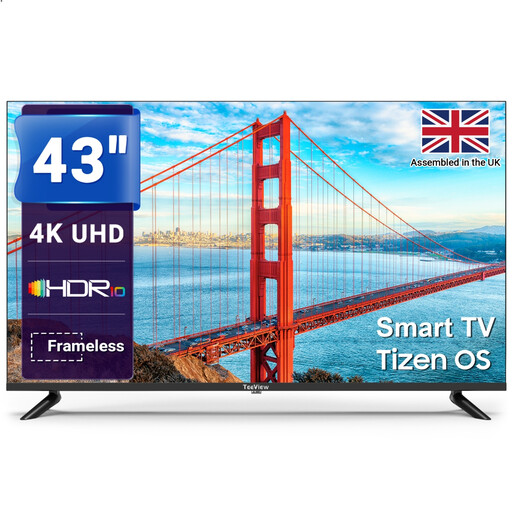 Image unavailable
TeeView TV43QUT-UK 43-inch 4K Tizen OS smart TV
Consider this if you want to change the screen and use a built-in streaming platform. The listing specifies 4K, HDR10, HLG, Tizen OS, HDMI, Wi-Fi and Ethernet. Check broadcaster apps and their required features for this exact TV before choosing it for shared viewing.
View on Joybuy
 Image unavailable
TCL 43V6C 43-inch 4K HDR Google TV
This combines a new 43-inch screen with a built-in Google TV platform. The listing specifies 4K HDR and names Netflix and Disney+. Check your broadcaster apps and features on this model, along with the network connections available where the TV will sit.
View on Joybuy
Common questions
Can I add a streaming device instead of replacing an older TV?
Yes, if the screen still suits you, it has a working HDMI input and the device supports your required services. Roku describes HDMI-connected players, and Apple says Apple TV 4K works with HD and UHD TVs that have HDMI. An external player will not change the TV panel, so 4K and HDR viewing still require a compatible display.
Does an ITVX app mean every ITVX feature will work?
No. ITV Support distinguishes app compatibility from regional live-content availability and says the latter is currently unavailable on several otherwise supported platforms, including tvOS, Android TV and PlayStation. Check the exact model and software version for the features your household watches.
When is Ethernet worth checking for streaming?
Check for a wired option when playback is unstable or Wi-Fi is weak at the TV, but confirm that the exact device variant supports it. Netflix says slow or unstable connections can lower streaming quality; Apple specifies Ethernet on the Apple TV 4K Wi-Fi + Ethernet variant, not its Wi-Fi variant.
Can an existing PlayStation or Xbox take the place of a streaming player?
It can if that console has all the apps and features the household uses. ITV Support currently lists PlayStation 4, PlayStation 5, Xbox One, Xbox Series S and Xbox Series X for ITVX, but says ITVX regional live content is unavailable on PlayStation. Check other services on the exact console as well.
Does a streaming setup need a TV Licence in the UK?
It depends on what you watch, not the device. TV Licensing says a licence is needed for live TV and for programmes on BBC iPlayer. If you do not watch live TV, on-demand programmes on other services such as Netflix or ITVX do not by themselves require one.


