For theatre-programme editing beside a bright window, start with a matte or anti-glare screen and a position that keeps daylight out of the reflection path; rated brightness alone cannot solve direct glare. Choose screen size and resolution for your layouts, then decide how much colour-management support you need for print artwork and check that the display fits your desk and laptop workflow.
Who this choice affects
Window-side layout editor
If you edit cast lists and page layouts beside daylight, readable text and manageable reflections come before extra colour features. Screen position matters too: the Health and Safety Executive advises arranging screens and lighting to avoid glare.
Print-conscious programme designer
If artwork is going to print, colour modes, calibration tools and a suitable proofing workflow deserve closer attention than gaming-oriented features. A monitor specification alone cannot establish how the finished programme will look on paper.
Laptop-based production coordinator
If you move between layouts, proof PDFs and administration on a laptop, consider workspace, stand adjustment and whether the monitor’s connection and power delivery suit that laptop.
What to check when choosing
Work out where the screen can sit relative to the window before comparing display specifications. Then give colour control or desk space greater weight according to the part of programme production you handle most.
| Concern | What to check | Who this matters to |
|---|
| Daylight glare and readability |
Look for a matte or anti-glare surface, compare rated brightness, and check whether the stand lets you turn the screen away from reflections. |
If window light crosses the copy I am editing, I need to reposition the display and still read small text comfortably. Around 42% of consumers put reflection control and readability first. |
| Colour for print artwork |
Check the colour space required by your workflow and the monitor’s calibration support; ask the print provider about profiles and proofs. |
When I hand over programme artwork for print, I want colour decisions I can manage rather than relying on how the screen looks out of the box. Print-colour control is the primary concern for around 33% of consumers. |
| Layout space and laptop connections |
Check screen size against desk depth, native resolution against computer output, and any USB-C or Thunderbolt power-delivery rating against the laptop’s requirements. |
With spreads, proofs and messages open, I need enough room to arrange windows without placing an oversized screen too close. Around 25% of consumers prioritise workspace and laptop connections. |
Buying pitfalls
-
Expecting brightness to cancel a direct reflection
A bright panel can still be hard to view when the window appears on its surface. The Health and Safety Executive advises adjusting screens and lighting to avoid reflections and glare.
Plan the screen position and any window shading before comparing coatings, brightness ratings and stand adjustment.
-
Treating a wide colour gamut as a print guarantee
Monitor calibration does not control the printer, paper or production settings used for the finished programme.
Ask the print provider which colour profile and proofing process to use, then check that the monitor supports your part of that workflow.
-
Choosing a large screen without checking the desk
A 31.5- or 32-inch display needs room for its stand and a position that keeps the window out of the reflection path.
Measure desk depth and stand footprint, and check the model’s adjustment or mounting options before ordering.
-
Assuming a specification page means a model is available
Dell UK marks its U2723QE listing unavailable even though the model specifications remain visible.
Check the exact model’s current listing, warranty terms and returns information before deciding to buy.
Relevant brands for reference
Dell UltraSharp
Dell UK’s 27-inch U2723QE illustrates a 4K productivity display with an anti-glare coating and USB-C hub for layout work.
- Dell specifies 400 cd/m² brightness, 100% sRGB and Rec.709 coverage, and an adjustable stand for the U2723QE.
- Dell UK marks this exact model’s listing unavailable; check a current listing rather than assuming it can be ordered.
BenQ DesignVue
BenQ’s PD3225U illustrates a larger, 31.5-inch 4K design display for working with layouts and colour modes.
- BenQ specifies a matte panel, 400-nit typical brightness, a factory calibration report and 85 W Thunderbolt power delivery for the PD3225U.
- Its stated colour figures do not establish a match to a particular printed programme; the print workflow still matters.
EIZO ColorEdge
EIZO’s 27-inch CS2731 illustrates a colour-management route for print-sensitive programme artwork.
- EIZO states 99% Adobe RGB coverage for the CS2731 and provides uniformity control and ColorNavigator 7 software.
- Its native resolution is 2560 × 1440 rather than 4K; weigh colour-workflow needs against layout workspace.
Joybuy monitor choices
These 4K monitors offer different screen sizes and display types for programme layouts. For a desk beside a bright window, check the exact screen surface and where you can position it before choosing on resolution or colour features alone.
 No image available
ASUS ProArt PA27DCE-K OLED 4K UHD
Consider this model if detailed layouts and print-sensitive artwork are both part of your work.
The title identifies an OLED 4K UHD display. Confirm its typical brightness for your desk, and agree a proofing workflow with the print provider rather than relying on monitor colour claims alone.
View on Joybuy
 No image available
ASUS ProArt Display PA32UCG-K 32-inch 4K IPS Mini LED
The larger screen may suit programme spreads and palettes if your desk has room to position it away from window reflections.
The title identifies a 32-inch 4K IPS Mini LED display with Thunderbolt 3. Check the exact model’s typical brightness and desk fit; do not use its peak-brightness claim as a measure of everyday daylight readability.
View on Joybuy
 No image available
iiyama ProLite XUB2792UHSU-B6 27-inch 4K UHD
A 27-inch 4K screen is worth considering when detailed programme pages must fit on a smaller desk.
Check the screen coating for your window-side position and confirm that its connections meet your laptop’s video and charging needs.
View on Joybuy
 No image available
ASUS Eye Care VY27UQ 4K UHD 60 Hz
This 4K option may suit on-screen programme copy and layouts when print-specific colour management is not your main requirement.
Before placing it beside a window, confirm the screen coating and whether its positioning or mounting options let you avoid reflections.
View on Joybuy
 No image available
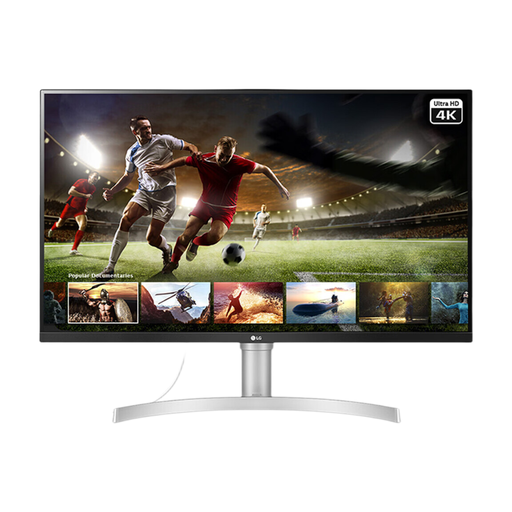
LG UHD Monitor 32UN650K white 32-inch 4K IPS
Consider the larger physical screen if programme spreads and application panels need more room and the desk can accommodate it.
The title states 95% sRGB coverage and HDMI and DisplayPort connections. Check the screen coating and stand movement for your window-side position.
View on Joybuy
Common questions
Will a brighter monitor fix glare from the window?
No: higher rated brightness does not remove a direct reflection. The Health and Safety Executive advises arranging screens and lighting to avoid glare, so check placement and window shading as well as the monitor’s surface.
Do I need 4K to edit a theatre programme?
Not necessarily. A 4K display gives more native pixels for pages and application panels, but a 2560 × 1440 model such as the EIZO ColorEdge CS2731 may still merit consideration when its colour-management workflow matters more to you than extra workspace.
Will calibrating the monitor make the printed programme match?
Calibration alone cannot guarantee a print match. Confirm the printer’s profile and proofing process, including the intended paper and production settings, before judging colour from the screen.
Does a UK employer need to assess a programme editor’s workstation?
The Health and Safety Executive says employers must assess workstations for employees who use display screen equipment daily for continuous periods of an hour or more. Its guidance also covers arranging the screen and lighting to avoid reflections and glare.


