Who needs which setup?
The deciding question is whether you need another copy of the files during the trip, rather than simply enough cards to keep shooting.
Laptop-free travellers who need a second copy
If photos or video will otherwise remain only on a camera card, check whether your phone or tablet can act as the transfer host for both the card reader and the destination drive. Test a complete copy before relying on this setup away from home.
iPhone or iPad photographers using a wired setup
Apple Support describes access to external storage and importing from compatible camera adapters. Choose a reader for your camera card, then check the drive format, connections and available power with your particular device.
Travellers keeping their kit simple
Spare cards avoid a mobile transfer setup when you cannot test one before departure. They let you retain the original cards, but only a camera configured to duplicate files across cards—or a separate copying step—creates another copy of those files.
What matters when choosing?
Decide whether you need an independent copy during the trip, then test the connections and file-copying steps before choosing a drive for its capacity or rated speed. A phone or tablet needs to act as the host: a USB-C connector on each item does not, by itself, make direct card-to-drive copying possible.
Portable SSD and card reader
Choose when: You need a second storage destination away from the camera and can test copying from your actual card through a compatible phone or tablet.
Trade-off: The drive adds cables, a reader and possible power or hub requirements; its rated speed does not establish the speed of your mobile setup.
Extra camera cards
Choose when: You need a straightforward way to keep shooting and retain used cards, particularly without a tested mobile copying setup.
Trade-off: Additional cards alone are not a second copy of existing files. Check the camera manual if you intend to use duplicate recording across two slots.
| Concern |
What to check |
Who this matters to |
| Card-to-drive compatibility |
Match the reader to your camera card and test a copy using the intended host and drive. For iPhone storage, Apple Support specifies one data partition and a supported file system. |
I need to know that my actual card, reader, mobile device and drive can make a second copy before I travel. Around 33% of consumers would put compatibility first. |
| Power and copying workflow |
Test the reader and drive together, including whether the host can read the card and write to the drive. Check power needs before choosing a powered hub. |
If I am transferring files through a phone or tablet, I need both devices to remain accessible throughout the copy. For around 27% of consumers, a workable transfer setup is the primary concern. |
| Capacity and travel handling |
Allow room for the files you expect to copy and check speed claims against the host and cable requirements. Treat published protection ratings as conditional. |
On a longer trip or when shooting video, I need enough destination space and a drive I can carry carefully. This would be the leading concern for around 20% of consumers. |
| Kit simplicity |
Check the camera’s supported cards and whether it can duplicate files across slots; otherwise, distinguish spare storage from a second copy. |
I would rather carry spare cards than depend on an untested transfer arrangement, while accepting that the files may still exist in only one place. Around 20% of consumers would prioritise this simpler kit. |
A reader alone can make an interim copy on a phone or tablet if that device has enough free space, but moving the files to a separate drive still takes another step. An external hard drive is another possible destination; Apple Support notes that hard drives often need external power with iPhone, so include that requirement when planning a lightweight kit.
Brands to consider for portable SSDs
These product lines offer different capacities, connection details and stated protection features. Compare the exact model and its conditions against the device you will use to copy your files.
Samsung
The T7 and T7 Shield are portable SSD lines to consider when comparing connection accessories and travel protection.
- Samsung lists USB-C-to-C and USB-C-to-A cables with the cited T7. For the T7 Shield, Samsung states IP65 protection and drop testing up to 3 metres under controlled conditions.
- Host compatibility and drive formatting need checking. Samsung says the cited T7 Shield’s maximum speeds depend on a compatible host, cable, USB 3.2 Gen 2 and UASP; its warranty excludes liquid, dust and drop damage.
SanDisk
The cited Extreme Portable SSD V3 line offers several capacities and manufacturer-stated protection features.
- SanDisk lists capacities from 500GB to 4TB for the cited line, alongside IP65 and drop-protection claims for the specified model.
- SanDisk says it does not test every phone. Its mobile-drive guidance calls for at least 1.1A from the phone in the cited detection scenario and suggests a powered hub if the drive is not recognised.
Crucial
The X10 and X10 Pro lines are relevant when comparing portable storage capacities.
- Crucial’s UK portable-SSD catalogue lists capacity options from 500GB through 8TB across its range.
- Crucial describes its advertised maximum sequential speeds as measured in a specified high-performance desktop setup; those figures are not mobile-device transfer rates.
Portable SSDs for a tested travel setup
These portable SSDs are possible destinations for an additional copy of travel photos or video. Choose a card reader separately for your camera’s media, and confirm that your phone or tablet can read the card and write to the chosen drive before depending on the combination.
 Image unavailable
Lexar ES4 Portable SSD with Magnetic Set, 1TB
Consider this as a separate storage destination if your intended phone or tablet can copy files from your camera card to the drive.
The product name specifies USB 3.2 Gen 2 and rated speeds of up to 1050MB/s read and 1000MB/s write; these do not establish the speed of a card-to-drive transfer. Its magnetic setup is described for iPhone 15/16, so check the exact phone and mounting arrangement if you intend to use it.
View on Joybuy
 Image unavailable
Samsung MU-PE1T0S portable SSD, 1TB, black
This is a 1TB USB-C storage option for travellers who can confirm that their mobile host supports the complete copying setup.
The product name specifies USB 3.2 Gen 2. Samsung’s T7 Shield guidance for the MU-PE1T0S model conditions its maximum rated speeds on the host, cable and UASP support; check the exact drive and connection rather than assuming the same rate on a phone.
View on Joybuy
 Image unavailable
Samsung MU-PG4T0B portable SSD, 4TB, black
The 4TB capacity may suit a trip with a larger volume of photos or video, provided your intended host can use the drive alongside your card reader.
The product name specifies USB 3.2 Gen 2x2. Check the host’s interface before treating that connection standard as a reason to choose it, and protect the drive from moisture and dust.
View on Joybuy
 Image unavailable
DigiEra LPS2000M-3 magnetic portable SSD, 1TB, pink
Consider the magnetic design for a compatible phone-based kit, while testing camera-card copying as a separate requirement.
The product name specifies USB 3.2 Gen 2x2 and a rated transfer speed of up to 2000MB/s. Check your phone, reader, drive connection and power arrangement; the speed figure is not a measured rate for that combination.
View on Joybuy
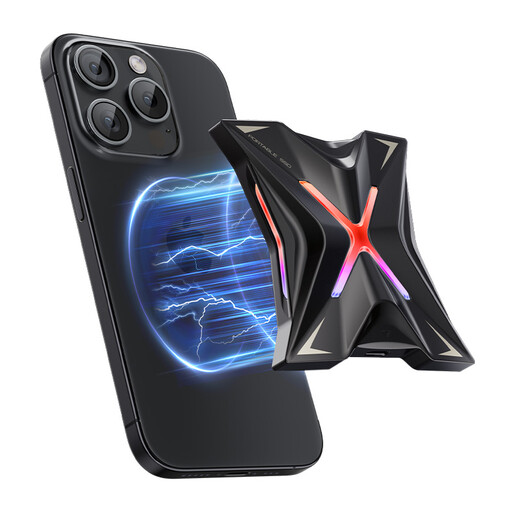 Image unavailable
MOVESPEED YSPSRX20M-1TTG magnetic portable SSD, 1TB
This 1TB drive is another possible destination for travel files if your phone or tablet can write to it while accessing your camera card.
The product name specifies USB 3.2 Gen 2x2 and a rated transfer speed of up to 2060MB/s. If you want to attach it magnetically, check compatibility with your exact phone; also check the required cable, drive format and power before travel.
View on Joybuy
Frequently asked questions
Can I copy camera-card photos to a drive using an iPhone or iPad?
Yes, with a compatible adapter, storage device and copying arrangement. Apple Support describes importing photos from SD cards or cameras and accessing external storage, but that does not mean every reader, drive and hub will work together. For iPhone external storage, Apple specifies one data partition and a supported file system, including exFAT or FAT32.
Can an Android phone handle the transfer instead?
A compatible Android phone can manage files on connected USB storage, but test the complete camera-card-to-drive arrangement. Files by Google Help describes USB-storage access on Android 7.0 and later; it does not establish that a particular phone will power your drive or operate it alongside your chosen reader.
How do I check a copy before reusing the camera card?
Copy the files rather than moving them, then compare the folders or file counts and open a sample of photos or videos from the destination. Keep the original card until you can check the copy again on your main computer where practical; seeing files on the drive is a useful check, not a guarantee against every transfer error.
When would a powered hub help?
Consider a powered hub when the mobile host cannot supply enough power for the connected drive, then test that the hub supports your reader-and-drive arrangement. Apple Support says external hard drives often need external power with iPhone, while SanDisk’s guidance for its cited portable SSDs describes a phone-current requirement and suggests a powered hub if the drive is not detected.
Are spare memory cards enough for a backup?
Spare cards provide more room to keep shooting, but they do not make a second copy of photos already on another card. If your camera supports duplicate recording across two cards, check its manual and settings; otherwise, use a separate copying step when an independent copy during the trip matters to you.


