Choose three matching monitors if separate centre and side views matter most and your graphics card, simulator and rig can accommodate them. A single ultrawide avoids three-panel alignment and a centre bezel, but cannot reproduce the distinct angled side screens of a configured triple-monitor cockpit. Before buying, check GPU outputs, game support, mounting dimensions and the refresh mode available through each planned connection.
Who each setup suits
Dedicated triple-screen rig builders
You want separate centre and side views and can measure the cockpit, mount three panels and configure the simulator. SIMRACINGCOCKPIT.GG advises using three ideally identical monitors in its triple-screen setup guidance.
Detail-focused sim racers
You put fine dashboard and track detail ahead of minimising graphics-card demand. Samsung and ASUS ROG list 32-inch-class 4K gaming displays, but their published refresh modes still need to suit your PC and connections.
Buyers who prefer a simpler wide view
You want a broad driving view without mounting and aligning three panels. SIMRACINGCOCKPIT.GG describes an ultrawide as easier to set up than triples; it does not give you separate angled side screens.
What to check before buying
For virtual touring-car driving, settle the screen layout first. Then check that the cockpit, graphics card and simulator can support the resolution and refresh mode you intend to use.
Three matching monitors
Choose this when: You want distinct centre and side views and have room for a rigid three-panel mount. SIMRACINGCOCKPIT.GG recommends matching the model, resolution and refresh rate.
Allow for: Three compatible graphics-card connections, physical alignment and the simulator's multi-screen configuration.
One curved ultrawide
Choose this when: You prefer one continuous screen and want to avoid aligning three panels.
Accept that: A single panel cannot provide the separate angled side-screen geometry of a triple-monitor rig.
| Concern |
What to check |
Who this matters to |
| Cockpit view and fit |
For triples, compare visible panel dimensions, mounting patterns and bezel widths with your rig. Check whether the simulator lets you enter screen angles and viewing distance. |
If I want side views positioned around my seat, the panels must fit and align on my rig; around 31% of consumers put cockpit geometry first. |
| PC and game compatibility |
Count suitable graphics-card outputs and check the required mode on each connection. Confirm the simulator's current multi-screen support; for an ultrawide, check its intended aspect ratio and resolution. |
I need my PC and touring-car simulator to run the layout I choose, rather than discovering a connection or game-mode obstacle after mounting it. Around 25% of consumers make compatibility their primary concern. |
| Motion and refresh |
Compare the refresh mode available through the planned ports, response-time test conditions and compatible variable refresh rate (VRR) support. |
Fast-moving scenery makes consistent motion presentation important to me, but a monitor's rated refresh does not set my in-game frame rate; around 25% of consumers prioritise motion behaviour. |
| Image and panel care |
Consider your room lighting and persistent dashboard or HUD elements. For OLED, check the exact model's panel-care guidance and warranty terms. |
If I leave cockpit graphics on screen for long sessions, I want to weigh picture quality against panel-care requirements. Picture quality and care come first for around 19% of consumers. |
A three-screen 4K plan deserves particular attention to graphics-card capacity: each 4K panel has more pixels than a QHD panel. Choose the target resolution alongside the frame rate you want your own PC to sustain, rather than treating the monitor's maximum refresh specification as a performance promise.
Buying pitfalls
-
Buying three screens before checking the PC and game
Windows can arrange detected displays, but a graphics-card display group and the simulator's own multi-screen view are separate setup steps.
Check the card's outputs and supported modes, then read the current instructions for your particular simulator before committing to three panels.
Different connectors may also call for suitable cables or adapters.
-
Mixing panels without planning their alignment
SIMRACINGCOCKPIT.GG recommends identical models, resolutions and refresh rates for its triple-screen workflow. Different dimensions or display modes can make alignment and configuration harder.
Check that the chosen model meets your mounting and connection requirements, and plan the placement of all three screens before mounting them.
Allow time to adjust the mounts and align the side panels.
-
Reading response time as an in-game guarantee
Samsung says refresh and response results for its Odyssey G70D vary with the input source, content and settings; its 1ms GtG figure requires Extreme mode under its stated test conditions.
Compare the conditions behind any response-time figure and confirm which refresh mode your chosen port and graphics card can use.
-
Choosing OLED triples without considering static images
ASUS ROG describes features intended to reduce burn-in risk on the PG32UCDM, while persistent dashboard and HUD graphics remain relevant to how you use an OLED racing display.
Compare panel-care guidance and the exact warranty terms with IPS alternatives before choosing OLED for each screen in a triple setup.
Brands to consider
Dell
The G2725D is a 27-inch QHD Fast IPS example to examine when planning three matching screens.
- Dell lists 2560 × 1440 resolution and up to 180Hz through DisplayPort 1.4; its HDMI connections support QHD at up to 144Hz.
- Check availability of the exact model before planning a matched set of three.
Samsung
The 32-inch Odyssey G70D LS32DG702EUXXU is a 4K Fast IPS option for a detail-focused display plan.
- Samsung specifies 4K UHD resolution and a 144Hz refresh rate for this model.
- Its stated refresh and response figures depend on the input source, content and settings; check the modes your PC can use.
ASUS ROG
The ROG Swift OLED PG32UCDM offers a 31.5-inch-viewable 4K QD-OLED route for a single screen or a carefully planned matching set.
- ASUS ROG lists 240Hz, DisplayPort 1.4 DSC and HDMI 2.1 for the PG32UCDM.
- ASUS ROG describes its thermal design as reducing burn-in risk, not eliminating it. Consider persistent cockpit graphics and the exact warranty terms.
LG UltraGear
The 45GS95QE-B is a single-screen curved OLED ultrawide alternative to a three-panel cockpit.
- LG lists a 45-inch, 3440 × 1440, 21:9 panel with an 800R curve and up to 240Hz refresh.
- Its continuous screen avoids panel alignment but cannot provide separate angled side views.
Joybuy monitor choices
These choices cover 27-inch monitors to assess for a matching triple-screen rig and curved ultrawides for a single-screen alternative. For any three-screen plan, check that the exact model, connections and mounting arrangement work together before buying multiple units.
 No image available
MSI MAG 274QF 27-inch WQHD Rapid IPS monitor
Consider this 27-inch monitor if you are comparing matching panels for a triple-screen cockpit.
Its product title states WQHD, Rapid IPS, a 180 refresh-rate figure and a 0.5ms response-time claim. Check the refresh mode available through your intended connections and measure the bezel and mount fit before planning three screens.
Joybuy
 No image available
Dahua 34-inch 3440 × 1440 curved VA monitor
Consider this single-screen option if you want a wide view without aligning three monitors; it will not provide separate angled side panels.
The product title specifies a 34-inch VA panel, 3440 × 1440 resolution, a 200Hz refresh-rate figure and DisplayPort 1.4 connections. Confirm the intended mode with your graphics card and simulator.
Joybuy
 No image available
HKC G27H2DPro 27-inch QHD Fast IPS monitor
This 27-inch model is relevant if you are assessing QHD panels for a matching triple-screen arrangement.
Its product title specifies 2560 × 1440 and 220Hz. Check the supported mode for each planned connection, plus mounting compatibility and bezel dimensions, before choosing three.
Joybuy
 No image available
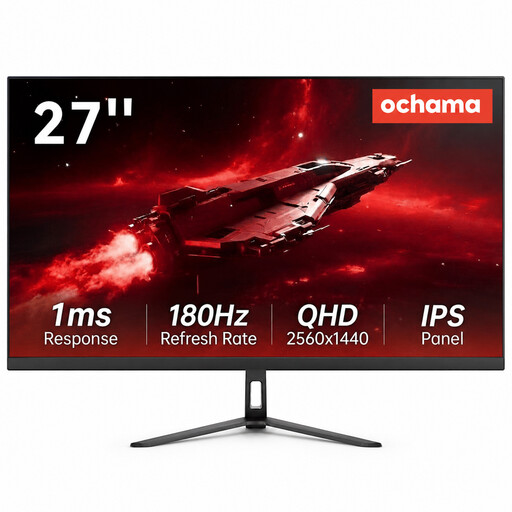
Ochama 27-inch QHD IPS 180Hz monitor (keyboard offer)
Consider this 27-inch monitor when comparing panels for a three-screen layout, and confirm whether the keyboard offer applies to your purchase.
The product title states QHD IPS and 180Hz, but confirm the exact pixel resolution and the modes available through its connections. Check the mounting pattern and bezel measurements against your rig.
Joybuy
 No image available
CRUA 49-inch 5120 × 1440 curved VA monitor
This single-screen alternative offers a wide format without three-panel alignment, but cannot reproduce separate angled side screens.
The product title specifies a 32:9 panel, 1500R curve, 165Hz, HDMI 2.1, DisplayPort 1.4 and a 75 × 75 VESA pattern. Check physical fit and the resolution and refresh mode supported by your chosen input.
Joybuy
Frequently asked questions
Do three racing monitors need to be the same model?
They do not have to be identical, but matching models make a triple-screen setup easier to plan. SIMRACINGCOCKPIT.GG recommends the same model, resolution and refresh rate; check the physical dimensions and mounting requirements too.
Should I connect all three monitors to the graphics card?
For the triple-screen racing workflow described by SIMRACINGCOCKPIT.GG, connect all three displays to the graphics card rather than the motherboard's display outputs. Check that the card has enough suitable outputs for the modes you intend to run.
Can I arrange the monitors in Windows before setting up the simulator?
Yes. Microsoft Support explains how to identify and drag displays into their physical arrangement in Windows. If you plan to use AMD Eyefinity, AMD says to enable extended multi-display mode before creating an Eyefinity group; the racing game may then need its own view configuration.
Can NVIDIA Surround or AMD Eyefinity combine three displays?
Both offer multi-display grouping, subject to the particular graphics card and setup. NVIDIA describes GeForce Surround as combining up to five displays, while AMD describes an Eyefinity group of up to six per graphics card; check your card's specifications and the simulator's requirements before choosing a triple-monitor mode.


