PC players considering two screens
If you want a wider truck-simulator view but would rather avoid a centre bezel and another set of cables, assess a single 34-inch 21:9 monitor. Confirm that the game and your PC can use its native resolution.


For PC truck simulation, a single 34-inch 21:9 monitor is worth considering if you want a wide driving view without the centre bezel and extra cabling of two displays. Check the full monitor and stand dimensions against your desk before choosing it over a smaller 16:9 screen, and check whether your PC can run the game at 3440 × 1440. If you also use a console, confirm how the console, game and monitor handle the wider aspect ratio.
If you want a wider truck-simulator view but would rather avoid a centre bezel and another set of cables, assess a single 34-inch 21:9 monitor. Confirm that the game and your PC can use its native resolution.
Limited floor space makes the desk layout especially important. Compare the complete monitor width, stand depth and available adjustment or mounting options with your desk and seating position; the screen diagonal alone will not establish fit.
Check the console’s output modes, the game’s display options and the monitor’s scaling controls before choosing 21:9. BenQ’s April 2025 PS5 guidance discusses 1440p output and ultrawide scaling, not native 21:9 behaviour for every setup.
Start with desk fit and the device you will connect. A 34-inch 21:9 screen offers a wider single-panel format; a suitably sized 16:9 screen remains an option if the ultrawide does not fit or the wider view matters less to you.
| Concern | What to check | Who this matters to |
|---|---|---|
| Desk fit | Compare the exact model’s overall width, stand depth and mounting requirements with your desk and seating position. | I cannot use a wider driving view if the screen or stand crowds my desk. Roughly 36% of consumers would put physical fit first. |
| Wide PC view | Check 21:9 game support and PC performance at 3440 × 1440; do not rely on a 1080p system requirement. | I want the road and cab on one wide screen, provided my PC can run the simulator comfortably. Around 29% of consumers would make that panoramic PC view their primary concern. |
| Motion and image features | Compare refresh rate, panel type and the connection needed for your chosen display mode. | I also play games where the display’s motion features matter, so I want to weigh them against my other uses. Approximately 21% of consumers would prioritise those features. |
| Console compatibility | Confirm supported output modes, game aspect ratios and scaling in the exact console and monitor manuals. | I switch between PC and console and need to know how each will appear on the screen. Roughly 14% of consumers would put input and aspect-ratio certainty first. |
A 34-inch label does not tell you how much desk width or depth the assembled monitor needs. A single screen can simplify the layout yet still leave too little room for the stand or your seating position.
Measure the desk and compare it with the exact model’s dimensions with its stand. If you plan to use an arm, check its mounting pattern, capacity and clearance too.
SCS Software’s September 2023 system-requirements update describes a target of 1080p at 30 FPS on medium-to-low settings. A 3440 × 1440 image has about 2.39 times as many pixels as 1920 × 1080, so that target cannot establish your frame rate at ultrawide resolution.
Check performance for your PC, simulator, settings and any mods at the resolution you intend to use.
Console output, game display options and monitor scaling can produce a different presentation from native 21:9 PC output. BenQ’s April 2025 PS5 guidance discusses 1440p output and scaling in a particular ultrawide context.
Check current documentation for your console, game and exact monitor, including resolution, refresh rate and aspect-ratio handling.
LG lists 240Hz on both the 34G630A-B and 34GS95QE-B, with OLED specified for the latter. Those features do not establish that either monitor fits your desk or that your simulator will run at that frame rate.
Resolve physical fit, PC performance and connections first. Then compare panel features and warranty terms against your intended gaming and desktop use.
These named models illustrate different ways to meet the space and usage requirements; their specifications should not be applied to every monitor from the same brand.
The Odyssey G5 LC34G55TWWPXXU is a curved, single-panel ultrawide option.
LG’s 34-inch UltraGear range provides both non-OLED and OLED ultrawide models to compare.
The EX3410R is a 34-inch curved ultrawide for shoppers considering built-in audio alongside the display.
The UltraSharp U3425WE is a work-and-play ultrawide to assess if desk connectivity and adjustment matter alongside occasional driving games.
These are 34-inch ultrawide options for a single-screen PC driving setup, including gaming-focused and work-oriented models. Check desk fit and PC performance for the particular monitor you choose.
 No image available
Consider this for a single-screen driving setup if you also want the OLED and 240Hz features named in the listing. Check the assembled dimensions and your PC’s performance for your simulator. The listing warns that the OLED screen is susceptible to burn-in, so review its screen-care guidance for your intended use.
 No image available
This curved ultrawide suits a PC player seeking one wide display without choosing OLED. LG UK specifies 3440 × 1440 and 240Hz for the 34G630A-B. Check desk dimensions and simulator performance; the product listing says a PC needs a graphics card supporting DisplayPort 1.4 or HDMI 2.1 to achieve 240Hz.
 No image available
Consider this curved ultrawide if OLED is part of your display preference as well as a single-screen driving view. Check its dimensions against your desk and the game’s performance on your PC. For console use, confirm aspect-ratio handling with the exact console, game and monitor.
 No image available
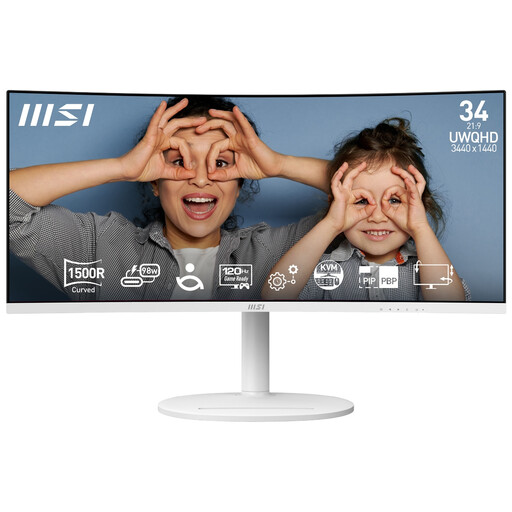
This curved ultrawide is worth assessing if the same desk also serves work or another device. Its title specifies 3440 × 1440 and 120Hz; the listing describes USB-C and a built-in KVM for switching between devices. Check its stand dimensions, connections and your PC’s simulator performance before choosing it for gaming.
 No image available
Consider this single-panel option if a high stated refresh rate matters alongside a wide driving view. Its title specifies 3440 × 1440 and 200Hz. Check the complete stand footprint against your desk: the listing’s screen dimensions exclude the base. It lists different maximum refresh rates by input, so confirm that your source device and cable support the mode you want.
It can provide a wide single-panel PC view without a centre bezel, provided the game supports the format and the monitor fits your desk. Measure the full width, stand depth and seating clearance; one screen does not necessarily occupy less desk space than your proposed two-screen arrangement.
Not necessarily. SCS Software’s September 2023 system-requirements update describes a target of 1080p at 30 FPS on medium-to-low settings, while 3440 × 1440 contains about 2.39 times as many pixels as 1920 × 1080. Check performance for your GPU, game version, settings and any mods.
Do not assume it will display your game at the monitor’s native 21:9 resolution. BenQ’s April 2025 guidance discusses PS5 1440p output and ultrawide scaling in a specific context; check current console output modes, the game’s options and the exact monitor’s scaling behaviour.