Who each setup suits

Face-to-face oral-history interviewers

When interviewer and narrator sit opposite each other, a front-and-rear recorder offers a way to capture their voices on separate tracks without setting up a microphone for each person. Zoom describes this recording option for the H2essential; the recorder still needs to face the speakers correctly.

Quiet-room shared-desk recordists

If a straightforward computer connection matters and you can keep papers, keyboards and tapping away from the desk, a central microphone with an omnidirectional mode may suit the conversation. Logitech G describes the Yeti Nano’s omni mode as picking up sound from all around it, including unwanted room sounds.

Interviewers working in noisier rooms

When background sound or unequal speaking levels make a shared microphone harder to place, close directional microphones offer more deliberate positioning for each speaker. Shure’s placement guidance stresses that a directional microphone has a fixed pickup area: each one must face the person it is intended to record.

What to check before buying

Front-and-rear recorder

Choose when: Two people face each other and separate front and rear tracks would help you manage their voices. Zoom specifies this capability for the H2essential.

Allow for: Positioning the recorder so each person speaks towards the intended side.

Central omnidirectional USB microphone

Choose when: Both speakers are near one microphone in a quiet room and a simple computer-based setup matters most.

Allow for: Pickup from every direction, including room ambience and desk activity.

Close directional microphones

Choose when: Each speaker needs an individually positioned microphone, particularly where room noise or voice levels make one shared position difficult.

Allow for: A microphone position for each person and a recording arrangement that accepts both.

Concern What to check Who this matters to
Both voices at usable levels Map the seating positions; check whether front and rear sources can be recorded separately. If we sit opposite each other, I need the interviewer and narrator to remain intelligible without relying on one person turning towards a central mic. Around 42% of consumers put balanced two-voice capture first.
A repeatable setup Check the required recording connection and whether monitoring and the accessories you need are available. For recurring community interviews, I want a setup I can prepare consistently without a complicated desk arrangement. Keeping setup simple is the primary need for around 33% of consumers.
Room and desk noise Check the pickup pattern and microphone position; consider whether each person needs a close mic. When papers or background sounds are hard to avoid, I would accept more careful placement to keep speech clear. Noise control comes first for around 25% of consumers.

Shared-desk recording pitfalls

  • Putting one cardioid microphone between opposite speakers

    A cardioid microphone has a fixed front pickup area. Shure’s placement guidance for adjacent talkers does not mean it will cover two people facing each other equally.

    Draw the seating arrangement before buying. For opposite seats, consider front-and-rear capture or a close microphone for each speaker.

    Changing to separate close microphones later also means making room for another microphone and a suitable recording input.

  • Expecting omni mode to ignore the desk

    Omnidirectional pickup includes sound from all around the microphone. Shure also cautions that microphones near a table can capture paper rustling and tapping.

    Use a central omni setting where the room is quiet, and keep papers, keyboards and tapping hands away from the microphone during recording.

  • Using noise reduction instead of positioning the microphone

    Shure describes noise-reduction features for the MV7+, but its directional pickup still needs to face the intended speaker. Software features do not make the microphone follow someone who moves away from it.

    Position each microphone first, then listen on headphones and make a short test recording at normal speaking levels.

  • Recording before deciding how interviews will be used

    Identifiable recordings used by an organisation can involve personal data. The UK Information Commissioner’s Office says organisations must identify a lawful basis and be transparent about their use of that data.

    Before recording, set out the project’s purpose, storage and access arrangements, and any archive or publication plans. Seek advice suited to the project where needed.

Relevant brands and models

Zoom

The H2essential is relevant when a compact recorder will sit between two people facing each other.

  • Zoom specifies selectable microphone patterns and two discrete mono tracks using the front and rear microphones.
  • The recorder’s orientation and each speaker’s position still matter; separate tracks do not ensure equally clear voices in every desk layout.

Shure

The MV7+ is relevant to close, speaker-facing recording rather than relying on one central microphone for opposite seats.

  • Shure specifies USB-C and XLR connections and headphone monitoring for the MV7+.
  • Shure’s voice-isolation and denoising descriptions are the brand’s own claims; positioning remains important, and one MV7+ is not an all-round two-speaker setup.

Logitech G

The Yeti Nano is relevant to a simple central USB setup in a quiet shared space.

  • Logitech G specifies cardioid and omnidirectional modes and describes omni mode for conversations around a table.
  • Omni mode also picks up room and desk sounds. Check the seller’s terms and the configuration offered for the product you intend to buy.

RØDE

The NT-USB+ is relevant to a direct-to-computer setup aimed at a primary speaker.

  • RØDE specifies a USB-C connection, a tight cardioid pattern, a desktop stand, a pop filter and headphone monitoring.
  • Its tight front-facing pickup needs deliberate placement if two people are seated on opposite sides of the desk.

Joybuy product choices

These choices cover two different ways to position microphones near interview participants: a two-transmitter wireless kit and a single directional microphone kit. Check how either option connects to your intended recording device before choosing it for a two-person interview.
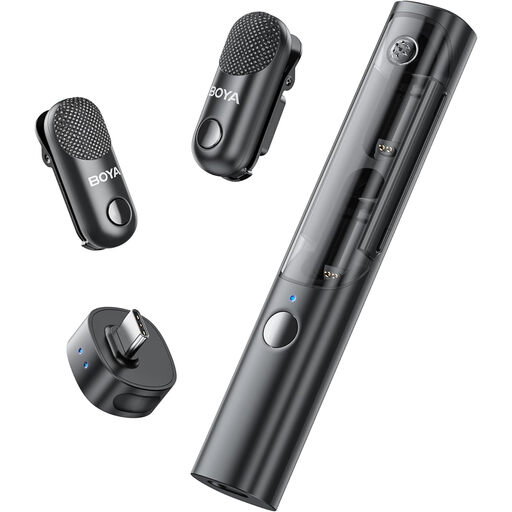
BOYA Magic-05 USB-C wireless lavalier microphone kit with two transmitters, one receiver and a charging case

BOYA Magic-05 USB-C wireless lavalier kit, 2 TX + 1 RX with charging case

The two-transmitter kit is relevant if you want to place a microphone with each interview participant rather than use one between them.

The product name specifies a USB-C receiver and charging case. Before buying, check compatibility with your recording device and software, and whether the resulting recording keeps the voices separate or mixes them.

View on Joybuy

FIFINE K688CT USB/XLR dynamic microphone kit with boom arm

FIFINE K688CT USB/XLR dynamic microphone kit with boom arm

This single microphone suits a close, aimed position for one interview participant; recording both people this way calls for another microphone and a compatible recording arrangement.

The kit’s name specifies USB/XLR connections, a boom arm, headphone jack, mute button and gain knob. Check that the arm clamp fits your desk and that you have the cable and inputs needed for your chosen connection.

View on Joybuy

Questions about interview recording

Can one microphone record both people at a shared desk?

Yes, if its pickup pattern suits where they sit. Logitech G describes the Yeti Nano’s omni mode as receiving sound from all around the microphone, which can suit nearby speakers in a quiet room; for opposite seats, Zoom’s H2essential offers front-and-rear recording, while separate close microphones provide another way to position pickup for each person.

Where should a shared-desk microphone go?

Place it away from papers and tapping hands, then orient it for the speakers and its pickup pattern. Shure notes that a directional microphone has a fixed front pickup area and that microphones near a table can capture rustling and tapping; make a short test recording with both people in their usual seats.

Is headphone monitoring useful during an interview?

Yes, listening while recording can help you notice a quiet speaker, handling noise or an incorrectly aimed microphone before the conversation ends. If direct monitoring matters to you, check for a headphone connection: Shure specifies one for the MV7+, and RØDE lists headphone monitoring for the NT-USB+.

Do UK data-protection rules matter for local-history recordings?

They can matter when an organisation collects and uses identifiable interviews. The UK Information Commissioner’s Office says organisations must identify a valid lawful basis and be clear about how personal data is used; plan the project’s storage, access and intended archive or publication use before recording, and obtain project-specific advice where appropriate.