Choose a portable recorder for interviews that move between classroom tables, a two-transmitter wireless system when both speakers need a microphone close to them, or a USB desk microphone for a fixed, computer-based station with one speaker close to the mic. Whichever setup you choose, plan microphone placement and test the recording in the classroom; agree how interviews will be recorded and handled before starting.
Who each setup suits
Teachers running interviews at different tables
A dedicated portable recorder lets students move between seated interview pairs without setting up a computer at each table. Place it near the speaker rather than assuming its built-in microphones will capture every voice equally clearly.
Groups recording two principal speakers
When the interviewer and interviewee both need close microphone placement, a two-transmitter wireless system offers a microphone position for each person. Check how its receiver connects to the device that will make the recording.
Classes creating a fixed recording corner
A computer-connected desk microphone suits a station where a speaker can stay close to the mic for each recording. One microphone at that station is not a complete plan for several people speaking around a table.
What matters when choosing
Decide where interviews will take place and how many voices need close microphone coverage before comparing recorder features or connection options.
| Concern | What to check | Who this matters to |
|---|
| Recording between tables |
Look for a portable recorder with built-in microphones, and plan a position near the interviewee that keeps it off direct contact with a hard table. |
If interviews move between pairs, I need students to start recording without setting up a laptop each time. Around 42% of consumers put that movable, straightforward workflow first. |
| Two distinct voices |
Check that a wireless kit has two transmitters and that its receiver can connect to the intended recording device. |
When both interviewer and interviewee need to be heard, I want a microphone close to each person rather than one in the middle. For around 33% of consumers, separate close-mic coverage is the primary need. |
| Fixed computer station |
Check direct USB compatibility and whether one speaker can stay close to the desk microphone; an XLR connection to a computer may need an audio interface. |
For repeated recordings at one station, I need a consistent speaking position and a workable computer connection. That fixed-station need comes first for around 25% of consumers. |
Mistakes to avoid
-
Using one desk microphone for two distant speakers
The University of Leicester’s oral-history guidance advises placing a table microphone near the interviewee and considering two microphones if the interviewer must also be audible. A centrally placed mic can leave the more distant voice difficult to hear.
Decide whether the recording needs one main voice, two principal voices or a group before choosing the microphone layout.
Clear coverage of both principal speakers may call for a second microphone or separate stand.
-
Setting a recorder directly on a hard table
Zoom’s H1essential manual warns that sound reflected from a table can reduce clarity when the recorder sits directly on it.
Raise the recorder on a small tripod or isolate it from the surface, then make a short test recording in the classroom.
-
Choosing XLR without planning the computer connection
An XLR microphone may need more than a cable to feed a computer. Shure states that its MV7+ requires an analogue-to-digital audio interface when connected to a PC through XLR.
For a direct computer setup, check USB compatibility; if choosing XLR, account for the interface and cables required by the particular microphone.
-
Planning the equipment but not the recordings
Classroom interviews can contain identifiable personal information. The UK Information Commissioner’s Office says an applicable lawful basis must be determined and documented before that information is processed; later sharing or a change of purpose needs its own consideration.
Agree the project’s purpose, access, retention and publication plans before recording. Follow the school’s procedures and involve its data-protection lead where appropriate.
Relevant brands for reference
Zoom
Zoom’s H1essential illustrates the dedicated handheld-recorder route for interviews that do not use a computer at every station.
- Zoom specifies built-in X/Y microphones and 32-bit-float recording for the H1essential.
- Its manual warns that placing the recorder directly on a table can reduce clarity through reflected sound.
Tascam
Tascam’s DR-07XP is another portable-recorder option when adjustable built-in microphone positions matter.
- Tascam specifies adjustable stereo condenser microphones and a 32-bit-float recording mode for the DR-07XP.
- Those specifications do not establish how clearly individual voices will be separated in a busy classroom; test the intended placement.
RØDE
RØDE’s Wireless ME Dual illustrates close-worn recording for an interviewer and interviewee who each need a microphone position.
- RØDE describes the Wireless ME Dual as a two-transmitter wireless system.
- Check the chosen kit’s transmitter count, charging arrangements and connection to the recording device.
Shure
Shure’s MV7+ illustrates a close-addressed microphone for a fixed spoken-word recording station.
- Shure lists USB-C and XLR outputs for the MV7+.
- Shure says an analogue-to-digital audio interface is required to connect the MV7+ to a PC through XLR; a single close-addressed mic also requires the speaker to remain near it.
Joybuy products for these setups
These products cover three classroom interview approaches: a two-transmitter wireless kit, portable voice recorders and a microphone kit for a fixed computer station. Choose by speaker placement and recording workflow, then check the connection and classroom layout for the particular product.
 No image available
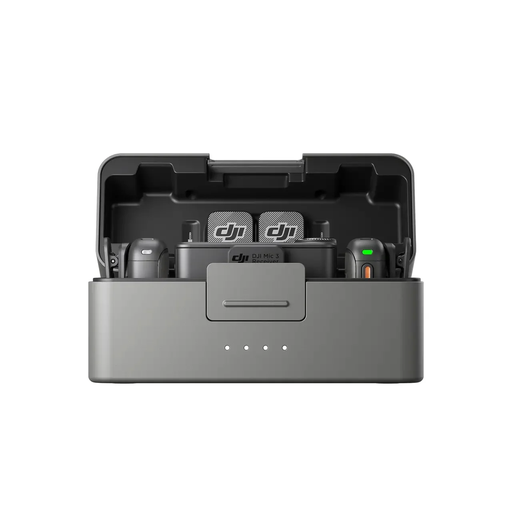
DJI Mic 3, 2 TX + 1 RX + Charging Case
Consider this kit when the interviewer and interviewee each need a close microphone position. The named bundle has two transmitters, one receiver and a charging case; check how the receiver connects to the device you intend to record with.
View on Joybuy
 No image available
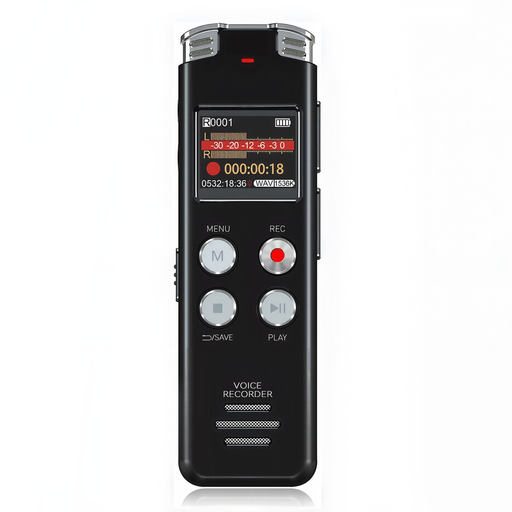
Rexsun L357 128GB Portable Voice Recorder
A portable recorder is a choice for interview pairs working away from a computer station. This L357 variant has 128GB storage and an LCD screen; test its position with both speakers in the intended classroom before relying on a full interview.
View on Joybuy
 No image available
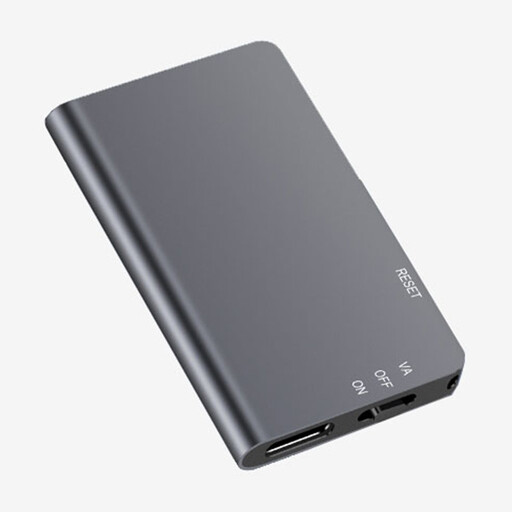
Rexsun L810 64GB One-Touch Voice Recorder
This one-touch recorder suits a movable interview setup when starting a recording without a computer matters. It is the 64GB L810 variant; place it near the interviewee and test whether both voices are audible in the classroom.
View on Joybuy
 No image available
FIFINE K688CT USB/XLR Dynamic Microphone Kit
Use this close-addressed microphone kit for a fixed station where a speaker can remain at the mic. The named kit includes a boom arm and has USB/XLR connection options, a mute button, headphone jack and gain knob; check computer compatibility and plan separate coverage if two people must be heard equally clearly.
View on Joybuy
Questions about classroom recording
Does a classroom oral-history interview always require consent as its UK GDPR lawful basis?
No: consent is not automatically the appropriate UK GDPR lawful basis. The Information Commissioner’s Office says the school or project must identify and document a basis that fits its purpose before processing personal information. Separately, Norfolk Record Office’s oral-history guidance calls for an interviewee to approve a participation agreement before recording; follow school procedures and seek data-protection advice for pupil recordings, sensitive disclosures or publication.
Should a portable recorder sit directly on a classroom table?
Keep it off direct contact with a hard table where practical. Zoom’s H1essential manual warns that reflected sound from table placement can reduce clarity and recommends a tripod; test the position in the room before the interview.
Where should a table microphone go during an interview?
Place it as near to the interviewee as practical and test whether the interviewer is also audible. The University of Leicester’s oral-history guidance recommends close placement and suggests considering two microphones when the interviewer’s voice needs coverage too.
Can an XLR microphone connect directly to a classroom computer?
Check the particular microphone’s connection requirements rather than assuming an XLR cable is sufficient. Shure says connecting its MV7+ to a PC through XLR requires an analogue-to-digital audio interface; its USB-C connection is the route to check for direct compatible-computer recording.


