Window-side digital artists
You draw for extended periods beside a bright window and need to manage reflections while keeping a usable canvas on screen.


Choose a matte or anti-glare ultrawide with an adjustable stand if you draw beside a bright window, but position the screen and control daylight so the window is not reflected directly in it. For colour-sensitive work, match the model’s documented colour space and calibration information to your output. Choose screen size and connections around the space you need for your canvas and references, the room on your desk and your laptop’s capabilities.
You draw for extended periods beside a bright window and need to manage reflections while keeping a usable canvas on screen.
You work to a defined colour space and want documented colour specifications that fit your drawing workflow.
You keep drawing software and references open together, and may need laptop charging, a monitor hub or easier switching between two sources.
Plan the screen’s position relative to the window before choosing its size, colour specification and connections. The Health and Safety Executive advises arranging displays to avoid bright reflections and using blinds or curtains when light is intrusive.
| Concern | What to check | Who this matters to |
|---|---|---|
| Window reflections | Check the screen finish and stand adjustment, and whether you can position the display away from direct reflections. | When daylight catches my screen, I need to see the canvas rather than a reflection of the window; around 31% of consumers put reflection control first. |
| Drawing colour | Match the stated colour space to your output and check the exact model’s accuracy and calibration documentation. | If I deliver artwork in a defined colour space, I need more than a wide-gamut figure to judge my setup; colour reliability comes first for around 31% of consumers. |
| Canvas and reference space | Measure the desk and compare 3440 × 1440 with 5120 × 2160 or other stated resolutions. Check your computer’s supported display output. | I want my canvas and reference images visible together without crowding either window; around 23% of consumers make usable workspace their primary concern. |
| Laptop and source connections | Check video support, charging requirements and cable compatibility; consider a KVM if you switch between two computers. | When I connect a laptop or move between two sources, I want fewer connection changes during a drawing session; connectivity is the leading need for around 15% of consumers. |
A brighter display does not remove a direct reflection. The Health and Safety Executive advises arranging the screen to avoid glare and controlling intrusive daylight with curtains or blinds.
Work out the desk position first, then check the panel finish and the adjustment available on the stand.
If the desk cannot move, you may also need window coverings or a monitor arm.
The Dell U4025QW’s stated 5120 × 2160 resolution provides more vertical pixels than the 3440 × 1440 specified for the BenQ PD3420Q and ASUS PA34VCNV, but the larger screen also needs more desk room.
Measure your available space and decide how much room your canvas, tools and references each need before choosing a size.
A monitor’s USB-C power-delivery rating does not establish whether your laptop can send it video or charge as required.
Compare the laptop’s port, charging requirement and supported display modes with the monitor and cable specifications.
Depending on the laptop and connection, a compatible cable, separate charger or dock may still be needed.
Gamut coverage, an accuracy target and calibration documentation answer different questions about a drawing display; check them for the exact model rather than relying on a brand or HDR label.
Choose a colour mode suited to your delivery target and check whether the model’s calibration or validation information meets your workflow needs.
Colour-critical work may also require calibration equipment or time to maintain the workflow.
Dell’s UltraSharp U4025QW and U3425WE are model-specific options for desks that need drawing space, references and laptop connectivity.
The DesignVue PD3420Q focuses on a matte drawing display with documented colour specifications and USB-C connectivity.
The ProArt PA34VCNV combines an anti-glare ultrawide surface with colour and laptop-docking specifications.
The ViewFinity S65VC is relevant when switching between two sources is central to the desk setup.
These ultrawides offer different amounts of room for a canvas and references, from a 29-inch display to 49-inch 32:9 models. Check each screen’s position relative to your window, along with any colour or laptop requirements that determine your choice.
 No image available
Consider this 49-inch screen if you need a broad layout for drawing and references and have room to position it away from window reflections.
Its stated format is 32:9 Double Quad HD, with a 240 Hz refresh rate. Check the colour documentation and your laptop’s video and charging requirements if those matter to your workflow.
 No image available
The 34-inch format is worth considering if you want drawing software and references side by side without choosing a 49-inch screen.
The product is specified as WQHD with a 240 Hz refresh rate. Check its calibration documentation if colour consistency is essential, and plan how to keep the window out of direct reflection.
 No image available
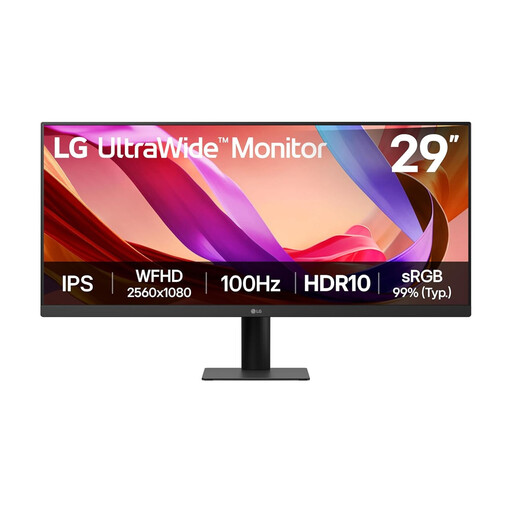
This smaller ultrawide may suit a desk where drawing and references must share one screen but a 34-inch or 49-inch display would be difficult to place.
Its stated format is UWFHD 1080p, with a 100 Hz refresh rate and HDMI and DisplayPort connections. Check that the available workspace and stand adjustment suit your layout.
 No image available
Its 34-inch ultrawide format gives a canvas and reference windows space to sit alongside each other.
The stated resolution is 3440 × 1440, with a 200 Hz refresh rate and HDMI and DisplayPort inputs. Check the exact screen finish and colour specifications before choosing it for a bright-window or colour-critical setup.
 No image available
Consider this broad display when you want references and a canvas open together and can accommodate a 49-inch screen on the desk.
Its stated format is 32:9 VA at 5120 × 1440, with a 165 Hz refresh rate and height adjustment. Check the screen finish and calibration information if reflections or colour consistency will decide your purchase.
No, brightness alone will not remove a direct reflection. The Health and Safety Executive advises positioning the screen to avoid bright reflections and adjusting blinds or curtains when daylight is intrusive; treat screen finish and brightness as supporting considerations.
Not necessarily: choose 5120 × 2160 when its extra vertical pixels and room for a canvas, tools and references justify a larger screen on your desk. A 34-inch 3440 × 1440 model may meet a side-by-side need with less physical width; check the dimensions of the exact models you are considering.
Compare your laptop port’s video support and charging requirement with the monitor’s stated connection and power-delivery limit. Also check the cable and the resolution and refresh rate you intend to use; a USB-C socket alone does not establish that all of these will work together.