What matters when choosing?
Decide whether your two work areas are windows from one computer or feeds from two devices. Then weigh vertical detail against horizontal span and the colour controls your work requires.
40-inch 5K2K
Choose it when: You want a continuous, detailed space for the stage, timeline and tools. Dell’s U4025QW and LG’s 40U990A-W both have a listed resolution of 5120 × 2160.
Trade-off: Allow for the larger physical display, and confirm that your computer and chosen connection can run the settings you need.
34-inch creator ultrawide
Choose it when: Two device feeds or documented creator colour controls take priority. BenQ’s PD3420Q and ASUS’s PA34VCNV both list PBP.
Trade-off: Their listed 3440 × 1440 resolution provides fewer vertical pixels than a 5120 × 2160 display.
49-inch 32:9
Choose it when: A long timeline and several wide windows side by side matter more than canvas height.
Trade-off: Check vertical resolution and desk fit. For Samsung’s OLED G93SC specifically, Samsung says static interface elements can trigger automatic brightness reduction.
| Concern | What to check | Who this matters to |
|---|
| Detailed canvas |
Native resolution and whether your computer can output it through the intended port; measure the desk space available. |
If the stage, frames and timeline must remain legible beside tool panels, I would put vertical detail first. Around 36% of consumers with these animation-workspace needs would make canvas detail their primary concern. |
| Colour controls |
Named colour-space coverage, accuracy information and presets relevant to the delivery workflow. |
When work is going to a client or into a colour-managed video workflow, I need more than a wide panel. For around 29% of consumers, documented colour handling would be the deciding need. |
| Two-device workflow |
PBP support, usable input combinations and any required KVM or USB-C charging capability on the exact model. |
If a laptop and another computer must appear on one display, arranging two windows will not solve my problem. Two-source operation would come first for around 21% of consumers. |
| Horizontal span |
Aspect ratio, vertical resolution, physical width and, for an OLED model, its documented static-image behaviour. |
With a long timeline and several wide windows, I may prefer uninterrupted width even if I give up vertical pixels. Around 14% of consumers would put that span ahead of the other needs. |
Joybuy product choices for ultrawide workspaces
These models cover wide 49-inch layouts and 34-inch ultrawide workspaces. Decide whether you need windows from one computer or simultaneous feeds from two devices: a product’s width or its number of ports alone does not establish PBP support.
 Image unavailable
Acer X Predator X49X 49-inch QD-OLED
Consider this model if a very wide layout is your priority rather than the vertical resolution of a 5K2K display.
The title specifies 32:9, Double Quad HD, a 1800R curve, 240 Hz and USB-C. Check the exact PBP input modes and OLED panel-care behaviour for a workspace with fixed tool panels.
View on Joybuy
 Image unavailable
CRUA 49-inch 5120 × 1440 curved ultrawide
This 32:9 model is suited to considering a long timeline alongside other windows on one screen.
Its title lists a VA panel, 165 Hz, two HDMI 2.1 ports and two DP 1.4 ports. Confirm PBP operation if those windows need to come from separate devices, and check that your desk or mount can accommodate the display.
View on Joybuy
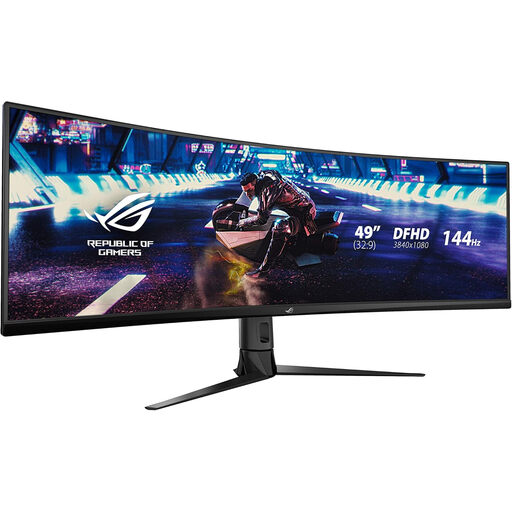 Image unavailable
ASUS ROG STRIX XG49VQ DFHD 144Hz
Consider this curved ultrawide for side-by-side windows if horizontal room is the main need.
The title identifies DFHD resolution and a 144 Hz refresh rate. Check its vertical resolution against the height your animation stage needs, and confirm PBP and colour specifications if either is essential to your workflow.
View on Joybuy
 Image unavailable
Dahua 34-inch 3440 × 1440 curved ultrawide
This 34-inch model is an option for arranging applications on a 21:9 workspace rather than a 49-inch-wide display.
Its title lists a VA panel, 200 Hz, 85% DCI-P3 and two each of HDMI and DP 1.4 ports. A stated gamut is not a colour-accuracy result; check colour documentation and PBP support if your work requires them.
View on Joybuy
 Image unavailable
Lepow HC-SJ34MZ5 34-inch 3440 × 1440
Consider this 34-inch ultrawide if one computer needs room for an animation application and adjacent windows.
The title specifies a curved display and 165 Hz. If your two work areas require separate computer feeds, confirm PBP and the required connections; check documented colour specifications for colour-managed delivery.
View on Joybuy
Common questions
Can an ultrawide show two computers at once?
Yes, if the exact monitor supports a suitable multi-input mode and your devices can connect through the required ports. BenQ lists PIP/PBP and KVM for the PD3420Q, while ASUS lists PIP/PBP for the PA34VCNV; neither feature follows automatically from screen width.
Is a 49-inch 32:9 monitor better for animation than 40-inch 5K2K?
Neither format suits every layout: 32:9 favours horizontal span, while the 5120 × 2160 resolution listed for Dell’s U4025QW and LG’s 40U990A-W provides more vertical pixels than the 1440-pixel-high Dual QHD format. Choose according to whether your stage and stacked panels need height or your timeline and adjacent windows need width.
How can I make use of the extra screen space?
Arrange the stage, timeline and tools in your animation application, then save the layout if the application supports workspaces. Adobe says saved workspaces in Animate can restore panel sizes and positions, making it easier to return to a layout that fits the display.
What if an online monitor purchase does not work out?
For a qualifying UK distance purchase, GOV.UK says customers generally have 14 days after receiving the item to notify the seller that they wish to cancel, followed by another 14 days to return it. Check the applicable cancellation conditions and seller’s process; remedies for a faulty or misdescribed monitor are separate from a change-of-mind return.
What should I do with an old monitor?
Use an appropriate electrical-equipment recycling or retailer take-back route rather than putting it in general household waste. GOV.UK describes the UK waste electrical and electronic equipment regime as encouraging recovery, reuse and recycling.


