For frequent comparison of long documents, start with a height-adjustable 40-inch 5K2K ultrawide if your computer can drive its 5120 × 2160 resolution. A lower-resolution 21:9 screen may suit a tighter desk or different computer setup, while a 49-inch 32:9 screen prioritises width over vertical pixels. Whichever format you choose, check that you can position it comfortably when both sitting and standing.
Who this choice affects
Long-document reviewers
If you compare revisions of reports, contracts or spreadsheets, you need room to keep both versions visible at a usable zoom. Dell, LG and Lenovo list 40-inch-class 21:9 models with 5120 × 2160 resolution; whether that space feels sufficient still depends on your applications and preferred text size.
Sit-stand desk users
Changing desk height also changes your viewing position. The UK Health and Safety Executive advises placing the top of the screen level with your eyes and the screen about an arm’s length away, so the stand or mounting arrangement matters alongside panel size.
Single-cable laptop workers
A docking monitor may combine display, charging and connected devices, but the intended setup depends on the laptop’s video output and charging requirements. Check both the computer and the exact monitor model before relying on one cable.
What matters when choosing
Choose the screen format around the documents you need to see, then check whether its connections and physical adjustment work at your desk.
40-inch 5K2K, 21:9
Choose when: Long pages are your main task and your computer supports 5120 × 2160 through the connection you plan to use.
Trade-off: Allow room for the large screen and confirm that its stand or a compatible arm reaches your working position.
Lower-resolution 21:9
Choose when: You want two documents on one screen but a smaller format or a different display-output requirement matters more.
Trade-off: The 3440 × 1440 and 3840 × 1600 examples from Philips and LG have fewer vertical pixels than 5120 × 2160, which can mean more scrolling at your preferred zoom.
49-inch dual-QHD, 32:9
Choose when: An especially broad desktop for documents and other windows matters more than page height.
Trade-off: Philips lists 5120 × 1440 for its 49-inch example: it is wide, but has fewer vertical pixels than 5120 × 2160 and needs space across the desk.
| Concern |
What to check |
Who this matters to |
| Readable document space |
Compare native resolution and try your usual application zoom; confirm your computer can output the chosen resolution. |
I need to follow changes across two long pages without shrinking the text too far. Around 36% of consumers would put readable document space first. |
| Seated and standing position |
Check stand adjustment or compatible mounting, desk stability and viewing distance at both desk heights. |
When I raise my desk, I still need the screen directly ahead at a comfortable height. For around 29% of consumers, positioning would be the primary concern. |
| Laptop and device connections |
Match video-output support and charging needs to the monitor’s ports; check switching features if you use two computers. |
I want my work laptop and peripherals to connect without rebuilding the setup each time. Connection needs would come first for around 21% of consumers. |
| Desk fit and purchase constraints |
Measure usable width and depth, including stand or arm clearance, before choosing a screen size. |
I have to leave room for my keyboard and a comfortable viewing distance, rather than choose by diagonal size alone. Around 14% of consumers would make desk fit or other purchase constraints their deciding need. |
Buying pitfalls
-
Choosing by diagonal size alone
A wider display does not necessarily show more of a document vertically. Philips lists 5120 × 1440 for its 49-inch dual-QHD model, compared with 5120 × 2160 for its 40-inch 5K2K model.
Compare native resolution and aspect ratio with the way you arrange your documents, rather than assuming the larger diagonal suits long pages.
-
Assuming the standing desk positions the screen for you
The Health and Safety Executive advises a screen top level with the eyes and a viewing distance of about an arm’s length. Desk-height adjustment alone does not establish where the monitor will sit.
Check the stand’s adjustment range, usable desk depth and any proposed arm’s compatibility and weight limit at your standing working height.
A compatible monitor arm or mounting solution may be needed if the supplied stand cannot reach the position you need.
-
Assuming a USB-C connector guarantees the full setup
Display output and charging depend on the capabilities of both the laptop and the monitor; a connector label alone does not establish the resolution, refresh rate or charging arrangement you need.
Check the exact laptop model’s external-display modes and charging requirement against the exact monitor’s port and power-delivery specifications.
-
Considering the monitor in isolation
A broad screen also changes how you use the space around the keyboard, mouse and other equipment. The Health and Safety Executive advises considering the whole workstation and adjusting screens and lighting to avoid reflections and glare.
Before settling on a size, check your viewing distance, central screen placement, input-device position and lighting at both desk heights.
Relevant brands to consider
Dell
The UltraSharp U4025QW is a 40-inch-class 5K2K option for document space and laptop docking.
- Dell UK lists 5120 × 2160 at 120 Hz, height, tilt and swivel adjustment, and USB-C video and data with up to 90 W power delivery.
- Check that your laptop supports the intended display mode and that the stand’s range suits your desk heights.
LG
The 40WP95CP-W represents LG’s 39.7-inch 5K2K route with Thunderbolt 4 connectivity.
- LG UK lists 5120 × 2160 resolution, up to 96 W charging and 5K daisy-chain capability for this model.
- Confirm that your laptop supports the output mode and any connected-display arrangement you intend to use.
Lenovo
The ThinkVision P40w-20 is a 39.7-inch 5K2K model aimed at docking and multi-device work.
- Lenovo lists 5120 × 2160 resolution, Thunderbolt 4, Ethernet, eKVM and True Split features for this model.
- Check current availability and whether its particular connections suit your computers.
Philips
Philips has distinct 40-inch 5K2K, lower-resolution ultrawide and 49-inch dual-QHD business-monitor models.
- Philips UK lists 5120 × 2160 for the 40B1U6903CH/00, 3440 × 1440 for the 40B1U5600/00 and 5120 × 1440 for the 49B2U6903CH/00.
- Ports and other features vary by model; do not assume that the webcam or docking features of one apply to another.
HP
The Series 7 Pro 740pm is a 39.7-inch 5K2K option with integrated conferencing equipment.
- HP lists a 5120 × 2160 display, two Thunderbolt 3 ports, a webcam, microphones and height, tilt and swivel adjustment for this model.
- Decide whether integrated conferencing equipment serves your work if document comparison is the main reason for buying.
Joybuy product choices
These models cover a 49-inch 32:9 screen and several 34-inch ultrawides for side-by-side work. Compare their document space and desk fit with the 40-inch 5K2K route before deciding which format suits you.
 No image available
Acer Predator X49X 49-inch QD-OLED ultrawide
Consider this format if a particularly wide workspace matters more to you than page height. The title specifies a 32:9 curved QD-OLED display, Double Quad HD resolution and 240 Hz refresh rate; measure the space available across your desk before choosing it.
View on Joybuy
 No image available
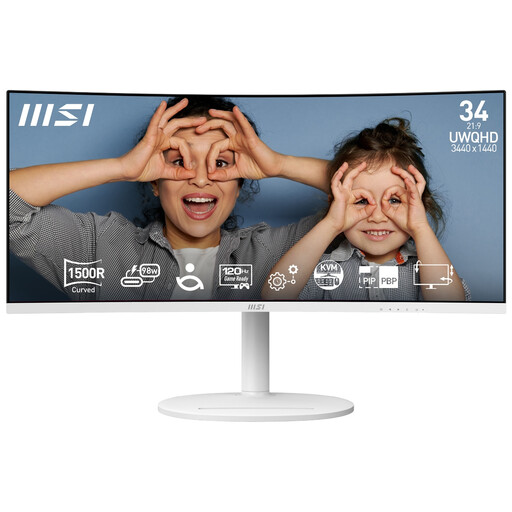
Modern MD342CQPW 34-inch curved monitor, white
This 34-inch format is worth considering if you want two documents on one screen without moving to a 49-inch display. Its title specifies 3440 × 1440 resolution, 120 Hz refresh rate and a 1500R curve; check the stand’s usable height at your standing desk.
View on Joybuy
 No image available
LG UltraGear 34GX900A-B 34-inch OLED monitor
This 34-inch ultrawide is an option if you also want the OLED panel specified in its title. It is described as WQHD with a 240 Hz refresh rate; for prolonged use with static document windows, consider OLED image-retention risk and check the manufacturer’s care guidance.
View on Joybuy
 No image available
Philips Evnia 6000 34M2C6500 34-inch monitor
Consider this 34-inch ultrawide if you plan to connect through HDMI or DisplayPort and need to check its fit at a sit-stand desk. Its title specifies 3440 × 1440 resolution, two HDMI inputs, DisplayPort, and height, swivel and tilt adjustment; confirm that its adjustment range reaches your standing position.
View on Joybuy
 No image available
Dahua 34-inch curved UWQHD monitor
This 34-inch ultrawide may suit two-document work where HDMI or DisplayPort connections fit your computer. Its title specifies 3440 × 1440 resolution, 200 Hz refresh rate, two HDMI inputs and two DisplayPort 1.4 inputs; check screen placement at both desk heights before ordering.
View on Joybuy
Frequently asked questions
Which resolution helps when comparing two long documents?
A 5120 × 2160 5K2K ultrawide is a useful starting point when vertical page space is important and your computer supports it. The Dell and LG 40-inch-class examples have more vertical pixels than the 3440 × 1440 Philips alternative or Philips’ 5120 × 1440 dual-QHD model; check readability at your preferred application zoom.
How should I position an ultrawide at a standing desk?
Set it up so you can work with the screen directly in front of you at both desk heights. The Health and Safety Executive advises keeping the top of the screen level with your eyes and the display about an arm’s length away; check whether the stand or a compatible arm lets you achieve that position.
Will USB-C run a 5K2K monitor and charge my laptop?
USB-C alone does not establish either capability. Check your laptop’s supported external-display resolution and refresh rate, its video-output mode and its charging requirement against the monitor’s specifications; Dell lists up to 90 W power delivery for the U4025QW, while LG lists up to 96 W for the 40WP95CP-W.
Is a 49-inch dual-QHD screen better for document comparison?
Choose a 49-inch dual-QHD format when broad horizontal space is your priority, not simply because its diagonal is larger. Philips lists 5120 × 1440 for its 49-inch example, compared with 5120 × 2160 for its 40-inch 5K2K model, so long-page visibility and the physical width of the screen both deserve a check.


