What matters when choosing?
Decide how you will judge and deliver colour before choosing a screen size; then check whether your editing layout, desk and computer connection suit the monitor.
| Concern |
What to check |
Who this matters to |
| Colour confidence |
Check the exact model’s sRGB or Rec.709 mode, stated accuracy basis and calibration options. For print preparation, check the colour requirements of that workflow too. |
If I make final colour decisions for a gallery or print, I need a display I can profile rather than trusting gamut coverage alone. Around 36% of consumers put colour confidence first. |
| Editing workspace |
Compare native resolution and physical dimensions: the cited 40-inch 5K2K models offer 5120 × 2160, while the cited 34-inch creative models offer 3440 × 1440. |
Keeping a full image, thumbnails and editing panels visible matters when I select many photographs. For around 29% of consumers, workspace is the primary need. |
| Laptop connection |
Match the monitor’s video-input requirements and power-delivery rating to your laptop and intended cable. |
I move my laptop between workspaces and want fewer connections to manage without losing the display mode or charging I need. Around 21% of consumers prioritise laptop integration. |
| Compact setup |
Measure usable desk width and depth, and decide whether a 34-inch 3440 × 1440 layout holds the windows you use. |
If a 40-inch screen would crowd my desk, I would accept less native pixel space for a smaller ultrawide layout. A compact setup comes first for around 14% of consumers. |
Joybuy ultrawide monitors
These ultrawides offer different ways to arrange a gallery preview and editing windows, from 34-inch layouts to extra-wide 49-inch screens. Check the exact model’s colour documentation and computer connection before using it for final gallery decisions; a 5120 × 1440 screen should not be confused with a 5120 × 2160 display.
 Image unavailable
Acer Predator X49X 49-inch QD-OLED monitor
Consider its extra-wide layout if you want a gallery preview beside several editing windows and have room for a 49-inch screen.
The product name specifies a 32:9 curved QD-OLED display, Double Quad HD resolution and a 240 Hz refresh rate. Check the computer’s display mode and your calibration workflow before relying on it for colour-critical work.
Use a desk or mount rated for the display’s size and weight; the listing advises two people to move it.
View on Joybuy
 Image unavailable
LG UltraGear 34GX900A-B 34-inch OLED monitor
This 34-inch ultrawide may suit a side-by-side gallery and editing layout when a smaller screen is preferable to a 40-inch model.
The product name specifies an OLED WQHD display and a 240 Hz refresh rate. Confirm the colour-accuracy and calibration information you need for final image decisions.
The listing warns of OLED burn-in, a consideration if editing controls remain static for long periods. Check laptop video support and charging needs separately.
View on Joybuy
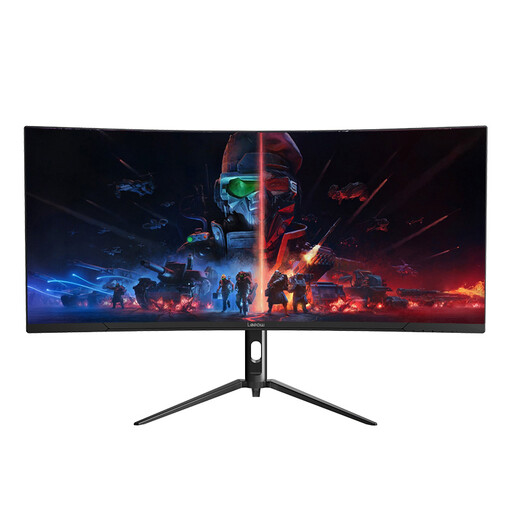 Image unavailable
Lepow HC-SJ34MZ5 34-inch curved monitor
Its 34-inch format is worth considering if you want to place photo-selection and editing windows side by side.
The product name specifies 3440 × 1440 resolution and a 165 Hz refresh rate. Check the model’s documented colour specifications before using it for critical gallery decisions.
Match the listed DisplayPort and HDMI connections to your computer; check separately if laptop charging through the monitor is important to you.
View on Joybuy
 Image unavailable
Dahua 34-inch curved UWQHD monitor
The 34-inch ultrawide layout can accommodate a gallery preview alongside other open windows.
The product name specifies a 3440 × 1440 VA panel, a 200 Hz refresh rate, two HDMI inputs and two DisplayPort 1.4 inputs.
The listing gives conflicting colour-gamut descriptions. Confirm the exact specification and any accuracy or calibration documentation before choosing it for colour-critical work.
View on Joybuy
 Image unavailable
CRUA 49-inch curved 5120 × 1440 monitor
Consider this extra-wide screen if you want multiple gallery and editing windows visible at once, rather than the taller pixel canvas of a 5120 × 2160 model.
The product name specifies a 32:9 VA panel, 5120 × 1440 resolution, a 165 Hz refresh rate and HDMI and DisplayPort connections. Its stated 120% sRGB figure does not establish colour accuracy; check the measurement basis and calibration information for your workflow.
Check that your desk or mount is appropriately rated. The listing advises two people to move the display.
View on Joybuy
Frequently asked questions
Is 100% sRGB enough for an online photo gallery?
Documented 100% sRGB coverage can be an appropriate target for an sRGB web-gallery workflow, provided you use the relevant colour mode and profile the display. Wider-gamut coverage is useful when your output workflow calls for it, but does not replace calibration.
Do I need a calibrator if the monitor has a factory report?
For colour-critical decisions, treat a factory report as a starting point rather than a profile of your monitor in your editing space. A compatible measurement device and profiling software let you calibrate and check that display; Calibrite documents calibration and monitor-validation options in its software.
Can one cable drive the monitor and charge my laptop?
One-cable operation depends on both devices supporting the required video mode and charging level. LG specifies up to 96 W through Thunderbolt 4 for the 40WP95CP-W, ASUS lists 96 W USB-C power delivery for the PA34VCNV, and BenQ lists 65 W for the PD3420Q; compare the exact monitor and laptop requirements before choosing a cable.
What should I check when the monitor arrives?
Check the model and supplied accessories, test its native resolution using your intended connection, and inspect the panel and colour modes before relying on it for final gallery choices. Keep the packaging while you establish whether the monitor works as expected and check the seller’s applicable return terms.
What if a monitor bought in the UK is faulty or misdescribed?
A faulty or misdescribed monitor is a different matter from a change-of-mind return. The UK Consumer Rights Act 2015 requires goods supplied under a consumer contract to be of satisfactory quality, and GOV.UK says a seller must offer a refund if goods are faulty, not as described or do not do what they are meant to do. Explain the problem to the seller and keep a record of it.


