Who this setup suits

Colour-managed photo editors

If edits need to remain consistent between Photoshop, other displays and possibly print, assess colour modes and calibration support alongside screen size. Adobe explains that an accurate ICC-compliant monitor profile is essential to reliable colour management.

Large-library photo organisers

If you sort thumbnails and compare similar images while keeping metadata and editing controls visible, consider both the available screen resolution and whether the monitor fits your desk.

Quiet-study laptop users

If you want fewer cables and an adjustable screen position, check that your laptop supports the monitor’s intended display, data and charging functions. Plan the stand position or mounting arrangement around your study desk.

What to check when choosing

39.7-inch 5K2K IPS

Choose when: You regularly need a large image beside gallery thumbnails and editing tools, and have room for a wide monitor. Dell, LG and Lenovo list 39.7-inch 5120 × 2160 models.

Allow for: More physical desk space than a 34-inch option; a model’s stated colour coverage does not replace a suitable current monitor profile.

34-inch creator IPS

Choose when: A narrower study desk or an sRGB/Rec.709 workflow matters more than maximum pixel space. ASUS lists its ProArt PA34VCNV at 34.1 inches and 3440 × 1440.

Allow for: Less working area and vertical resolution than the named 39.7-inch 5K2K models, while still checking the colour workflow for critical edits.

OLED ultrawide

Consider when: Deep blacks and mixed-media use matter more to you than an all-day, largely fixed gallery interface.

Allow for: Burn-in risk from persistent thumbnails, menus and taskbars. RTINGS identifies static-heavy desktop use as a relevant concern in its accelerated longevity work; check the exact model’s panel-care guidance and warranty.

Concern What to check Who this matters to
Reliable colour Check the exact model’s relevant colour mode and stated accuracy conditions, then plan how you will maintain a suitable monitor ICC profile. If I make colour-critical edits, I need to trust how the current display shows my images before sharing or printing them. Around 36% of consumers put reliable colour first.
Gallery workspace Compare native resolution and monitor dimensions, including stand depth, with the space available on your desk. When sorting a large library, I want a substantial preview visible beside thumbnails and controls without crowding the desk. Workspace is the primary concern for around 29% of consumers.
Laptop connectivity Match the laptop’s display-output and charging requirements to the monitor’s USB-C or Thunderbolt functions and the cable you intend to use. If I connect a laptop at the study desk each day, I want the display and other connections to work without unnecessary cable clutter. Around 21% of consumers prioritise that connection setup.
Long sessions and static screens Check positioning adjustments or mounting options; for OLED, review panel-care guidance and warranty terms. With thumbnails and toolbars open for hours, I need a comfortable screen position and a panel choice suited to persistent interface elements. For around 14% of consumers, that is the main concern.

Buying pitfalls

  • Choosing by colour-gamut percentage alone

    A gamut claim does not tell you whether a monitor is currently profiled for your editing application and intended output. Adobe explains that monitor profiles describe how the display reproduces colour.

    Check the exact model’s colour modes, stated accuracy conditions and calibration support. Use a suitable current ICC profile for colour-critical edits.

    A compatible calibration device may be a separate purchase: LG says the hardware calibrator for its 40WP95CP-W is sold separately.

  • Choosing a wide monitor before measuring the desk

    A 39.7-inch display needs more physical room than a 34-inch option. ASUS specifies a width of 81.72 cm even for its smaller PA34VCNV with stand.

    Measure usable desk width and depth, viewing position and any monitor-arm clearance against the exact model and stand.

    A different mounting arrangement or desk layout may be needed if the supplied stand does not fit.

  • Assuming any USB-C laptop can use every monitor function

    A USB-C connector alone does not establish that the laptop can deliver the intended resolution, use the hub and receive the required charging power.

    Compare the laptop’s display-output and charging specifications with the exact monitor’s port requirements, then check the cable specification.

  • Choosing OLED solely for contrast

    Gallery thumbnails, editing controls and taskbars may remain fixed for long sessions. RTINGS identifies static-heavy desktop use as a situation in which OLED burn-in remains a consideration.

    For predominantly static photo work, compare non-OLED options too. If you choose OLED, review the exact model’s warranty and follow its panel-protection guidance.

Relevant brands to consider

Dell

The UltraSharp U4025QW is a 39.7-inch 5120 × 2160 IPS Black option for a large curved workspace with hub connectivity.

  • Dell lists 100% sRGB, 99% DCI-P3/Display P3, average Delta E below 2, stand adjustment and USB-C power delivery up to 90 W for this model.
  • Check that its physical size and connectivity suit your desk and computer; these specifications do not describe every Dell monitor.

LG

The UltraWide 40WP95CP-W is a 39.7-inch 5120 × 2160 Nano IPS model with Thunderbolt 4.

  • LG lists 98% DCI-P3 coverage, hardware-calibration readiness and charging up to 96 W for this model.
  • LG says its hardware calibrator is sold separately; check compatibility if calibration is part of your workflow.

ASUS

The 34.1-inch ProArt PA34VCNV offers a 3440 × 1440 IPS workspace for buyers who favour a narrower display and sRGB/Rec.709 work.

  • ASUS lists 100% sRGB/Rec.709, stated Delta E below 2, height adjustment, RJ45 and USB-C power delivery up to 96 W for the PA34VCNV.
  • Its 3440 × 1440 resolution provides less working area than the named 5120 × 2160 models.

Lenovo

The ThinkVision P40w-20 is a 39.7-inch 5120 × 2160 professional ultrawide with Thunderbolt 4 hub features.

  • Lenovo lists 98% DCI-P3, 99% sRGB, stated Delta E below 2, dual Thunderbolt 4 and KVM capabilities for this model.
  • Check current availability and the exact connection requirements before planning a laptop-based setup around it.

Ultrawide monitors on Joybuy

These monitors offer 34-inch or 49-inch ultrawide layouts for arranging a photo gallery. They include OLED and gaming-oriented models, so check colour-management needs, desk fit and the demands of a largely static interface rather than treating screen width alone as a reason to choose one.

Acer Predator X49X curved QD-OLED monitor

Acer Predator X49X 49-inch curved QD-OLED monitor

Consider this model if you want a very wide gallery layout and can accommodate a 49-inch screen. Its stated format is 32:9, with an 1800R curve and 240 Hz refresh rate.

For long sessions with fixed thumbnails and controls, review the model’s panel-care and warranty terms. Check desk fit, computer compatibility and model-specific operating noise before choosing it for a quiet study.

View on Joybuy

LG UltraGear 34GX900A-B OLED monitor

LG UltraGear 34GX900A-B 34-inch OLED monitor

This 34-inch WQHD ultrawide may suit a gallery layout where a 49-inch screen would be too imposing. The product name specifies a 240 Hz refresh rate.

Its OLED panel calls for particular care if editing tools and thumbnails remain on screen for hours. Check panel protection, warranty terms and model-specific operating noise for your intended study setup.

View on Joybuy

Dahua 34-inch curved VA ultrawide monitor

Dahua 34-inch 3440 × 1440 curved VA monitor

Its 34-inch ultrawide format offers room to arrange a gallery preview and neighbouring panels without moving to a 49-inch screen. The product name specifies a VA panel, 200 Hz refresh rate, 85% DCI-P3 and HDMI and DisplayPort inputs.

If colour-critical edits are the priority, check the model’s colour-accuracy conditions and your profiling options rather than relying on gamut coverage alone. Confirm computer compatibility and model-specific operating noise.

View on Joybuy

CRUA 49-inch curved ultrawide VA monitor

CRUA 49-inch 5120 × 1440 curved VA monitor

Consider its 32:9 layout if keeping multiple gallery panels visible is more important than a compact desk footprint. The product name specifies a 1500R curve, VA panel, 165 Hz refresh rate and VESA 75 × 75 mounting pattern.

Measure the desk and check mounting capacity. Confirm the supplied stand’s adjustments before purchase, and assess colour accuracy and model-specific operating noise separately.

View on Joybuy
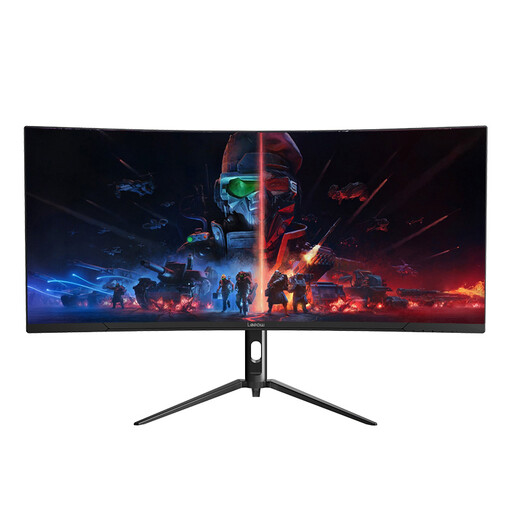
Lepow HC-SJ34MZ5 curved ultrawide monitor

Lepow HC-SJ34MZ5 34-inch curved ultrawide monitor

This 34-inch 3440 × 1440 monitor offers an ultrawide layout for placing a photo preview beside other windows. Its product name specifies a 165 Hz refresh rate.

For colour-critical work, check the exact colour mode, accuracy conditions and profiling options. Confirm the stand adjustments and model-specific operating noise if those affect your study setup.

View on Joybuy

Common questions

Do I need a wide-gamut monitor for a photo gallery?

Not necessarily: an sRGB-focused workflow may be sufficient for a web-first gallery, while wider-gamut support matters when your source images and intended output call for it. Adobe explains that accurate ICC-compliant profiles are essential for reliable colour management, so check your profiling workflow as well as the monitor’s stated coverage.

Does factory calibration remove the need to profile a monitor?

No. A factory-calibration claim is a model-specific starting point, not a description of how your display reproduces colour throughout its use. For colour-critical edits, use an appropriate current monitor profile; Adobe explains that the profile describes the monitor’s colour reproduction.

Can one cable handle the display, laptop charging and peripherals?

Yes, on compatible combinations, but check the laptop, cable and exact monitor functions together. LG lists Thunderbolt 4 and charging up to 96 W for the 40WP95CP-W, while ASUS lists USB-C power delivery up to 96 W for the PA34VCNV; neither specification guarantees that every laptop can use all those functions.

Is OLED suitable for an all-day photo-gallery workstation?

OLED can suit mixed-media use, but a workstation with fixed thumbnails, toolbars and taskbars needs a deliberate burn-in assessment. RTINGS identifies static-heavy desktop use as a relevant risk in its accelerated longevity work; compare non-OLED options and check the exact OLED model’s warranty and panel-care instructions.