For a shared desk used to build a club website, start by checking whether a 34-inch, 3440 × 1440 ultrawide will fit at a comfortable viewing distance and work with the computer normally connected to it. Prioritise a suitable USB-C connection for a laptop; make a built-in keyboard, video and mouse (KVM) switch a requirement only if two computers need to share one keyboard and mouse. If several people use the desk, screen positioning matters as much as the available workspace.
Who this setup suits
Shared-desk website editors
If you regularly move between a browser preview, the club’s content management system and reference material, an ultrawide gives you room to arrange those windows on one screen. Check the desk space before replacing a compact display or a two-monitor arrangement.
Two-computer desk sharers
If members alternate between a fixed computer and a laptop, a monitor with a built-in KVM may let both use the same keyboard and mouse. Samsung Business UK and LG UK describe this function on specific models; the connections required still depend on the computers and monitor.
Club content and layout creators
If you prepare page layouts, event images or other web content, consider the panel type and stated sRGB coverage alongside workspace size. A colour-gamut specification alone does not establish the accuracy of an individual screen.
What to check before buying
Decide how many computers will use the desk, then check their connections and the space available for a screen that each regular user can position comfortably.
| Concern |
Buying checks |
Who this matters to |
| Sharing two computers |
Confirm built-in KVM and the video and USB connections needed for both computers. Check Picture-by-Picture separately if both outputs must appear at once. |
When club members switch between a desktop and a laptop, I want to keep one keyboard and mouse in place. Around 36% of consumers put two-computer sharing first. |
| Connecting a laptop |
Check USB-C video support, the laptop’s charging requirement and the monitor’s power-delivery rating; confirm cable requirements. |
If I bring a laptop to the desk, I want to connect it without rebuilding the workstation each time. Roughly 29% of consumers make the laptop connection their primary concern. |
| Website workspace and colour |
Look for the resolution needed to arrange your working windows; for web graphics, check panel type and stated sRGB coverage. |
While editing pages and event graphics, I need room for a preview and working tools without treating a gamut figure as a calibration result. About 21% of consumers put this workspace and colour need first. |
| Shared-desk fit |
Measure desk depth and stand footprint, then check height adjustment or a compatible mounting option. |
When people of different heights use the desk, I need a screen each person can place in a workable position. Approximately 14% of consumers prioritise this fit. |
Mistakes to avoid
-
Assuming any USB-C laptop will work with one cable
A USB-C socket by itself does not establish that the laptop can send video to the monitor or accept its available charging power.
Check the laptop’s USB-C video capability and charging requirement against the exact monitor model, then confirm the cable needed.
-
Choosing KVM before planning both connections
A built-in KVM can share a keyboard and mouse, but each computer still needs a suitable video connection and the USB arrangement specified for that monitor.
List the ports on both computers and compare them with the monitor’s input and USB-upstream instructions before ordering.
-
Checking screen width but not its position
The Health and Safety Executive advises placing a screen directly in front of the user, with its top around eye level and the screen about an arm’s length away. A wide panel and its stand need room for that position.
Measure desk width and depth, and check the stand’s adjustment range or mounting compatibility for regular users.
If the supplied stand cannot reach a workable position, a compatible arm or different stand may be needed.
-
Reading sRGB coverage as proof of colour accuracy
A manufacturer’s gamut figure describes stated coverage, not the calibration accuracy of the particular monitor you receive.
Use panel and gamut specifications to narrow choices for routine web content; set separate calibration requirements if the work calls for colour-critical output.
Relevant brands to consider
Dell
Dell UK lists 34-inch business ultrawides aimed at laptop-based desks, including the Pro 34 Plus P3425WE and UltraSharp U3425WE.
- Dell UK specifies USB-C power delivery up to 90W and RJ45 Ethernet for the P3425WE.
- Check the exact model’s KVM connections and stand arrangement rather than assuming every Dell ultrawide has the same shared-desk features.
LG
LG UK lists UltraWide models with laptop connectivity; its 34BA75QE-B is also described as having a built-in KVM.
- LG UK specifies USB-C power delivery up to 90W and RJ45 for the 34BA75QE-B, alongside control of two computers through one keyboard and mouse.
- Confirm the cables and computer connections required for the particular two-device setup.
Samsung
Samsung Business UK describes the 34-inch ViewFinity S65UC as a curved monitor with USB-C, LAN and a built-in KVM.
- The S65UC’s stated KVM function is relevant when two connected computers must share a keyboard and mouse.
- Check whether its curved screen, stand footprint and required connections suit everyone using the desk.
Joybuy monitor choices
These ultrawides are choices for arranging website-building windows on a shared desk. Compare each monitor’s stated configuration with your computers and desk layout, particularly if USB-C charging or two-computer peripheral sharing is essential.
 No image available
Modern MD342CQPW 34-inch curved monitor, white
Consider this model if you want a wide screen for a website editor and preview at the shared desk.
The named variant specifies 3440 × 1440 resolution, a 120Hz refresh rate and a 1500R curve. Check the stand’s positioning range, desk fit and the connections required by each computer before choosing it for shared use.
View on Joybuy
 No image available
Lenovo R34w-30 34-inch UWQHD monitor
This is a screen-size option for arranging website tools side by side.
The product name specifies a 34-inch UWQHD gaming monitor. If the desk needs USB-C charging or shared peripherals, confirm the exact connections and functions before buying; also check its stand footprint and viewing position.
View on Joybuy
 No image available
LG UltraGear 34G630A-B 34-inch VA monitor
Consider the 34-inch format if you need space for a club site preview and editing windows.
The named variant specifies WQHD, a VA panel and a 240Hz refresh rate. Check its laptop charging capability against your laptop’s requirements, and confirm any two-computer connections you need.
View on Joybuy
 No image available
Dahua 34-inch 3440 × 1440 curved VA monitor
The wide format is relevant if your website work involves keeping several windows open at once.
The product name specifies a 200Hz refresh rate, two HDMI inputs and two DisplayPort 1.4 inputs. Check how the computers would connect, whether peripherals need sharing and whether the stand fits the desk.
View on Joybuy
 No image available
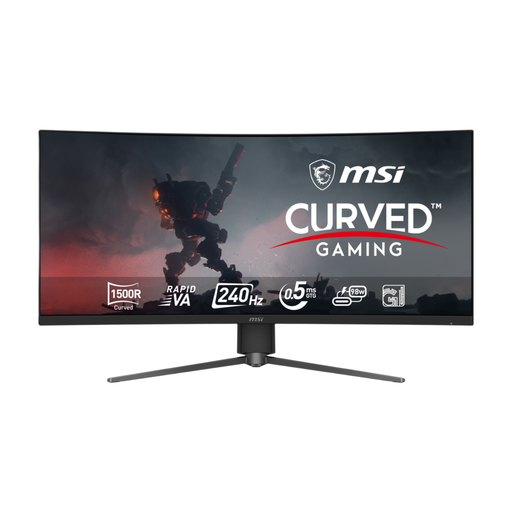
MSI MPG 346CQRF X24 34-inch UWQHD monitor
This 34-inch option is relevant to a desk used for side-by-side website editing.
The product name specifies a curved Rapid VA display and a 240Hz refresh rate. Before planning a laptop setup around it, confirm USB-C video and charging compatibility; check the stand adjustment and desk fit as well.
View on Joybuy
Common questions
Is a 34-inch ultrawide enough for building a club website?
A 34-inch, 3440 × 1440 screen is a reasonable starting point if you want a page preview and editing tools visible side by side. Check that you can position the full screen comfortably on the shared desk; LG UK also describes side-by-side working as a use for this format, rather than a guarantee that it will suit every setup.
Do we need a KVM switch at the shared desk?
Choose a built-in KVM if two computers regularly need to use the same keyboard and mouse. For a desk normally connected to one laptop at a time, check USB-C video and charging compatibility first. In either case, confirm the monitor’s required video and USB connections.
How should an ultrawide be positioned for different users?
Allow each user to place the screen directly in front of them, with its top around eye level and the screen about an arm’s length away, following Health and Safety Executive guidance. Check the stand’s adjustment range and the desk depth before choosing a wide or curved model.
What should we do with an old monitor?
Check your local council’s or retailer’s collection and recycling options rather than assuming an old monitor belongs in general waste. The Office for Product Safety and Standards and the Department for Environment, Food & Rural Affairs explain that waste electrical and electronic equipment is regulated to reduce electrical waste.


