What matters when choosing?
Start with screen position and the workspace you need for editing; then check laptop connections and colour specifications against the work you actually do.
| Concern |
What to check |
Who this matters to |
| Standing-desk positioning |
Check the stand's maximum screen height; for an arm, match the VESA pattern and monitor weight to the arm. |
If I alternate between sitting and standing, I need the screen centred and high enough without straining to see it. Around 36% of consumers would put positioning first. |
| Editing workspace |
Compare native resolution and the exact monitor's width and stand depth, not just its ultrawide label. |
When I edit a page, I want room for the editor and a live preview without losing sight of club administration. Workspace would come first for around 29% of consumers. |
| Laptop connections |
Match USB-C video support and power delivery to the laptop; check hub connections if you use wired peripherals. |
If I regularly connect and disconnect my laptop, I want fewer cable changes without giving up the charging it needs. Around 21% of consumers would prioritise docking. |
| Colour for graphics |
Look for stated sRGB coverage; compare wider-gamut or calibration details only if your asset workflow needs them. |
When I make club graphics as well as web pages, I need colour specifications I can assess for that work. Colour handling would be the main concern for around 14% of consumers. |
Joybuy monitor choices
These 34-inch ultrawides are choices to compare for club website editing at a standing desk. Their display formats are only a starting point: check each model's standing-height reach and, if you use a laptop, its required connections.
 No image available
MSI MPG 346CQRF X24 34-inch UWQHD curved monitor
Consider this model if you want an ultrawide screen for keeping a site editor and preview in view. Its title identifies a Rapid VA panel and curved design; check the stand's maximum screen height and the exact USB-C functions against your desk and laptop.
View on Joybuy
 No image available
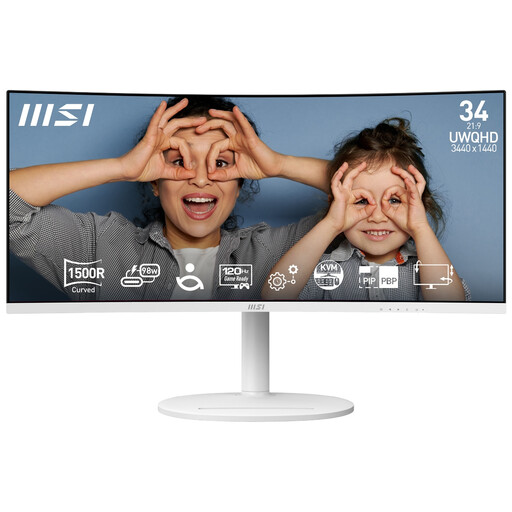
Modern MD342CQPW 34-inch curved monitor, white
This model suits a comparison focused on screen space for page editing and previewing. Its title specifies 3440 × 1440 resolution, 120 Hz and a 1500R curve; check its maximum screen height and whether its connections meet your laptop's video and charging needs.
View on Joybuy
 No image available
Lenovo R34w-30 34-inch UWQHD monitor
Consider its ultrawide format if you want to keep website work and a preview on one screen. Check the exact stand adjustment and mounting specification for standing use, and confirm the connections separately if laptop docking matters to you.
View on Joybuy
 No image available
Philips Evnia 6000 34M2C6500 34-inch monitor
This is another 3440 × 1440 option for comparing an editor and browser preview on one display. The title lists height, swivel and tilt adjustment, plus DisplayPort and HDMI; check the stand's actual height range and any laptop-docking requirements before choosing it.
View on Joybuy
 No image available
Dahua 34-inch UWQHD curved monitor, 200 Hz
Its stated 3440 × 1440 resolution makes it a screen-space option for website editing. The title also specifies a VA panel, 200 Hz refresh rate and HDMI and DisplayPort connections; check its standing-height reach and laptop connectivity for your setup. Its stated 85% DCI-P3 figure should not be treated as an sRGB specification for web graphics.
View on Joybuy
Frequently asked questions
How should I position an ultrawide monitor when standing?
Keep the screen central, with its top level with your eyes and about an arm's length away, in line with Health and Safety Executive guidance. If the supplied stand cannot reach a suitable height, compare the monitor and a compatible arm before buying.
Is a 34-inch, 3440 × 1440 ultrawide a sensible starting point for club website work?
Yes, it is a practical format to consider when you want a page editor and browser preview visible together. Check the exact monitor's width, stand depth and positioning range against your standing desk rather than choosing by screen size alone.
Can one USB-C cable handle my laptop's display and charging?
It can if the laptop supports compatible video output over USB-C and the monitor's power delivery meets its charging requirement. BenQ specifies 65 W for the PD3420Q, while Dell and LG specify up to 90 W for the P3424WE and 34WQ75C-B respectively; compare the exact connection and rating with your laptop before relying on one cable.
When does UK work at a screen call for a workstation assessment?
The Health and Safety Executive says employers must assess workstations for workers who use display screen equipment daily as part of their normal work for continuous periods of an hour or more. If that describes your club website work, discuss the workstation arrangement with your employer rather than assuming a particular monitor size settles the assessment.


