Start with a 34-inch 3440 × 1440 ultrawide only if its width, stand and viewing position fit your desk; check how your own applications render type at your usual scaling. A flat design-focused IPS model suits buyers who prioritise planar layouts and documented colour modes, while a curved USB-C hub model makes more sense when laptop docking is the priority. If finer pixel pitch is essential, investigate a 5K2K model, but check its availability and connections before choosing that route.
Who this setup suits
Typography-focused designers with limited desk space
If you compare type sizes, spacing and page layouts on one screen, measure the monitor as well as the desk. BenQ UK lists its 34-inch PD3420Q at 825.8 mm wide with its stand and specifies 109 PPI; those figures describe that model, not every 34-inch ultrawide.
Laptop users seeking fewer desk cables
A USB-C monitor may combine display connection and charging, but the laptop and monitor must support the required functions. LG UK specifies up to 65 W charging for the 34WR55QK-B, while Dell UK specifies 90 W for the U3425WE.
Designers working with type and colour
If typography previews also include UI, illustration or brand assets, check the colour spaces and modes needed by your workflow. BenQ UK documents sRGB, Rec.709 and P3 coverage and a calibration report for the PD3420Q specifically.
What to check before buying
Decide whether type detail, physical fit, laptop connections or colour-managed work is your primary need. A flat design monitor and a curved docking monitor address different preferences; for finer pixel pitch, LG UK documents a 5120 × 2160 34WK95U, but marks that model discontinued.
| Concern |
What to check |
Who this matters to |
| Text detail |
Compare native resolution and pixel pitch or PPI, then check key typefaces at your usual application scaling. |
If I inspect small letterforms and spacing, I need to see how my own software renders them, not judge by resolution alone. Around 33% of consumers put text detail first. |
| Desk fit |
Measure usable width and depth against the monitor’s dimensions with its stand; allow for your viewing position. |
When the screen, keyboard and mouse must share a shallow desk, I need the stand to leave enough working room. Desk fit is the first concern for around 27% of consumers. |
| Laptop workflow |
Check USB-C video support and charging wattage against your laptop; check KVM support if you switch computers. |
If I want one connection for my laptop, I need it to carry the display signal and meet my charging requirement. Around 20% of consumers prioritise this workflow. |
| Colour-managed work |
Check the exact model’s relevant colour-space coverage, modes and calibration information. |
When type appears alongside UI or brand assets, I need colour settings that suit the work as well as readable text. Colour management comes first for around 20% of consumers. |
Common buying mistakes
-
Checking the diagonal but not the footprint
BenQ UK lists the PD3420Q at 825.8 mm wide and 244.3 mm deep with its stand. A screen that fits across the desk may still leave too little depth for a comfortable viewing position.
Measure the usable surface and where you will sit. If you plan to use an arm, check the monitor’s mounting specification and the arm’s load and reach separately.
An arm or longer cables may be needed if the supplied stand crowds the working area.
-
Assuming every 34-inch ultrawide shows type equally
Dell UK lists a 0.23250 mm pixel pitch for the U3425WE, while LG UK lists 0.1554 mm for its discontinued 5K2K 34WK95U. Pixel pitch is one specification to compare; operating-system scaling, applications and typefaces also affect the preview.
Check the exact model’s resolution and pixel pitch or PPI. Where a retailer’s return process permits it, try your key applications and typefaces at your normal scaling.
-
Treating USB-C as a complete dock specification
LG UK specifies charging up to 65 W for the 34WR55QK-B, while Dell UK and LG UK specify 90 W for the U3425WE and 34BA75QE-B respectively. Ethernet and KVM functions also vary by model.
Match the monitor’s video connection, power delivery and ports to your laptop and any second computer before relying on one cable.
A separate charger, dock or Ethernet adapter may still be needed for your setup.
Relevant brands to compare
BenQ
BenQ UK’s PD3420Q is a flat 34-inch IPS model worth examining when planar layouts and documented design colour modes matter.
- For the PD3420Q, BenQ UK specifies 3440 × 1440 resolution, 109 PPI, sRGB and Rec.709 coverage, P3 coverage and a calibration report.
- Its stated width is 825.8 mm and its stand depth is 244.3 mm. USB-C power delivery is 65 W, so check desk fit and laptop charging needs separately.
Dell
Dell UK’s UltraSharp U3425WE is a curved 34.1-inch 3440 × 1440 IPS Black option for buyers considering laptop docking alongside typography work.
- Dell UK specifies 90 W power delivery and height, swivel and tilt adjustment for this model.
- Its curved panel is not a flat reference for planar artwork. Confirm your laptop’s video connection and charging compatibility.
LG
LG UK documents several distinct ultrawide configurations, including models aimed at USB-C laptop and multi-device setups.
- LG UK specifies up to 65 W USB-C charging for the 34WR55QK-B and 90 W USB-C power delivery, RJ45 and KVM for the 34BA75QE-B.
- LG UK marks its 34-inch 5K2K 34WK95U discontinued. Treat its resolution as a specification to compare, not as an available purchase option.
Curved ultrawides to consider
These 34-inch curved monitors are options to compare if you want one wide screen for type previews and are comfortable assessing layouts on a curve. Check each model’s desk footprint, type rendering and connections against your own setup.
 No image available
LG UltraGear 34GX900A-B 34-inch OLED WQHD 240 Hz monitor
Consider this model if you are comfortable previewing layouts on a curved OLED screen; check how your applications display fine type at your usual scaling. Its listing warns of OLED burn-in with prolonged static content, so review its screen-care guidance if layouts will remain on screen for long periods.
Measure the available desk space and check laptop connection requirements before ordering.
View on Joybuy
 No image available
Dahua 34-inch 3440 × 1440 curved VA 200 Hz monitor
If native resolution is your starting point for comparing typography previews, this 34-inch VA model specifies 3440 × 1440. Check how your typefaces look at your usual scaling and whether its curve suits straight-line layout work.
Confirm the complete footprint with its stand and the colour specifications your workflow requires.
View on Joybuy
 No image available
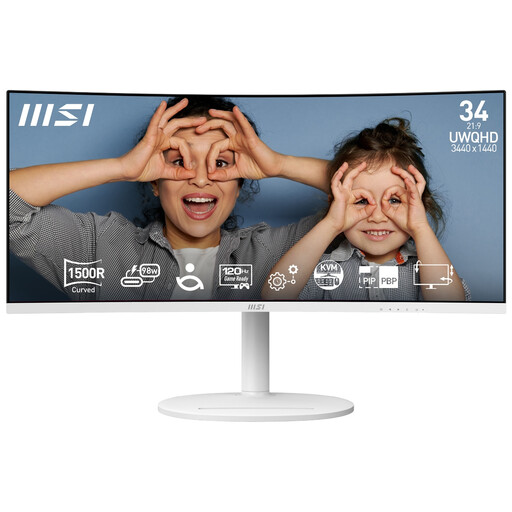
Modern MD342CQPW 34-inch 3440 × 1440 120 Hz 1500R curved monitor, white
For a single-screen desk, compare this model’s 34-inch 3440 × 1440 display and 1500R curve with the space and viewing position you can provide. Check the stand footprint before buying.
If you intend to charge a laptop through the monitor, confirm its USB-C power-delivery rating against your laptop’s requirement before relying on a one-cable setup.
View on Joybuy
Frequently asked questions
How much desk space does a 34-inch ultrawide need?
Measure the exact monitor’s width and depth with its stand rather than relying on the diagonal. BenQ UK lists the PD3420Q at 825.8 mm wide and 244.3 mm deep with its stand; leave room for your keyboard, mouse and viewing position. The UK Health and Safety Executive advises placing the top of the screen around eye level and the display about an arm’s length away.
Should I choose a flat or curved ultrawide for typography?
Choose a flat monitor if a planar view of layouts and straight lines matters to your work; consider a curved model if its shape suits the way you use one wide screen. Neither shape alone establishes how clearly your applications will render type, so compare resolution, pixel pitch, adjustment and relevant colour specifications for the exact models.
Can one USB-C cable connect and charge my laptop?
Yes, if your laptop supports video through the connection and the monitor and cable meet its charging requirements. LG UK specifies charging up to 65 W for the 34WR55QK-B, while Dell UK specifies 90 W for the U3425WE; check the exact laptop and monitor ports before relying on either figure.


