Choose a 39.7-inch 5K2K ultrawide if you need to inspect a render while keeping references and review tools visible, and your computer, connection and desk can accommodate it. A 34-inch 3440 × 1440 creator monitor makes more sense when switching between computers or fitting a shared workstation matters more than the extra pixels. In either case, check the required colour workflow and assess the whole workstation, not just the screen.
Who is this for?
Detail-focused 3D reviewers
If you inspect a render alongside reference images, modelling tools or feedback, a 5K2K screen offers a larger native workspace than a 3440 × 1440 model. Check that the computer can drive it and that the desk can accommodate it.
Shared-desk creative teams
When several people or computers use one display, connection switching, laptop charging and screen adjustment can affect the daily setup. Decide which devices and peripherals actually need to share the monitor.
Colour-managed design users
If a project specifies sRGB, Rec.709 or P3, match the monitor’s stated capabilities to that workflow. Gamut coverage and calibration features are separate considerations; neither alone establishes how a render will appear in its final output.
What matters when choosing?
Start with the space needed for the render and its accompanying windows, then check the shared-desk connections and the project’s colour requirements. Dell UK and LG UK specify 5120 × 2160 for their 39.7-inch models; BenQ specifies 3440 × 1440 for the 34-inch PD3420Q.
39.7-inch 5K2K ultrawide
Choose it when: fine render detail and room for references or review tools are your priorities.
Accept the trade-off: the large screen needs suitable desk space, and each computer and cable path must support the intended display mode.
34-inch creator ultrawide with KVM
Choose it when: sharing a keyboard and mouse between two connected computers is more important than a 5K2K canvas; BenQ lists a KVM switch for the PD3420Q.
Accept the trade-off: its 3440 × 1440 native resolution leaves less desktop area than the 5120 × 2160 models specified by Dell UK and LG UK.
| Concern |
What to check |
Who this matters to |
| Render-review workspace |
Compare native resolution and desk fit; confirm that the computer, dock and cable support the intended display mode. |
I need the render, references and feedback visible without constantly changing windows; around 40% of consumers put review workspace first. |
| Shared-desk operation |
Check the required inputs, whether a KVM switch is included, laptop power delivery and screen adjustment. |
When colleagues use different computers at one desk, I want switching and repositioning to work for everyone. Roughly 30% of consumers prioritise shared-desk operation. |
| Colour workflow |
Identify the project’s colour space, then check the exact model’s stated coverage, display mode and calibration requirements. |
If the render must be reviewed against a specified colour workflow, I need more than a wide-gamut label; colour-workflow assurance comes first for around 30% of consumers. |
Buying pitfalls
-
Ordering a 5K2K screen without checking the connection
A monitor’s native resolution does not establish what every shared laptop can output through a particular port, dock and cable.
Record each computer model and the intended connection. Confirm support for the required resolution and refresh rate with the exact setup before ordering.
-
Assuming wide gamut guarantees matching colour
Dell UK, LG UK and BenQ publish different gamut and calibration specifications. Those figures do not, by themselves, establish that a render will match another display or its final output.
Begin with the project’s target colour space and delivery medium, then check the chosen monitor’s modes and the team’s calibration process.
LG UK states that a hardware calibrator is not included with the 40WP95CP-W, so a workflow requiring one needs a separate device.
-
Expecting a new monitor to resolve workstation fit
A shared display may need repositioning for different users. The UK Health and Safety Executive advises assessing the whole workstation, including equipment, furniture and working conditions.
Consider desk depth, adjustment, chair position, lighting and how the desk is used together; reassess the setup when it changes or a user reports discomfort.
-
Treating Thunderbolt charging and KVM as the same feature
Charging a laptop and switching a keyboard and mouse between computers address different needs. LG UK specifies Thunderbolt 4 and up to 96 W charging for the 40WP95CP-W; BenQ specifies a KVM switch and 65 W USB-C power delivery for the PD3420Q.
Map the laptops, computers and peripherals that will use the desk, then check the connection and switching features each one requires.
Brands to consider for these monitor specifications
Dell
Dell UK positions the 39.7-inch UltraSharp U4025QW around a large 5K2K workspace and integrated connectivity.
- For the U4025QW, Dell UK specifies 5120 × 2160 at 120 Hz, 99% DCI-P3, height, tilt and swivel adjustment, and USB-C power delivery up to 140 W EPR.
- Check the available desk space and each connected computer’s display and power requirements. Dell’s colour figures are manufacturer specifications, not a test of your render workflow.
LG
LG UK describes the 39.7-inch 40WP95CP-W as a 5K2K creator ultrawide with Thunderbolt 4.
- LG UK specifies 5120 × 2160, DCI-P3 98% typical and charging up to 96 W.
- LG calls the model hardware-calibration ready but says the calibrator is not included. Confirm the complete colour workflow and connection requirements before choosing it.
BenQ
BenQ’s 34-inch PD3420Q is a 3440 × 1440 creator ultrawide with a KVM switch for a desk using two connected computers.
- BenQ specifies 100% sRGB, 100% Rec.709, 98% P3, 65 W USB-C power delivery and a 150 mm height-adjustment range for the PD3420Q.
- Its listed native resolution and 60 Hz refresh rate differ from the 5120 × 2160 models above. Colour specifications do not establish a match to another display or final output.
Ultrawide monitors on Joybuy
These 34-inch and 49-inch ultrawides offer different ways to arrange render and review windows at a shared desk. Check each model’s native display mode, physical fit and connection requirements against your setup; these choices are not all 5K2K creator monitors.
 No image available
Acer X Predator X49X 49-inch curved ultrawide monitor
Consider this model if you want a broad screen for keeping a render and other windows in view. Its listed 32:9 QD-OLED display has a 1800R curve and a 240 Hz refresh rate. Check the desk dimensions, viewing positions and the computer-to-monitor connection before choosing it for a shared workspace.
Joybuy
 No image available
CRUA 49-inch curved ultrawide monitor, 5120 × 1440
Its wide format may suit a review setup with several windows open. The product name specifies a 32:9, 5120 × 1440 VA display at 165 Hz, with two HDMI 2.1 and two DisplayPort 1.4 inputs. Confirm that the desk and each intended computer can accommodate the screen and its chosen display mode.
Joybuy
 No image available
Lenovo R34w-30 34-inch UWQHD monitor
This 34-inch ultrawide is worth considering when a 49-inch screen would be difficult to fit at a shared desk. Check the connected computer’s support for the intended display mode and whether the monitor’s adjustment and colour specifications meet your team’s requirements.
Joybuy
 No image available
Dahua 34-inch curved ultrawide monitor, 3440 × 1440
The 34-inch format may suit a shared desk where screen fit matters alongside room for review windows. The product name specifies 3440 × 1440 at 200 Hz, a VA panel, two HDMI inputs and two DisplayPort 1.4 inputs. Check computer and cable support for the intended mode; confirm the exact gamut specification before relying on this model for colour-critical work.
Joybuy
 No image available
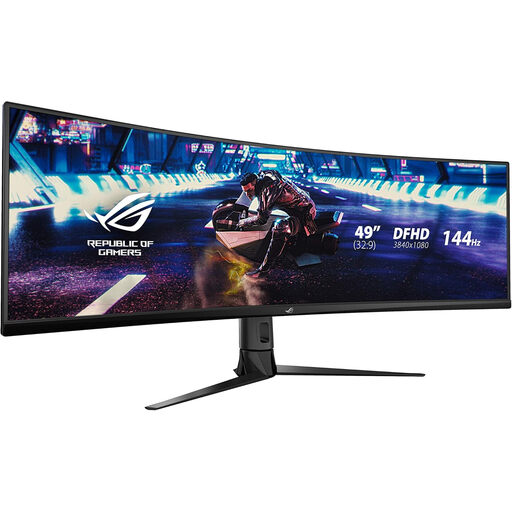
ASUS ROG Strix XG49VQ curved DFHD monitor
Consider its broad curved format if keeping several windows visible is the main requirement. The product name specifies DFHD and 144 Hz. Before using it to inspect fine render detail, compare its native resolution with your review needs, and check desk fit and computer compatibility.
Joybuy
Frequently asked questions
Is a 5K2K ultrawide automatically the right choice for reviewing 3D renders?
No. The 5120 × 2160 models specified by Dell UK and LG UK provide more native pixels than BenQ’s 3440 × 1440 PD3420Q, but your choice also depends on computer output, desk fit, colour requirements and whether the shared desk needs a KVM switch.
Does a calibration-ready monitor include a calibrator?
Not necessarily. LG UK describes the 40WP95CP-W as hardware-calibration ready and states that a hardware calibrator is not included. Check what your team’s calibration process requires before ordering.
Does a shared UK office need a particular monitor size?
The UK Health and Safety Executive’s display-screen-equipment guidance does not prescribe a particular diagonal or resolution. For workers who use display screen equipment daily for continuous periods of an hour or more, employers must assess the workstation, taking account of the equipment, furniture, working conditions, job and individual needs.
What should we do with an old office monitor?
Arrange an appropriate electrical-equipment reuse or recycling route rather than putting the monitor in general waste. GOV.UK explains the UK Waste Electrical and Electronic Equipment framework, and Recycle Your Electricals offers a locator for nearby recycling options.


