Side-by-side landing-page designers
If you keep a design canvas, browser preview, assets and notes open together, a 21:9 workspace and your preferred window layout are worth checking before gaming-oriented specifications.


For landing-page design, a 34-inch, 21:9, 3440 × 1440 IPS ultrawide with stated sRGB coverage is a practical starting point for keeping design tools and browser previews alongside one another. Choose USB-C docking for a compatible laptop or KVM switching for two computers only if those connections serve your setup; check the exact model’s colour modes, stand and desk footprint before deciding.
If you keep a design canvas, browser preview, assets and notes open together, a 21:9 workspace and your preferred window layout are worth checking before gaming-oriented specifications.
If you approve page colours or visual assets on screen, look for the exact monitor’s stated sRGB coverage and available colour modes. A coverage figure alone does not establish colour accuracy throughout your workflow.
If you want fewer laptop connections, check USB-C video and charging compatibility. If two computers share your desk, check how a monitor’s KVM switch connects the keyboard and mouse.
For consumers choosing an ultrawide primarily for landing-page design in a quiet study, start with the need that matters most: workspace, colour review, computer connections or physical fit.
| Concern | What to check | Who this matters to |
|---|---|---|
| Side-by-side workspace | Compare native resolution, aspect ratio and the window layout you use. | I need my design canvas and browser preview visible together without constantly switching windows. Around 33% of consumers put workspace first. |
| Web-colour review | Check the exact model’s stated sRGB coverage and colour modes; seek model-specific calibration evidence for colour-critical approval. | When approving landing-page visuals, I need to know which colour mode I am using rather than rely on a gamut claim alone. Colour handling comes first for around 25% of consumers. |
| Computer connections | Match USB-C video and charging to your laptop, or check KVM inputs and USB connections for two computers. | I want fewer laptop cables or one keyboard and mouse for two computers, provided the connections work with my devices. Around 25% of consumers prioritise that arrangement. |
| Study fit | Compare dimensions including the stand, adjustment range and mounting requirements with your desk. | My desk must accommodate the screen and let me position it comfortably for design work. Physical fit is the primary concern for around 17% of consumers. |
A monitor’s USB-C features do not establish that your laptop can send video and receive enough charging power through the connection.
Check your laptop’s USB-C or Thunderbolt display-output support, its charging requirement and the monitor’s stated power delivery. Check which cable is needed, too.
If the combination does not meet those needs, you may still need a separate charger, dock or compatible cable.
sRGB coverage, HDR support and colour-count claims describe different characteristics. None establishes how a finished page will appear across your monitor settings, computer and applications.
Check the exact model’s sRGB mode and use an appropriate display profile and colour-managed workflow. For colour-critical client approval, seek model-specific calibration evidence.
A 34-inch or 49-inch diagonal does not tell you how much desk depth the stand occupies or whether you can position the screen as intended.
Measure the study desk and compare its width and depth with the monitor’s dimensions including the stand. If using an arm, check the exact model’s mounting specification.
Dell’s UltraSharp U3425WE is a workstation-oriented, 34.1-inch curved ultrawide with a height-adjustable stand.
LG’s cited 34-inch UltraWide models pair 3440 × 1440 IPS displays with connections aimed at laptop and multi-window work.
Samsung’s 34-inch ViewFinity S65VC is a curved ultrawide with features directed at a two-computer workspace.
These ultrawides offer different screen sizes and connection possibilities for a landing-page workstation. Compare each model’s colour controls, computer compatibility and full desk footprint against your own setup; a gaming specification does not settle those design-work questions.
 Image unavailable
Consider this 34-inch OLED model if a wide design workspace also appeals to you; check its colour mode and laptop connections for your particular workflow.
The product name specifies WQHD resolution and 240 Hz. Persistent interface elements make the listing’s OLED burn-in warning and screen-protection settings particularly relevant to design work.
 Image unavailable
This wider option is worth considering if you need several work areas or regularly switch between computers; confirm the required KVM connections before choosing it.
Its product name specifies a 49-inch, 32:9 QD-OLED display and USB-C. Check the dimensions including the stand against your desk, and confirm the colour mode needed for web work.
 Image unavailable
This model may suit a side-by-side design and preview layout if its VA panel and available colour modes meet your requirements.
The product name specifies 3440 × 1440 resolution, a 200 Hz refresh rate, two HDMI inputs and two DisplayPort 1.4 inputs. Check its footprint with the stand before ordering.
 Image unavailable
Consider the 32:9 format if you want a particularly wide arrangement of design and supporting windows and have room for the screen.
The product name specifies 5120 × 1440 resolution and VESA 75 × 75 mounting. Its claimed 120% sRGB figure does not establish colour accuracy or an appropriate sRGB mode; also confirm the stand’s adjustment range and dimensions including the stand.
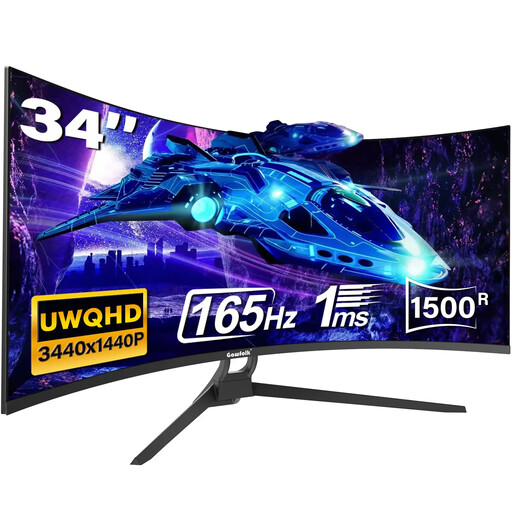 Image unavailable
The 21:9 format makes this a candidate for arranging a design canvas beside a browser preview, provided its connections and colour settings suit your computer.
The product name specifies 165 Hz and a 1500R curve. Confirm the exact sRGB mode, Type-C connection, stand adjustment and dimensions before relying on those features for your study setup.
It can be a useful starting point if you mainly want a design canvas and browser preview side by side. Compare the exact screen size and resolution with your preferred text size and viewing distance rather than assuming every ultrawide provides the same usable workspace.
It can cover those functions only when your laptop supports the required USB-C video and data connections and the monitor provides enough charging power. LG UK states that the 34WQ75C-B offers USB-C connectivity and up to 90 W power delivery; check your exact laptop and cable before relying on a single connection.
No. LG UK states sRGB 99% (typ.) for the 34WQ75C-B and 34BA75QE-B, but a coverage figure alone does not establish accuracy in the colour mode, display profile and applications you will use. Seek model-specific calibration evidence if colour approval is critical.
Compare the energy label and product information sheet for each exact model. GOV.UK’s guidance says that products within the UK electronic-display energy-labelling rules must be supplied with an energy label and product information sheet; a screen diagonal or retailer title is not a substitute for those documents.