Script-led remote workers
If a script, live call and notes must stay visible together, prioritise legible text and enough vertical workspace for the way you arrange those windows.


For a script beside a live call, consider a 40-inch 5K2K ultrawide if you also need notes or reference windows visible; a 34-inch ultrawide can suit a simpler split view on a smaller desk. Neither format resolves window reflections on its own, so assess screen position, reflection handling and SDR brightness before deciding whether you also need a built-in camera or separate call equipment.
If a script, live call and notes must stay visible together, prioritise legible text and enough vertical workspace for the way you arrange those windows.
Daylight or reflected light can make text difficult to see. RTINGS.com advises considering room lighting, screen brightness and reflection handling together; screen position matters too.
If you move between work and personal computers, a monitor with USB-C and a KVM switch may reduce peripheral swapping. Check the connections required by both computers.
For a script-and-call desk near a bright window, identify the factor most likely to determine your choice, then check the other constraints before ordering.
| Concern | What to check | Who this matters to |
|---|---|---|
| Simultaneous workspace | Compare native resolution and the space your script, call and notes occupy at a comfortable text size. LG lists a 40-inch 5K2K option, while Samsung lists a 34-inch 3440 × 1440 format. | If I keep notes beside my script and live call, I need all three readable without hiding a window; around 36% of consumers would put simultaneous workspace first. |
| Daylight readability | Check independent reflection and SDR-brightness results for the exact model where available, alongside the screen angle and options for controlling daylight. RTINGS.com identifies lighting, brightness and reflections as interacting factors. | When the window reflects in the screen, I need to read the script without losing my place during a call; roughly 29% of consumers would put daylight readability first. |
| Calls and connections | Confirm camera and microphone features separately from USB-C or Thunderbolt docking. For two computers, check the KVM connections and your laptops' video and charging requirements. | If I switch computers during calls, I want my camera and peripherals ready without repeatedly reconnecting them; about 21% of consumers would put call and connection needs first. |
| Desk fit | Measure usable desk width and depth, including stand clearance. Compare the intended window layout on a 34-inch screen with the space required by a 40-inch or 49-inch screen. | With limited desk space, I need the display and stand to fit while keeping the script beside the call; around 14% of consumers would put desk fit first. |
More workspace does not prevent a nearby window from appearing on the screen. RTINGS.com notes that room lighting, brightness and reflection handling all affect visibility.
Check whether you can angle the display away from the window and control direct light. Compare reflection and SDR-brightness tests for the exact models on your shortlist where available.
A large display or docking connection does not establish that the monitor has a camera, microphone or speakers.
Check each call feature in the exact model specification. Philips lists a pop-up webcam for its 40B1U6903CH; compare its camera position with the flexibility of a separate webcam.
A separate camera, microphone or mounting accessory may be needed to complete the call setup.
LG lists a 40-inch 5K2K format and a 49-inch 5120 × 1440 dual-QHD format. They offer different amounts of vertical pixel space, even though both extend to 5120 pixels horizontally.
Check your script at a comfortable text size: favour vertical workspace when reading is the priority, or assess a wider layout when you need more horizontal separation.
A monitor connection alone does not establish that your laptop and cable will provide the video, charging and peripheral functions you want.
Confirm the laptop's display-output and charging requirements, the cable specification and any KVM connection instructions before choosing a docking arrangement.
These product lines illustrate different screen and connection arrangements; the named features do not establish how each screen will handle reflections at your desk.
Dell presents the UltraSharp U4025QW as a 40-inch curved Thunderbolt hub monitor with a 5K display and 120Hz refresh rate.
LG's UltraFine and UltraWide lines include a 40-inch 5K2K format and a 49-inch 5120 × 1440 dual-QHD format.
Philips positions the 40B1U6903CH as a 5K2K Thunderbolt 4 business ultrawide with a pop-up webcam.
Samsung lists the 34-inch ViewFinity S65UC with USB-C and a built-in KVM for controlling two connected sources.
These 34-inch and 49-inch ultrawides offer different ways to place a script beside a call. Check vertical workspace, desk fit and window reflections as well as screen width; confirm any call hardware or laptop-docking functions you need on the exact model.
 No image available
Consider its wide layout if you want the script and call separated across a large screen. The product name specifies a 49-inch, 32:9 curved QD-OLED display and USB-C; check that your desk accommodates it and that your laptop supports the connection you intend to use.
Check reflection performance for this exact screen and confirm whether your call setup needs a separate camera or microphone.
 No image available
Its stated 49-inch, 32:9 layout offers room to arrange a script and call horizontally, while its 1440-pixel height is worth considering for long text. The product name lists a VA panel and HDMI and DisplayPort connections.
Measure the space for the screen and check reflection handling, call hardware and any separate laptop-docking needs before choosing it for a window-side desk.
 No image available
Consider this 34-inch option for a script-and-call split view when you do not need a 49-inch screen. The product name specifies 3440 × 1440 resolution, a VA panel, and HDMI and DisplayPort connections.
Check whether the available text space suits your script at a comfortable size, how the screen handles reflections and what separate equipment your calls or laptop connection require.
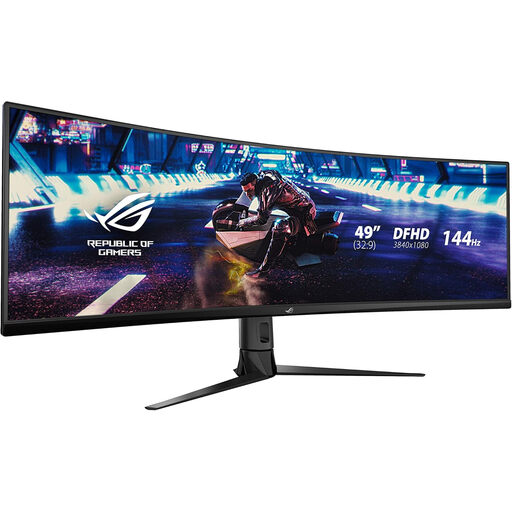 No image available
This curved DFHD model is worth assessing if a very wide arrangement matters more to you than vertical script space. Check its native resolution against the amount of text you need visible beside the call rather than judging it by width alone.
Measure desk fit and assess reflection handling for the exact model; confirm camera, microphone and connection requirements separately.
 No image available
This 34-inch UWQHD model is an option for arranging a script beside a call without moving to a wider screen. Confirm its exact native resolution and test your intended window sizes at a comfortable text setting.
For a bright-window desk, check reflection and SDR-brightness results for this model, along with the connections and call equipment your setup requires.
Not by itself. RTINGS.com explains that brightness, reflection handling and room lighting jointly affect visibility. The Health and Safety Executive advises arranging a screen to avoid glare and bright reflections, often by keeping it from directly facing a window or bright light.
Only if an integrated camera suits how you take calls and position your screen. Philips lists a pop-up webcam on the 40B1U6903CH; a separate webcam may give you more freedom to place the camera, so check the microphone and other call requirements either way.
A KVM is useful when two connected computers need to share one keyboard and mouse. Samsung lists a built-in KVM on the ViewFinity S65UC; check its input and USB connection instructions against both of your computers before relying on it for calls.