What matters when choosing?
Start with the part of the help-centre workflow that most affects the desk: keeping work visible, connecting shared computers, adjusting the workstation or checking visual assets.
| Concern | What to check | Who this matters to |
|---|
| Workspace |
Compare the intended window layout with the screen’s resolution and operating-system scaling; measure the available desk space. |
I need my editor, preview and references in view together without continually swapping windows. For around 31% of consumers, that workspace need would come first. |
| Shared connections |
Check each laptop’s USB-C video support and charging needs, plus the monitor inputs and KVM arrangement required for the desk. |
When another computer takes over the desk, I want the display and peripherals to be straightforward to reconnect. Around 31% of consumers would make that handover their primary concern. |
| Workstation adjustment |
Check stand adjustment, desk depth and reflections, alongside the employer’s DSE assessment process. |
I share the screen with colleagues and need to position it for my own viewing setup. That would be the main concern for around 23% of consumers. |
| Visual checking |
Decide whether the role requires colour-sensitive review, then check the exact model’s colour specifications and workflow requirements. |
If I regularly review branded graphics or interface assets, I need more than room for text windows. Around 15% of consumers would put visual checking first. |
Ultrawide monitors on Joybuy
These ultrawide monitors offer different screen sizes and formats for arranging help-centre work. For a shared desk, compare each screen’s fit and connection requirements rather than assuming that its gaming specifications answer the office’s needs.
 No image available
Acer X Predator X49X 49-inch curved QD-OLED monitor
Consider its wider 32:9 format if the desk and window layout call for a particularly broad display. The product name specifies a 49-inch screen, 1800R curve and 240Hz refresh rate.
Measure the shared desk and check laptop video and charging compatibility before choosing this size.
View on Joybuy
 No image available
LG UltraGear 34GX900A-B 34-inch OLED monitor
This 34-inch WQHD model is an option for arranging help-centre windows on one screen; its product name also specifies a 240Hz refresh rate.
For persistent editor windows, consider the stated OLED static-image warning and check the screen-protection settings. Confirm laptop connections and charging needs for the desk.
View on Joybuy
 No image available
Lenovo R34w-30 34-inch UWQHD monitor
Its 34-inch UWQHD format is worth considering when an editor and references need space on the same screen.
Check the stand position at the shared desk and confirm the connection arrangement needed for each computer.
View on Joybuy
 No image available
Dahua 34-inch curved UWQHD 200Hz monitor
The stated 3440 × 1440 resolution offers a format to assess for an editor, preview and reference windows. Its product name specifies a 34-inch VA panel, 200Hz refresh rate, two HDMI inputs and two DisplayPort 1.4 inputs.
Check viewing position and desk fit, and confirm how the office’s laptops and peripherals would connect.
View on Joybuy
 No image available
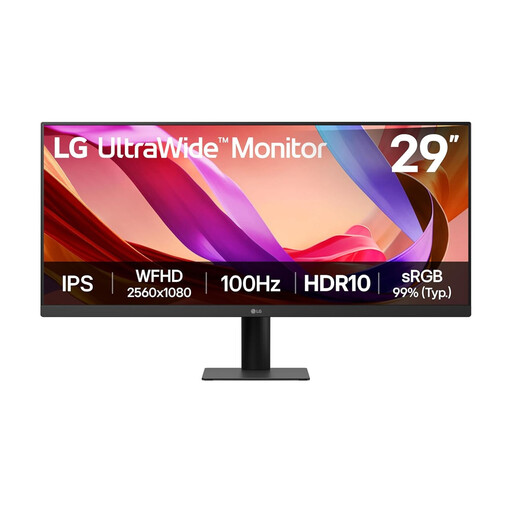
LG UltraWide 29U511A 29-inch UWFHD IPS monitor
This 29-inch UWFHD model offers an ultrawide format for arranging work windows, but check whether its 1080p vertical resolution gives your editor and preview enough room. The product name specifies HDMI, DisplayPort and a 100Hz refresh rate.
Confirm the desk’s connection and adjustment needs before choosing it for shared use.
View on Joybuy
Common questions
Does a shared office have to use an ultrawide monitor?
No. The UK Health and Safety Executive’s DSE guidance concerns the suitability of the workstation, not a requirement to use an ultrawide. For workers who use DSE daily for continuous periods of an hour or more, the employer must assess the workstation, including equipment, furniture, working conditions and the work being done.
When is a built-in KVM useful at a shared desk?
A built-in KVM is useful when two computers need to share a keyboard and mouse as well as the monitor. LG Electronics UK lists this function for the 34BA75QE-B; check the exact inputs, cables and peripherals before relying on a monitor’s KVM for your desk.
Will USB-C charging work with every office laptop?
No: check both video support and power needs for each laptop. Dell Technologies and LG Electronics UK specify up to 90W USB-C power delivery for the P3425WE and 34BA75QE-B respectively, while BenQ UK specifies 65W for the PD3420Q; those limits do not establish compatibility with a particular laptop.
What if a shared workstation has glare or is uncomfortable to use?
Address the whole workstation rather than changing the monitor alone. The Health and Safety Executive advises adjusting screens and lighting to manage reflections and glare, and considering furniture, desk arrangement and breaks or changes of activity through the employer’s DSE process.


