For contact-form layout work in a student room, consider a 34-inch-class, 3440 × 1440 ultrawide if you want an editor, browser preview and references visible together. Before choosing one, check that its footprint and stand allow a central screen position, with the top around eye level and the screen about an arm's length away, as the Health and Safety Executive advises. Prioritise USB-C charging only if your laptop supports the required video and charging functions; a high refresh rate is more relevant if gaming is also part of your plans.
Who this setup suits
Students working across several windows
If you keep a contact-form editor, browser preview and design reference open together, a wide desktop may be more useful to you than gaming-focused specifications. LG UK describes its 34WR50QK-B's 21:9, 3440 × 1440 screen as suitable for displaying multiple programmes at once.
Students planning around a compact desk
If desk space is limited, check the monitor's full width and stand depth before deciding where it will go. The Health and Safety Executive advises placing a screen directly in front of you, with its top around eye level and the screen about an arm's length away.
Students who work mainly from a laptop
If you regularly connect a laptop at the same desk, a monitor with USB-C video input and power delivery could reduce cable changes. Check your laptop's documented video output and charging requirements against the exact monitor rather than assuming any USB-C connection will do both jobs.
What to check before choosing
For contact-form work, establish the screen space you need, then check whether the monitor fits your desk and connects to your laptop as intended.
| Concern |
What to check |
Who this matters to |
| Layout workspace |
Look for the stated resolution and aspect ratio; confirm your computer can output the resolution you intend to use. |
If I am editing fields while reviewing a live form and references, I want those windows in view together. For around 42% of consumers, layout workspace is the primary concern. |
| Desk fit and screen position |
Compare the exact width and stand depth with your usable desk space, then check the available height adjustment or mounting options. |
A wide screen is less useful to me if I cannot place it centrally at a comfortable distance for study. Desk fit and positioning come first for around 33% of consumers. |
| Laptop connection |
Check the laptop's video output and charging requirements against the monitor's ports and stated USB-C power delivery, if offered. |
When I reconnect my laptop at a small desk, I would rather manage fewer cables, provided one connection performs the functions I need. Around 25% of consumers put laptop connection and cable reduction first. |
Common buying mistakes
-
Choosing by diagonal size alone
A 34-inch label does not tell you whether the stand will fit your desk. LG UK lists its 34WR55QC-B at 809 mm wide and 260 mm deep with the stand.
Measure the usable desk surface and compare the exact model's width, stand depth, cable clearance and mounting options before ordering.
Making room for a monitor arm or changing where the laptop and keyboard sit may also affect the setup.
-
Assuming USB-C means one-cable docking
USB-C power delivery varies by model: Dell Technologies lists up to 90 W for the P3425WE, while LG UK lists 65 W for the 34WR55QC-B. Neither rating establishes what your laptop can receive or whether it can send video through that port.
Check the laptop manufacturer's port specification, supported display output and charging requirements, as well as the cable needed for the connection.
You may still need to use a separate charger, dock or compatible cable.
-
Letting gaming refresh rate decide a study setup
Samsung UK lists a 165 Hz refresh rate for the Odyssey G5 LC34G55TWWPXXU, but that figure does not tell you whether its stand and connections suit your desk. For prolonged screen use, the Health and Safety Executive's positioning advice is also relevant.
If form-layout work is your main use, compare desk fit, screen adjustment and laptop connections before treating refresh rate as decisive.
-
Relying on screen comfort modes alone
LG UK lists Reader Mode and Flicker Safe for the 34WR50QK-B. Those features do not replace a screen position that works with your chair, keyboard and desk.
Use the modes if you prefer them, but also position the screen centrally at a suitable height and distance, and vary prolonged screen work with breaks or other tasks.
Relevant brands to consider
Dell
Dell's P3425WE is a reference point if laptop docking and screen adjustment matter alongside a wide workspace.
- Dell Technologies lists a 3440 × 1440 IPS display, 150 mm height adjustment, USB-C power delivery up to 90 W and RJ45 Ethernet for this model.
- Those features are specific to the P3425WE; check the connections and adjustments of any other Dell model separately.
LG
LG has 34-inch curved ultrawides with differing approaches to window organisation, USB-C connection and stand adjustment.
- LG UK lists a 3440 × 1440, 21:9 display and Picture-by-Picture for the 34WR50QK-B; its 34WR55QC-B specification lists USB-C power delivery at 65 W and height adjustment.
- LG identifies the 34WR55QC-B as discontinued. Check availability and do not assume its connections or stand features carry over to another model.
Samsung
Samsung's Odyssey G5 LC34G55TWWPXXU is relevant if gaming is a substantial second use for the same ultrawide screen.
- Samsung UK lists 3440 × 1440 resolution, a 165 Hz refresh rate and 1000R curvature for this model.
- Check its exact stand and ports for your study setup; the gaming specifications do not establish USB-C laptop charging or height adjustment.
Ultrawide monitors for layout work
These Joybuy monitors offer ultrawide options to consider when arranging a contact-form editor and preview on one screen. Compare each one's stated display features with your laptop output, then confirm that its full footprint and positioning options work at your desk.
 No image available
Lenovo R34w-30 34-inch UWQHD Gaming Monitor
Consider this 34-inch ultrawide if you want room to arrange layout and preview windows. Check its full footprint and your laptop's supported display output before choosing it.
View on Joybuy
 No image available
Dahua 34-inch UWQHD 200 Hz Curved Monitor
Its stated 3440 × 1440 resolution makes it an option for a wide layout workspace, particularly if gaming is another use. The product name also specifies a VA panel, 200 Hz refresh rate, two HDMI inputs and two DP 1.4 inputs. Confirm the footprint with its stand and the output your computer supports.
View on Joybuy
 No image available
Philips Evnia 6000 34M2C6500 34-inch WQHD Monitor
Consider its stated 3440 × 1440 resolution for working across layout and preview windows. The product name lists height, swivel and tilt adjustment, with refresh rates of 175 Hz through DisplayPort and 100 Hz through HDMI. Check the complete desk footprint and your computer's output capability.
View on Joybuy
 No image available
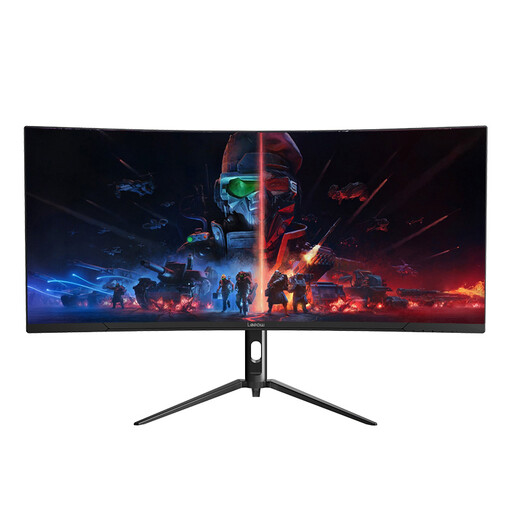
Lepow HC-SJ34MZ5 34-inch Curved Ultrawide Monitor
Its stated 3440 × 1440 resolution makes it worth considering for several work windows; the product name also lists a 165 Hz refresh rate. If screen positioning matters, confirm the stand adjustments as well as the monitor's width and depth with its stand.
View on Joybuy
Frequently asked questions
Is a 34-inch ultrawide useful for laying out a contact form?
Yes, if you want to keep an editor or page builder, browser preview and references visible together. Check the stated resolution rather than relying on diagonal size alone: LG UK lists a 21:9, 3440 × 1440 display for the 34WR50QK-B, a format it describes as able to show multiple programmes at once.
How much desk room should I allow for a 34-inch monitor?
Allow enough space for the exact monitor's width and stand depth, plus your keyboard, laptop and cables. As one model-specific reference, LG UK lists the 34WR55QC-B at 809 mm wide and 260 mm deep with its stand. You also need to be able to place the screen directly in front of you at a suitable viewing distance.
Will one USB-C cable connect and charge my laptop?
Only when the laptop and monitor support compatible video and charging functions through that connection. Dell Technologies lists USB-C power delivery up to 90 W for the P3425WE, while LG UK lists 65 W for the 34WR55QC-B; check your laptop manufacturer's port specification and charging requirement before relying on either rating.
Do UK display-screen rules apply just because I study with a monitor?
Studying with a monitor in your room does not, by itself, establish that the UK Display Screen Equipment Regulations apply to you. The Health and Safety Executive says the regulations apply to workers who use display screen equipment daily for continuous periods of an hour or more, with duties placed on employers. Its advice on screen position remains useful when arranging a desk for long study sessions.


