What matters when choosing
40-inch 5K2K ultrawide
Consider it when: One screen needs to hold a substantial page preview alongside design tools and references; Dell UK and LG UK specify 5120 × 2160 models in this size range.
Allow for: Checking the exact screen and stand dimensions, mounting requirements and viewing position before committing desk space.
34-inch 3440 × 1440 ultrawide
Consider it when: A smaller ultrawide and specified positioning options matter more than the extra pixels of a 5K2K display; BenQ lists stand adjustment and VESA mounting for the PD3420Q.
Allow for: Less native pixel workspace. BenQ specifies a 60 Hz refresh rate for the PD3420Q.
For a portfolio homepage at a standing desk, decide which constraint would take priority if screen space, physical positioning and laptop workflow pull in different directions.
| Concern |
What to check |
Who this matters to |
| Workspace |
Compare native resolution and comfortable display scaling; confirm your computer can output the intended resolution. |
I want the page preview, canvas and assets visible without constantly changing windows. Roughly 37% of consumers put maximum practical workspace first. |
| Desk fit and positioning |
Measure desk width and depth; check dimensions, stand adjustment and, if using an arm, mounting compatibility and load capacity. |
If the screen cannot be centred and positioned comfortably at both desk heights, extra pixels will not settle my choice. Around 36% of consumers prioritise standing-desk fit and positioning. |
| Colour and laptop workflow |
Check the colour space your work requires and the exact laptop, monitor and cable capabilities for display output and charging. |
I need the monitor to fit my colour workflow and connect to my laptop as intended before I choose a screen size. Roughly 27% of consumers place those workflow needs first. |
Ultrawide monitors on Joybuy
These monitors offer either a 49-inch, 32:9 workspace or a 34-inch ultrawide format for keeping portfolio-design windows alongside a preview. Assess each screen’s desk fit and laptop connection on its own terms: a 49-inch 5120 × 1440 display is not the same workspace as a 40-inch 5120 × 2160 display.
 No image available
Acer X Predator X49X 49-inch curved QD-OLED monitor
Consider its wide format if you want several design windows visible on one screen. The title specifies a 32:9, 49-inch QD-OLED display with a 240 Hz refresh rate; check its full dimensions and your desk or arm capacity before choosing this size.
View on Joybuy
 No image available
CRUA 49-inch curved 5120 × 1440 monitor
The 32:9 format is a choice for arranging multiple portfolio-design windows side by side. The title specifies 165 Hz and 75 × 75 mm VESA mounting; confirm the monitor’s weight, desk dimensions and selected arm’s capacity before mounting it.
View on Joybuy
 No image available
Dahua 34-inch curved 3440 × 1440 monitor
Its 34-inch ultrawide format suits a desk setup where you prefer a smaller screen to a 40- or 49-inch option. The title specifies a VA panel, 200 Hz refresh rate and DisplayPort 1.4 connections; check the complete stand dimensions and any intended arm arrangement.
View on Joybuy
 No image available
Lenovo R34w-30 34-inch UWQHD monitor
The 34-inch ultrawide format is relevant if you want a broad page-design workspace without choosing a 49-inch screen. Assess the stand’s usable adjustment at both desk heights, and check dimensions, weight and mounting compatibility if you plan to use an arm.
View on Joybuy
 No image available
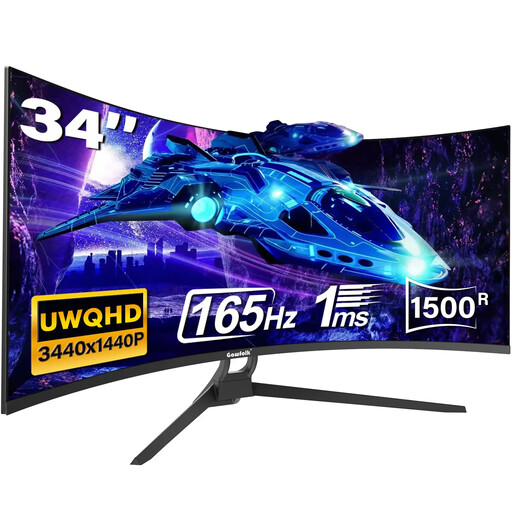
Gawfolk 34-inch curved UWQHD monitor
Its 21:9 format offers a 34-inch option for arranging design tools and a browser preview. The title specifies a 165 Hz refresh rate and HDMI and DisplayPort connections. Confirm the ports you need, colour specifications and complete mounting requirements before relying on them for your workflow.
View on Joybuy
Common questions
Is a 40-inch ultrawide automatically better for portfolio design than a 34-inch model?
No. The Dell UK and LG UK 5120 × 2160 models provide more native pixels than BenQ’s 34-inch 3440 × 1440 PD3420Q, but the useful choice also depends on display scaling, desk fit and comfortable positioning. BenQ’s specified stand adjustment and VESA mounting may matter more to a space-constrained setup.
Where should I position an ultrawide at a standing desk?
Keep the screen directly in front, with its top around eye level and the display about an arm’s length away, in line with Health and Safety Executive guidance. Recheck that position when you change desk height.
Can I put a 34-inch ultrawide on a monitor arm?
Yes, if the exact monitor’s mounting pattern and weight match the arm’s specifications. BenQ specifies 100 × 100 mm VESA mounting and a 6.9 kg monitor-only weight for the PD3420Q; those figures do not establish compatibility for another model or a particular arm.
Do UK display-screen-equipment rules apply when I work from home?
They can apply to employed home workers: the Health and Safety Executive says display-screen-equipment law covers home workers, while the Health and Safety (Display Screen Equipment) Regulations 1992 define a user in terms of an employee who habitually uses display-screen equipment as a significant part of normal work. This concerns workplace responsibilities, not a registration requirement for buying a monitor.


