Spreadsheet-heavy recipe organisers
If your index has long ingredient, source or tag columns, a wide screen gives you room to arrange the index beside a browser and notes. Check that your computer can output the monitor’s native resolution.


A 34-inch-class, 21:9 monitor with 3440 × 1440 resolution is a practical starting point for keeping recipe sources, index columns and notes visible together. On a small desk, measure the assembled monitor and your viewing position before choosing extra connections; USB-C charging and two-computer controls matter only if your devices and workflow can use them.
If your index has long ingredient, source or tag columns, a wide screen gives you room to arrange the index beside a browser and notes. Check that your computer can output the monitor’s native resolution.
A compatible USB-C hub monitor can consolidate display, data and charging connections. Check the laptop’s video-output support and charging requirement, as well as the space the monitor’s stand will occupy.
If you regularly move between a personal archive and another computer, a built-in keyboard, video and mouse switch, or KVM, may let both devices share one keyboard and mouse. Confirm the exact monitor’s input and switching requirements.
Start with the space needed for the index and the physical fit of the screen. Then decide whether laptop docking or control of a second computer will simplify your own setup.
| Concern | What to check | Who this matters to |
|---|---|---|
| Visible workspace | Look for 3440 × 1440 resolution and confirm your computer can output it through the intended connection. | If I keep source pages, index fields and notes open together, I want enough room to read them without constantly rearranging windows. Around 36% of consumers put visible workspace first. |
| Desk fit and position | Measure assembled width, stand depth and cable clearance; for an arm, check mounting pattern, weight and arm capacity. | On a shallow desk, I need space for my keyboard and a comfortable screen position, not merely enough width for the panel. Desk fit is the primary need for around 29% of consumers. |
| Laptop connections | Check USB-C video compatibility, required charging power and whether the cable you need is included. | If my laptop shares a cramped desk with the monitor, I would rather avoid separate display and charging connections where my devices allow it. Around 21% of consumers put a simpler laptop connection first. |
| Two-computer control | Confirm both video inputs and the monitor’s built-in KVM connection and switching instructions. | When I work across two computers, I want to share a keyboard and mouse without duplicating peripherals. That is the leading need for around 14% of consumers. |
A panel can fit across the desk while its stand takes too much depth or places the screen too close. Dell lists the P3424WE at 81.57 cm wide and 23.74 cm deep with its stand; another model’s footprint may differ.
Measure usable width, depth, rear cable clearance and the intended viewing position. If considering an arm, check the monitor’s mounting pattern and weight against the arm and desk mount.
An arm, adapter or change to the desk arrangement may be needed if the supplied stand leaves too little working space.
USB-C video and charging depend on both the monitor and laptop. LG lists up to 65W power delivery for the 34WR55QK-B, while Dell lists up to 90W for the P3425WE; neither figure establishes what your laptop requires.
Check the laptop’s USB-C video capability and charging requirement against the exact monitor and cable.
If they do not meet your needs together, you may still use a separate charger or another compatible connection.
Built-in KVM is intended for sharing controls between connected computers. LG describes it on the 34BA75QE, and Samsung on the ViewFinity S65VC; it does not change the needs of a single-computer recipe index.
List the devices you will actually connect, then prioritise screen resolution, desk fit and the ports those devices need.
LG’s cited 34-inch UltraWide models include the 34WR55QK-B for a USB-C laptop setup and the 34BA75QE for a more connected, two-computer desk.
Dell positions the Pro 34 Plus P3425WE as a curved 34.1-inch USB-C hub monitor for laptop and office workflows.
Samsung’s ViewFinity S50GC offers a 3440 × 1440 route with HDMI and DisplayPort, while the curved S65VC adds features for connected, two-source work.
These ultrawide models offer screen space for arranging a recipe index beside reference material. Compare each assembled footprint and your computer’s connections before choosing; gaming-oriented specifications alone do not establish suitability for long sessions with largely static index content.
 No image available
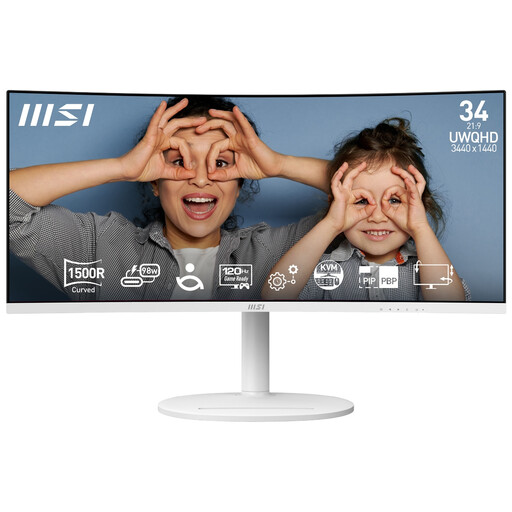
Consider this model if a 34-inch ultrawide would let you arrange index columns beside recipe sources; measure the complete monitor and stand before committing desk space.
The listed variant is a 1500R curved, 3440 × 1440 UWQHD display with a 120Hz refresh rate. If you plan to connect a laptop through USB-C, check its video and charging requirements against the monitor’s connections.
 No image available
The ultrawide format may suit a recipe index alongside browser material, but consider the OLED screen carefully if your index will remain largely static for long periods.
The listed variant is WQHD with a 240Hz refresh rate. Check the screen-protection guidance, assembled footprint and any intended laptop connection before buying.
 No image available
Its ultrawide format is relevant if you want index fields and reference pages visible together. Confirm the assembled stand footprint rather than relying on dimensions taken without the base.
The title specifies a 3440 × 1440 VA panel, 200Hz refresh rate, two HDMI inputs and two DisplayPort 1.4 inputs. Check that your computer has a suitable video output.
 No image available
The UWQHD format is worth considering for a wide recipe-index workspace. Before choosing it for a small desk, check the width and depth with its stand attached and whether its video connections suit your computer.
 No image available
The wide resolution is relevant to viewing a recipe database beside source pages. Check the assembled stand footprint and adjustment range to see whether it will work on your desk.
The listed variant has 3440 × 1440 resolution and a 165Hz refresh rate. Confirm its connection options against your computer and charging arrangement.
Yes, if you want wide index columns, browser sources and notes visible at once. LG and Samsung describe their cited 21:9, 3440 × 1440 monitors as supporting side-by-side applications; check that your computer can drive that resolution through the connection you intend to use.
Only if the laptop supports the required USB-C video output and the monitor’s power delivery meets its charging needs. LG lists up to 65W for the 34WR55QK-B and Dell up to 90W for the P3425WE, so compare the exact model and laptop specifications.
It can free desk surface space if the monitor, arm and desk mount are compatible. Check the monitor’s VESA mounting pattern and weight, the arm’s load limit and the space needed for the screen to move; Ergotron advises against exceeding an arm’s maximum weight.
For delivery to Great Britain, check the seller’s model identification and applicable conformity information rather than assuming that only one marking is acceptable. GOV.UK guidance says CE marking continues to be recognised alongside or in place of UKCA marking for many product types in Great Britain; Northern Ireland follows different processes, so check the applicable requirements for that destination.
Use an appropriate electrical-waste collection or retailer take-back route, checking the arrangements available locally. GOV.UK explains that UK waste electrical and electronic equipment rules encourage recovery, reuse and recycling rather than disposal with ordinary household waste.