What matters when choosing?
Check desk fit and the detail you need on screen before deciding which colour-workflow or laptop-docking features deserve priority. The concerns below reflect different needs that can determine the choice when compromises are necessary.
| Concern |
What to check |
Who this matters to |
| Colour for the deliverable |
Match stated colour spaces and modes to the work you deliver. For accuracy-sensitive review, check the exact model’s calibration information and any stated accuracy conditions. |
If I judge artwork against a specified colour space, a wide-looking image alone will not tell me whether I am reviewing it in the right mode. Around 31% of consumers would put this colour-workflow need first. |
| Desk fit and viewing position |
Measure available width and usable depth with the keyboard and mouse in place. BenQ UK lists the PD3420Q at 825.8 mm wide and 244.3 mm deep with its stand; the Health and Safety Executive advises a screen position about an arm’s length away. |
I need the monitor to leave room to work without pushing the screen uncomfortably close. For around 31% of consumers, physical fit would be the deciding concern. |
| Workspace detail |
Compare native resolution, not just diagonal size. Confirm that your computer’s video output and your applications can use the resolution and scaling you choose. |
If I keep a vector canvas beside layers and reference material, I want enough detail to inspect the work while those tools remain visible. Workspace detail would come first for around 25% of consumers. |
| Laptop connection |
Confirm video support over the laptop’s USB-C port, the cable required and whether the monitor’s power-delivery rating meets the laptop’s charging requirement. |
I regularly bring a laptop to this desk and want fewer connections to manage. Around 13% of consumers would make docking convenience their primary concern. |
Joybuy monitors for this setup
These ultrawides offer different screen sizes and stated display features for arranging vector artwork and tools. Check each model’s fit and colour-workflow requirements before choosing; the 29-inch option trades some resolution against the 34-inch, 3440 × 1440 models.
 No image available
LG UltraGear 34GX900A-B 34-inch OLED monitor
Consider this ultrawide if an OLED display is part of your shortlist and you can check the desk footprint and colour requirements separately. Its product name specifies WQHD and 240 Hz.
The listing warns that prolonged static images may cause OLED burn-in, a consideration if artwork or application panels stay in place for long periods. Check the colour modes and calibration information needed for your deliverables.
View on Joybuy
 No image available
Lenovo R34w-30 34-inch UWQHD monitor
This is a 34-inch UWQHD option to consider when arranging artwork and tools across one screen. Check its complete dimensions, including the stand, against your usable desk space.
For colour-sensitive review, confirm that its colour modes and accuracy documentation match your delivery requirements.
View on Joybuy
 No image available
Dahua 34-inch curved VA ultrawide monitor
The stated 3440 × 1440 resolution makes this 34-inch monitor an option for keeping artwork and tools visible together. Its product name also specifies a VA panel, 200 Hz refresh rate, 85% DCI-P3 coverage, two HDMI ports and two DP1.4 ports.
Gamut coverage does not establish accuracy for a particular deliverable. Check the colour modes and full footprint with the stand before choosing it for a small desk.
View on Joybuy
 No image available
Philips Evnia 6000 34M2C6500 34-inch monitor
Its stated 3440 × 1440 resolution suits a shortlist built around a wide canvas for artwork and tools. The product name specifies DisplayPort and HDMI connections and height, swivel and tilt adjustment.
Check its dimensions with the stand before planning the desk layout, and confirm the colour specifications your review workflow requires.
View on Joybuy
 No image available
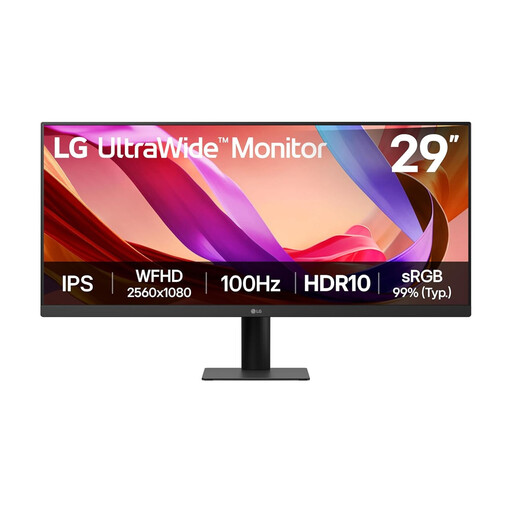
LG UltraWide 29U511A 29-inch IPS monitor
Consider this 29-inch UWFHD option if a smaller ultrawide is worth assessing for your desk. Its stated 2560 × 1080 resolution offers less detail than the 3440 × 1440 examples, so check whether your canvas and tools remain practical at that resolution.
The product name specifies DisplayPort and HDMI. Verify its actual width and stand depth before relying on it to fit, and check colour-workflow requirements separately.
View on Joybuy
Common questions
Will a 34-inch ultrawide fit on a small desk?
It can fit if its full width, stand and viewing position leave you usable working space. BenQ UK lists the PD3420Q at 825.8 mm wide and 244.3 mm deep with its stand; the Health and Safety Executive advises placing the display about an arm’s length away. Measure with your keyboard and mouse in place, and check both monitor and desk compatibility before considering an arm.
Is 99% sRGB enough for vector artwork review?
A stated 99% sRGB figure is relevant to an sRGB-based workflow, but it does not establish the modes or accuracy required for every deliverable. If you review work against P3 or Rec.709 targets, check explicit support and calibration information for the exact model. BenQ UK, for example, lists 100% sRGB, 100% Rec.709 and 98% P3 coverage for the PD3420Q.
Can a USB-C ultrawide replace my laptop charger and dock?
It may cover those functions if your laptop supports video over the connection and the monitor’s power delivery meets its charging needs. LG UK lists up to 90 W for the 34WQ75C-B and specifies its included USB-C cable for correct operation; BenQ UK lists 65 W for the PD3420Q. Check your laptop, cable and connected peripherals before relying on one connection.
Does a work-from-home monitor setup need a workstation assessment?
The Health and Safety Executive says employers must conduct a workstation assessment for employees who use display screen equipment daily as part of their normal work for continuous periods of an hour or more. That workplace requirement concerns the setup and work conditions; it is not a consumer product-registration requirement for a personally purchased monitor.


