What to prioritise
Start with the colour space your artwork needs and the space available on the desk. Then decide whether laptop connectivity or keeping more work visible at once matters most.
| Concern |
What to check |
Who this matters to |
| Colour confidence |
Match the required output colour space to the exact model’s colour modes, stated gamut and calibration documentation. Coverage alone does not establish accuracy. |
When artwork has a defined colour target, I want evidence relevant to that target before choosing a display. Around 36% of consumers put colour confidence first. |
| Desk fit and placement |
Measure usable width and depth against the assembled monitor and stand; check height adjustment and viewing distance. |
A shallow desk leaves little room to position a wide screen comfortably, so physical fit has to guide my choice. For around 29% of consumers, desk fit is the primary concern. |
| Laptop connection |
Confirm USB-C video support, the laptop’s charging requirement, the monitor’s power-delivery rating and the cable needed. |
If I take my laptop away and reconnect it regularly, I want a desk connection that works with my device. Around 21% of consumers prioritise that simplicity. |
| Room for artwork and references |
Compare resolution and aspect ratio with the windows you need open; check curvature or picture-by-picture only if they suit your workflow. |
I want to review artwork while keeping tools and references visible rather than repeatedly switching windows. That shared workspace comes first for around 14% of consumers. |
Ultrawides to compare on Joybuy
These 34-inch ultrawides offer space for vector artwork alongside tools or references. Compare each model’s colour requirements, assembled desk footprint and laptop connection before choosing; their gaming-oriented specifications do not, by themselves, establish suitability for colour-critical review.
 No image available
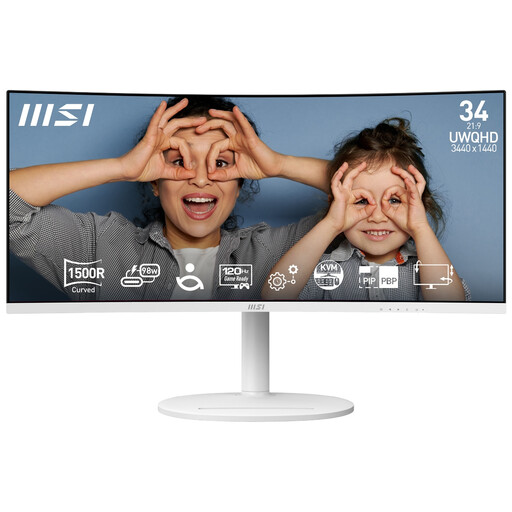
Modern MD342CQPW 34-inch curved monitor, white
Consider this model if you want an ultrawide canvas for artwork and adjacent reference windows. Its stated specifications include 3440 × 1440 resolution, 120Hz refresh rate and 1500R curvature.
Before relying on it for a defined colour workflow or a one-cable laptop setup, check the exact model’s calibration documentation, USB-C functions and compatibility with your laptop. Measure its assembled footprint against your desk.
View on Joybuy
 No image available
MSI MPG 346CQRF X24 34-inch curved UWQHD monitor
The 34-inch UWQHD format is worth considering if you want artwork and reference windows visible together. The product name also identifies a curved Rapid VA panel.
If colour accuracy or laptop docking drives your decision, check this exact model’s colour documentation and connection requirements. Confirm its assembled stand footprint before placing it on a student desk.
View on Joybuy
 No image available
Dahua 34-inch curved UWQHD 200Hz monitor
This 3440 × 1440 VA monitor offers an ultrawide layout for artwork and other open windows. Its product name states 85% DCI-P3 coverage and two HDMI and two DP1.4 inputs; the gamut figure does not establish colour accuracy.
Check the colour requirements of your work and the assembled stand dimensions before buying. If you need laptop charging through the monitor, confirm the connection arrangement on the exact listing rather than assuming the display inputs provide it.
View on Joybuy
 No image available
Lenovo R34w-30 34-inch UWQHD monitor
Consider the 34-inch UWQHD format if keeping vector artwork and supporting windows on one screen is your main aim.
For colour-sensitive review, check the R34w-30’s documented colour modes and calibration information against the required output. Confirm its assembled footprint and the connection your laptop needs before ordering.
View on Joybuy
Common questions
Do I need a colour-managed ultrawide to review vector artwork?
Prioritise documented colour specifications when your course or client sets a colour-space requirement. BenQ UK lists sRGB, Rec.709 and P3 coverage plus a calibration report for the PD3420Q, while ASUS states Calman verification and DCI-P3 coverage for the PA348CGV. Match those model-specific claims to the output colour space and application settings you will actually use.
Will any USB-C laptop work with a one-cable monitor setup?
No single monitor-side USB-C rating establishes compatibility with every laptop. LG UK describes video, data and power delivery of up to 90W through the 34WQ75C-B’s USB-C connection and specifies the supplied USB-C cable for that arrangement. Check your laptop’s USB-C video support and charging requirement before relying on one cable.
How can I tell whether a 34-inch ultrawide will fit my desk?
Compare the monitor’s dimensions with its stand attached against the usable desk surface and your intended viewing position. BenQ UK specifies the PD3420Q at 825.8 mm wide and 244.3 mm deep with its stand. The Health and Safety Executive advises keeping the top of the screen around eye level and the display about an arm’s length away.
What should I check about returns and support before ordering?
Check the terms for the exact listing, including the model and variant, supplied cables and stand, warranty, dead-pixel policy and arrangements for returns or faults. Distinguish a seller’s change-of-mind policy from the remedies that may apply if goods are faulty, damaged or misdescribed; confirm the applicable terms before purchase.


