What matters when buying?
Decide how much native detail the seam inspection needs, then assess colour validation and whether the display fits your computer and desk.
Approximately 40-inch 5K2K ultrawide
Consider it when: Fine seam edges and an asset beside reference windows make native detail a priority; Dell’s U4025QW and LG’s 40WP95CP-W are 5120 × 2160 examples.
Allow for: Both examples are large curved displays. Check desk clearance and whether your computer can drive the intended native mode.
34-inch colour-focused ultrawide
Consider it when: A smaller canvas with documented colour features suits your review work; ASUS specifies 100% sRGB/Rec.709 for the 3440 × 1440 PA34VCNV.
Allow for: The PA34VCNV is curved and has fewer native pixels than the 5K2K examples.
34-inch flat creative ultrawide
Consider it when: Avoiding a curved screen matters more to you than obtaining the 5K2K canvas; BenQ’s PD3420Q is a flat example.
Allow for: Check its resolution and colour mode against your seam-review workflow rather than treating flatness as a measure of inspection accuracy.
| Concern |
What to check |
Who this matters to |
| Native inspection detail |
Compare 5120 × 2160 with 3440 × 1440, then confirm the computer and connection can output the chosen native mode. |
When I inspect small joins beside source files, I want enough native detail to see the asset without giving up the adjacent workspace. Around 39% of consumers put native inspection detail first. |
| Colour confidence |
Check the exact model’s colour modes and stated colour figures, plus a compatible measurement and profiling path for colour-critical work. |
If a subtle hue shift could be a seam or a display issue, I need a way to check the screen before making the call. Colour confidence comes first for around 38% of consumers. |
| Connection and desk fit |
Check host video output, cable and charging requirements; measure space for the screen, stand or mount. |
With an editor and references open on a laptop-led desk, I need the monitor to fit and the intended connections to work together. Around 23% of consumers prioritise workstation integration and fit. |
Brands and models to consider
These model-specific examples show different resolution, colour and screen-shape choices; the brand name alone does not establish suitability for texture-seam review.
Dell
The UltraSharp U4025QW is a 39.7-inch curved 5120 × 2160 IPS Black display with hub connectivity.
- Dell specifies 99% DCI-P3, 100% sRGB/BT.709 and an average Delta E below 2 for the U4025QW.
- Check your computer’s output and connection capabilities before relying on its stated display and hub functions.
LG
The curved 40WP95CP-W pairs a 39.7-inch 5120 × 2160 Nano IPS panel with Thunderbolt 4.
- LG specifies 98% DCI-P3 coverage and hardware-calibration readiness for this model.
- LG says the hardware calibrator is not included; check instrument compatibility if you need measured calibration.
ASUS ProArt
The PA34VCNV is a curved 34.1-inch 3440 × 1440 IPS option with docking features.
- ASUS specifies 100% sRGB/Rec.709, Delta E below 2 and Calman Verified status for the PA34VCNV.
- Its native resolution is below that of the 5120 × 2160 examples; check which inspection canvas your work needs.
BenQ
The PD3420Q is a flat 34-inch creative ultrawide for reviewers who prefer a non-curved screen.
- BenQ states 98% P3, 100% sRGB/Rec.709 and Delta E at or below 3 for this model.
- Those manufacturer figures are not measurements of seam-review performance on an individual display.
Joybuy products for ultrawide workspaces
These curved ultrawides offer 34-inch 3440 × 1440 workspaces or a wider 49-inch 5120 × 1440 layout for arranging assets and tools. Compare their vertical resolution, colour requirements and desk fit against the professional-monitor routes above before choosing one for seam review.
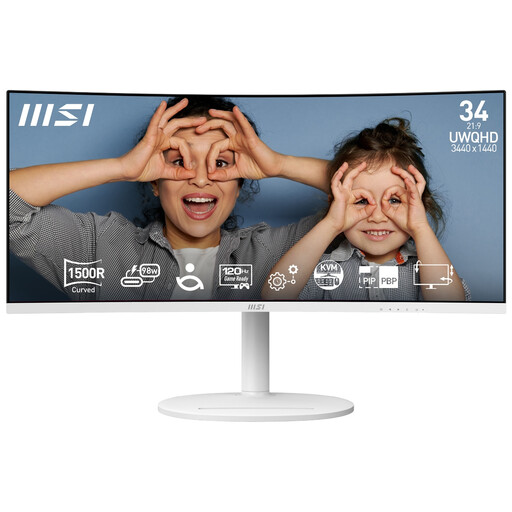 Image unavailable
Modern MD342CQPW 34-inch curved monitor, white
Consider its 34-inch ultrawide canvas if you want an asset beside other working windows.
The listed resolution is 3440 × 1440, with a 120 Hz refresh rate and 1500R curvature.
For colour-critical sign-off, check the display’s calibration path. Confirm the required computer output and USB-C power capability for your setup.
View on Joybuy
 Image unavailable
Dahua 34-inch 3440 × 1440 curved VA monitor
Its 34-inch ultrawide layout may suit an asset-and-tools workspace where 5K2K native detail is not the priority.
The listing states 200 Hz, 85% DCI-P3 coverage, two HDMI inputs and two DisplayPort 1.4 inputs.
The gamut figure does not establish colour accuracy or calibration; also check that your computer and cable support the output mode you intend to use.
View on Joybuy
 Image unavailable
Gawfolk 34-inch 165 Hz curved ultrawide monitor
Its 3440 × 1440, 21:9 canvas is an option for keeping texture work and other windows in view.
The title states 1500R curvature and VESA mounting.
Check colour accuracy for sign-off work, and confirm the actual inputs and your computer’s supported output mode before planning a USB-C setup.
View on Joybuy
 Image unavailable
CRUA 49-inch 5120 × 1440 curved VA monitor, black
The 32:9 format suits a particularly broad asset-and-tools layout, but its 1440 vertical pixels differ from a 5120 × 2160 inspection canvas.
The title states 165 Hz, 1500R curvature and VESA 75 × 75 mounting.
Check colour accuracy separately, confirm computer output support, and measure the space and support available for this large display.
View on Joybuy
Frequently asked questions
Should I choose 5120 × 2160 or 3440 × 1440 for texture seams?
Choose 5120 × 2160 if native detail and space for adjacent references take priority and your computer can drive that mode. A 3440 × 1440 professional ultrawide is worth considering when a smaller display and its colour features matter more to your setup.
Is a factory colour-accuracy claim enough for colour-critical seam review?
No: a model-specific gamut or Delta E claim does not check your individual panel and working profile. For colour-critical decisions, use a compatible measurement instrument and a suitable profiling and checking workflow.
Do I need a flat ultrawide?
Choose a flat ultrawide if avoiding curvature is important to your review style; curvature alone does not settle the resolution or colour decision. BenQ describes the PD3420Q as a flat creative display, while the Dell, LG and ASUS examples discussed here are curved.
Can one USB-C or Thunderbolt cable run the display and charge a laptop?
It can if the monitor, computer and cable all support the required video and power-delivery functions. Check the laptop’s output mode and charging requirement against the exact monitor connection rather than relying on the port name alone.
What should I check before disposing of an old monitor in the UK?
Check your retailer’s current electrical-equipment take-back terms and your local authority’s electrical-waste arrangements. GOV.UK describes the UK waste electrical and electronic equipment framework, but that guidance does not specify the collection route available at your address.


