Choose a USB-A or USB-C flash drive when every computer you regularly use has the matching port; choose a dual-connector drive when files move between both port types. A portable SSD is worth considering for frequent large transfers if carrying a cable suits you. Whichever route you take, check the host ports, file format, usable capacity and conditions behind any stated speed.
Who needs a transfer drive?
People using mixed-port computers
If files travel between a newer USB-C device and an older USB-A computer, a drive must fit both ends of the journey or you will need an adapter. Which? identifies both connector types as relevant when choosing a drive.
People moving large media folders
Repeated transfers of video, photos or project folders make write speed and the computer’s port worth checking. Kingston and Samsung specify conditions for their published maximum speeds, so those figures alone do not tell you how a long copy will perform.
People carrying a drive between locations
A drive that travels between home, study and work needs a practical way to protect its connector or enclosure. Check the conditions behind any durability claim rather than assuming it covers every knock or spill.
What matters when choosing?
Start with the ports on every computer you use, then consider how much you copy at once. A portable SSD adds a cable to carry; a dual-connector stick can avoid an adapter, but neither choice removes the need to check transfer-speed conditions.
| Concern |
What to check |
Who this matters to |
| Direct connection |
List the USB-A and USB-C ports on every regular computer; check each port’s data standard separately from its shape. |
I move files between computers with different ports and want to plug in without finding an adapter. About 37% of consumers put direct connection first. |
| Large-file write speed |
Check the exact model’s stated write speed and the host-port requirements; for long jobs, look for sustained-write testing of that model. |
When I repeatedly copy large folders, the time spent loading files onto the drive matters most. Speed is the primary concern for about 27% of consumers. |
| Space and file format |
Allow room for your largest folder. If exchanging files between Mac and Windows computers, check that both can write to the chosen format. |
I need the whole transfer set to fit and remain writable on both computers. About 18% of consumers place usable space and file-format compatibility first. |
| Carrying and handling |
Check connector protection and the exact conditions and exclusions attached to environmental or drop claims. |
My drive travels between locations, so protecting it during carrying matters more to me than another feature. Roughly 18% of consumers prioritise handling and durability. |
Mistakes to avoid
-
Choosing by plug shape alone
USB-A and USB-C describe physical connections, not the speed supported by every computer port. A dual-connector drive can solve a fit problem without making a slower port faster.
Check the ports and USB specifications of both the sending and receiving computers before choosing one connector type.
If a regular device has a different port, you may also need to carry an adapter or hub.
-
Reading an ‘up to’ speed as a long-copy result
Kingston says DataTraveler Max speed varies with host hardware, software and use. Samsung specifies a suitable host, cable and UASP mode for the T7 Shield’s published maximum speeds.
Use stated write speeds to shortlist drives, then check the connection requirements and look for sustained-write results for the exact model and capacity if long transfers are central to your choice.
-
Reformatting before saving existing files
Apple warns that formatting a disk erases its files. Changing the format to share a drive between computers can therefore remove files already on it.
Copy anything you need elsewhere first, then confirm that the intended computers and software support the format you plan to use.
-
Treating a rugged rating as damage-proofing
Samsung says the T7 Shield’s IP65 and drop claims come from controlled internal tests and that real-world resistance can vary. Its listed warranty wording excludes liquid, dust and drop damage.
Check the test conditions for the exact drive, carry it with care and keep a separate copy of important files.
Brands to consider for these drive types
SanDisk
Its relevant lines include a USB-A Extreme PRO flash drive and the USB-C/USB-A Ultra Dual Drive Luxe for mixed-port transfers.
- SanDisk rates the Extreme PRO 512GB at up to 420MB/s sequential read and 380MB/s sequential write.
- Those maximum figures do not establish sustained-write performance for every capacity or variant.
Kingston
The DataTraveler Max family offers separate Type-A and Type-C flash-drive versions rather than one drive with both plugs.
- Kingston lists capacities from 256GB to 1TB and maximum read and write speeds of up to 1,000MB/s and 900MB/s for the series.
- Kingston says speeds vary with host hardware, software and use; choose the connector variant that fits your computers.
Samsung
The T7 Shield is a cable-connected portable SSD to consider when moving large files and carrying the drive between locations.
- Samsung rates the 1TB T7 Shield at up to 1,050MB/s sequential read and 1,000MB/s sequential write with the specified USB 3.2 Gen 2 host, cable and UASP conditions.
- Its IP65 and drop claims reflect Samsung’s controlled tests; real-world resistance can vary, and the listed warranty excludes liquid, dust and drop damage.
Joybuy drives for file transfers
These options cover portable SSDs for large transfers and dual-connector flash drives for moving files between USB-A and USB-C devices. Check the connection and capacity of each particular model against your own computers and folders.
 Image unavailable
Samsung Portable SSD T7 1 TB, Blue
Consider this portable SSD for moving large folders when a cable-connected drive suits your routine. The listed model has 1 TB capacity and a USB Type-C 3.2 Gen 2 interface; confirm the cables needed for your computers. Do not treat this T7 as a water- or dust-resistant model.
View on Joybuy
 Image unavailable
Samsung T7 Shield MU-PE1T0S 1TB, Black
This portable SSD suits large transfers when you also want to assess the maker’s stated carrying protection. It has a USB Type-C 3.2 Gen 2 interface. Samsung’s maximum-speed figures require a suitable host, cable and UASP; its IP65 and drop claims have controlled-test limits and do not make the drive damage-proof.
View on Joybuy
 Image unavailable
DigiEra LUS320 128GB dual-connector flash drive
Its USB-A and USB-C connectors suit transfers between computers with different port shapes. The title specifies 128GB, USB 3.2 Gen 1 and a 360° swivel design. Check that your largest folder will fit with free space left over; the advertised read figure is not a sustained-write result.
View on Joybuy
 Image unavailable
Lexar ES4 1TB portable SSD with magnetic set
Consider this USB 3.2 Gen 2 SSD for large transfers if its cable-connected format works with your computers. The magnetic attachment described for iPhone 15/16 requires the stated case or ring; it is not wireless MagSafe charging. If formatting is needed before use, save existing files elsewhere first.
View on Joybuy
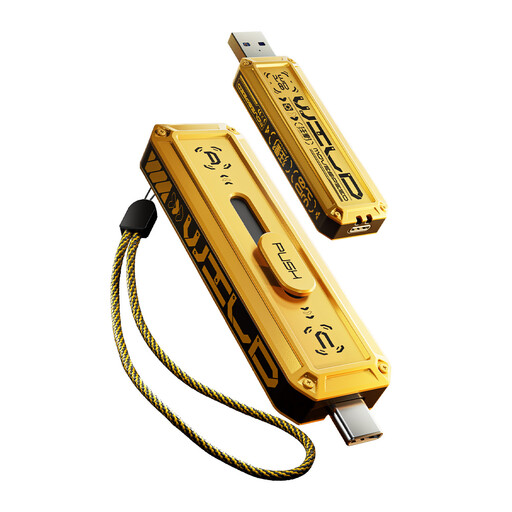 Image unavailable
MOVESPEED YSUWD10-1TSY 1TB dual-interface flash drive
The described USB-A and USB-C connectors make this an option for mixed-port transfers without a separate adapter. Its title identifies a 1TB capacity and zinc-alloy housing. Check the exact interface before relying on its advertised speed: the description pairs a USB 3.2 Gen 2×1 claim with a Type-C 5Gbps specification.
View on Joybuy
Common questions
Do I need USB-A, USB-C or both on a transfer drive?
Choose a plug that fits every device you regularly use, or a dual-connector drive if your computers have both USB-A and USB-C ports. Check each computer’s USB data standard as well: the plug shape alone does not establish transfer speed.
How do I prepare a drive for both Mac and Windows computers?
For a disk over 32GB intended for Windows use, Apple’s Disk Utility guidance identifies ExFAT as a format to choose. Confirm that your computers and any specialist software support it, and copy existing files elsewhere before formatting because the process erases them.
Will a drive reach its advertised transfer speed?
Not necessarily: published maximums depend on the drive and its connection conditions. Samsung specifies a USB 3.2 Gen 2 host, suitable cable and UASP for the T7 Shield’s stated maximums; Kingston says DataTraveler Max speeds vary with host hardware, software and use. For repeated long copies, assess sustained-write performance for the exact model rather than relying on a maximum figure.


